
A Freshservice portal employee engagement strategy is how you turn your IT helpdesk from a frustrating bottleneck into a self-service experience that your team actually wants to use. When employees can solve their own problems without waiting for a ticket response, adoption goes up, support tickets drop, and your IT team has breathing room.
Let's walk through how to build this from the ground up.
Why Employee Engagement in Your Freshservice Portal Matters
Your Freshservice portal is the front door to your entire IT service experience. If it looks generic, feels clunky, and requires employees to hunt for what they need, they will either skip the portal entirely or submit tickets for things they could have solved themselves.
A strong engagement strategy solves this by making the portal intuitive, branded to your organization, and positioned as the obvious first place to go. When employees trust the portal, they use it. When they use it, your support load shrinks and resolution times improve.
This isn't just about making things look nice. It's about removing friction at every step so your people can get back to their actual work faster.
Step 1: Design a Portal That Reflects Your Brand
Generic portals feel corporate and distant. Employees scroll past them and pick up the phone instead.
Your Freshservice portal should feel like it belongs to your organization. That means matching your colors, logo, and tone of voice. It means organizing information the way your employees think, not the way your IT team thinks.
A branded portal tells employees this is a tool built for them, not a checkbox IT had to check. That psychological shift matters more than most IT leaders expect.
Start by auditing what your employees actually ask for most. Knowledge base articles, service request forms, and ticket statuses should be front and center. Bury the technical stuff that only applies to power users.
Step 2: Build Self-Service Workflows That Work
Self-service only works when it actually solves real problems. If your portal offers to help with password resets but the workflow is buried three clicks deep, employees still won't use it.
Map out your most common employee requests: password resets, equipment requests, access provisioning, software licenses, travel approvals, onboarding steps. These are your engagement drivers.
For each one, build a streamlined workflow in Freshservice that guides employees to a solution without needing to talk to anyone. Automation is your friend here. When an employee requests a laptop, that should automatically trigger a ticket, alert the right team, and give the employee a timeline for delivery.
This reduces your support burden because routine requests no longer need human handling. It also speeds things up for employees, which boosts satisfaction immediately.
Step 3: Consolidate Your Information in One Place

Employees shouldn't need to check three different wikis, a shared drive, and an intranet to find the answer to a simple question. That friction kills adoption.
Related: Best Freshservice Portal Employee Engagement Features 2026: Top 5 Ranked
Related: Improving Freshservice Portal Engagement Metrics: A Guide
Your Freshservice portal should be the central hub where all employee information lives: policies, how-to guides, contact directories, IT announcements, and troubleshooting steps. Everything in one searchable place.
When an employee lands on your portal and finds the answer to their question within seconds, they bookmark it. They return next time. They recommend it to colleagues. That's how you build engagement organically.
Step 4: Make the Portal Multi-Account Ready
Not all employees need the same view or access. A facilities manager requesting something looks different than an engineer or a contractor.
Freshservice allows you to customize portal experiences for different user types and request categories. A contractor might only see IT onboarding steps, while a full-time employee sees the full menu. A facilities team member might have quick access to move request workflows.
This tailoring feels respectful and purposeful. Employees don't wade through options that don't apply to them, and they find their tools faster.
Step 5: Measure Adoption and Iterate
You can't improve what you don't measure. Build in simple metrics from day one: how many requests come through the portal versus email or chat? How many employees use the knowledge base? How long are employees spending on the portal before submitting a ticket?
If a workflow is getting skipped, dig into why. Maybe the description is confusing. Maybe it's in the wrong place. Maybe it's solving a problem nobody actually has.
Engagement is not a one-time project. It's a cycle of small changes, feedback, and refinement. Your portal should feel slightly different every quarter as you learn what works.
Step 6: Train and Communicate (Without Being Preachy)

The best portal in the world won't work if people don't know it exists. But long training sessions and mandatory announcements turn people off.
Instead, build awareness into your onboarding process. New hires should get a quick tour of the portal as part of day one. Embed quick-reference guides in your email signature. Share a "Did you know?" tip in your team channels once a month.
When you roll out a new self-service workflow, announce it as something good for the employee (faster resolution, no waiting), not as something good for IT.
If you're feeling uncertain about how to execute this across your Freshservice implementation, Ascend Portal Experience specializes in turning generic portals into engagement powerhouses that actually reflect how your organization works.
Want to work together?
Get in Touch →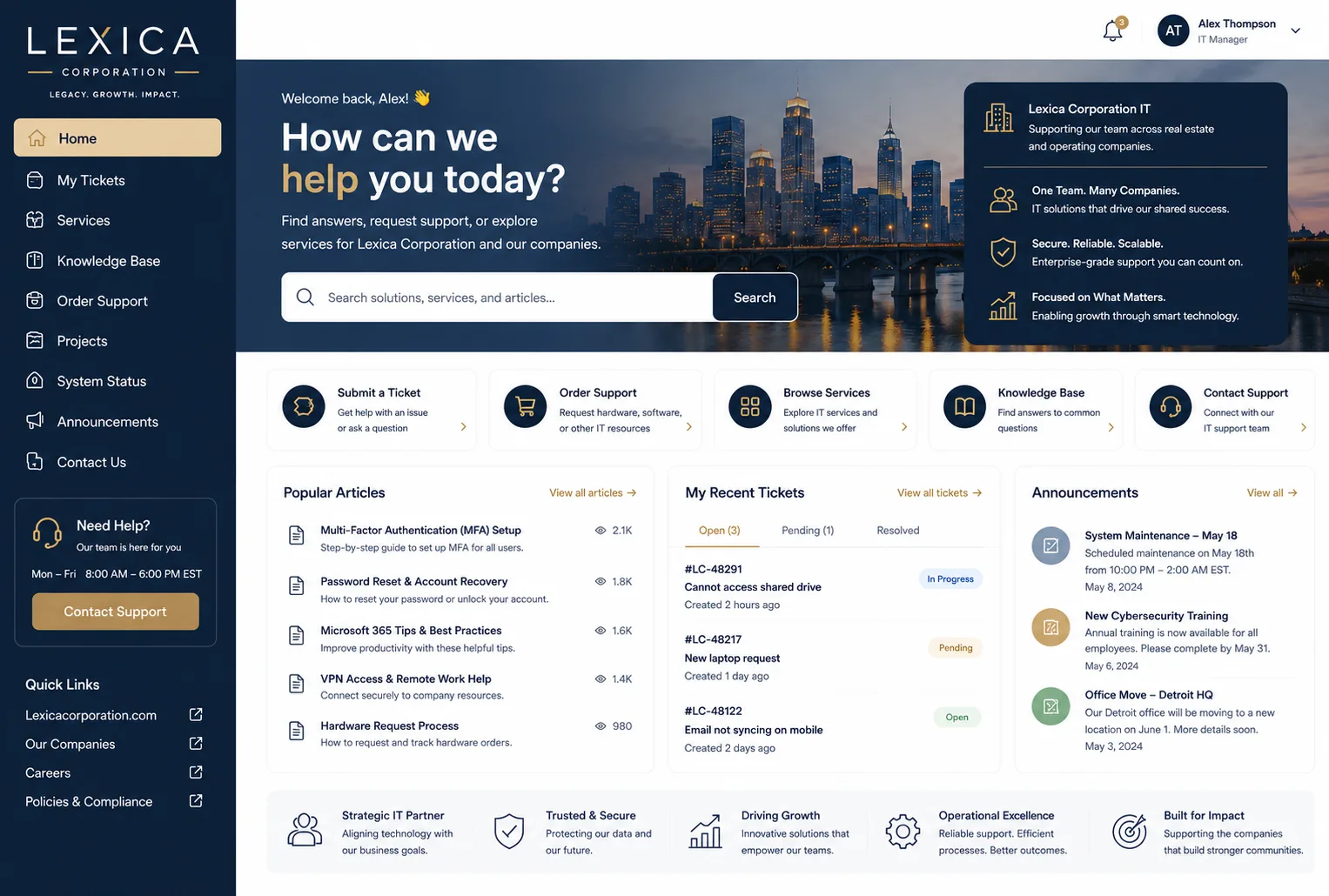
Common Stumbling Blocks and How to Avoid Them
Most organizations trip up at the same points. Being aware of them saves you months of frustration.
The first is trying to do too much at once. You don't need a perfect portal with every possible feature on day one. Start with your top three employee pain points, solve them beautifully, and expand from there.
The second is forgetting to involve actual employees in the design process. Your IT team's idea of a logical workflow is often different from what employees actually need. Ask them what they want before you build.
The third is launching the portal and then disappearing. Employees notice when things go stale. If your knowledge base has 2021 articles or your announcements are three months old, people stop trusting the portal. Commit to keeping it fresh.
Bringing It All Together
A Freshservice portal employee engagement strategy starts with the recognition that your portal is a business tool, not just an IT tool. It exists to make your employees' lives easier and to reduce friction in how they get help.
When you design with that mindset, everything else flows: the branding, the self-service workflows, the information architecture, and the ongoing maintenance.
Your employees will use it because it works. Your support team will love you because the volume of repetitive tickets drops. And your IT director will appreciate the improved satisfaction scores and faster resolution times.
If you want to accelerate this transformation and skip the guesswork, Ascend Portal Experience can help you design and launch a Freshservice portal that your team will actually adopt.
How long does it take to improve portal adoption?
Small changes can move the needle in weeks. A redesigned homepage or a new self-service workflow for a high-traffic request can increase usage noticeably within 30 days. Deeper engagement shifts take longer, usually 2-3 months, as employees form new habits and discover new features.
What's the most important feature for employee engagement in Freshservice?
Self-service request fulfillment. When employees can submit a request and see it tracked from start to finish without having to email anyone or call the help desk, engagement jumps. They feel empowered and respected.
Should we force employees to use the portal or make it optional?
Make it so easy and so obviously useful that using it becomes the default choice, not a mandate. People resist being forced. They embrace tools that solve their problems. Design first for real value, then communicate it clearly. Adoption will follow.
How do we know if our engagement strategy is working?
Track the basics: percentage of requests through the portal versus other channels, knowledge base search volume, time from request submission to resolution, and employee satisfaction scores specific to IT support. If these are trending in the right direction, your strategy is working.


