
An employee self-service portal that works is one thing. An employee self-service portal that people actually love using is another. The best employee self service portal design and user experience comes down to one core principle: build around what employees actually need to do, not what looks good on paper.
Most portals fail because they're designed by IT teams guessing at employee workflows instead of by listening to real employee requests. When you flip that around and start with actual usage patterns, adoption soars and your support tickets drop. Let's walk through how to design and build an ESS portal your team will genuinely want to use.
Start with Your Employees' Real Tasks, Not Theory
Before you design a single button, sit down and ask employees what they actually need to do without calling HR or IT.
The answer is usually the same across most organizations. Time off requests. Payroll information. Updating their personal details. Viewing benefits. That's it. Those four or five core tasks drive most ESS portal traffic.
The mistake teams make is adding everything else: org charts, policy documents, training modules, benefits calculators. Employees don't want a portal packed with features they'll never touch. They want speed and simplicity. If a task takes longer in your portal than it does to call HR, your portal loses.
Map out the top five employee requests your HR team gets every week. Those are your portal's job one through five. Everything else is noise.
Design for First-Time Users, Not Power Users
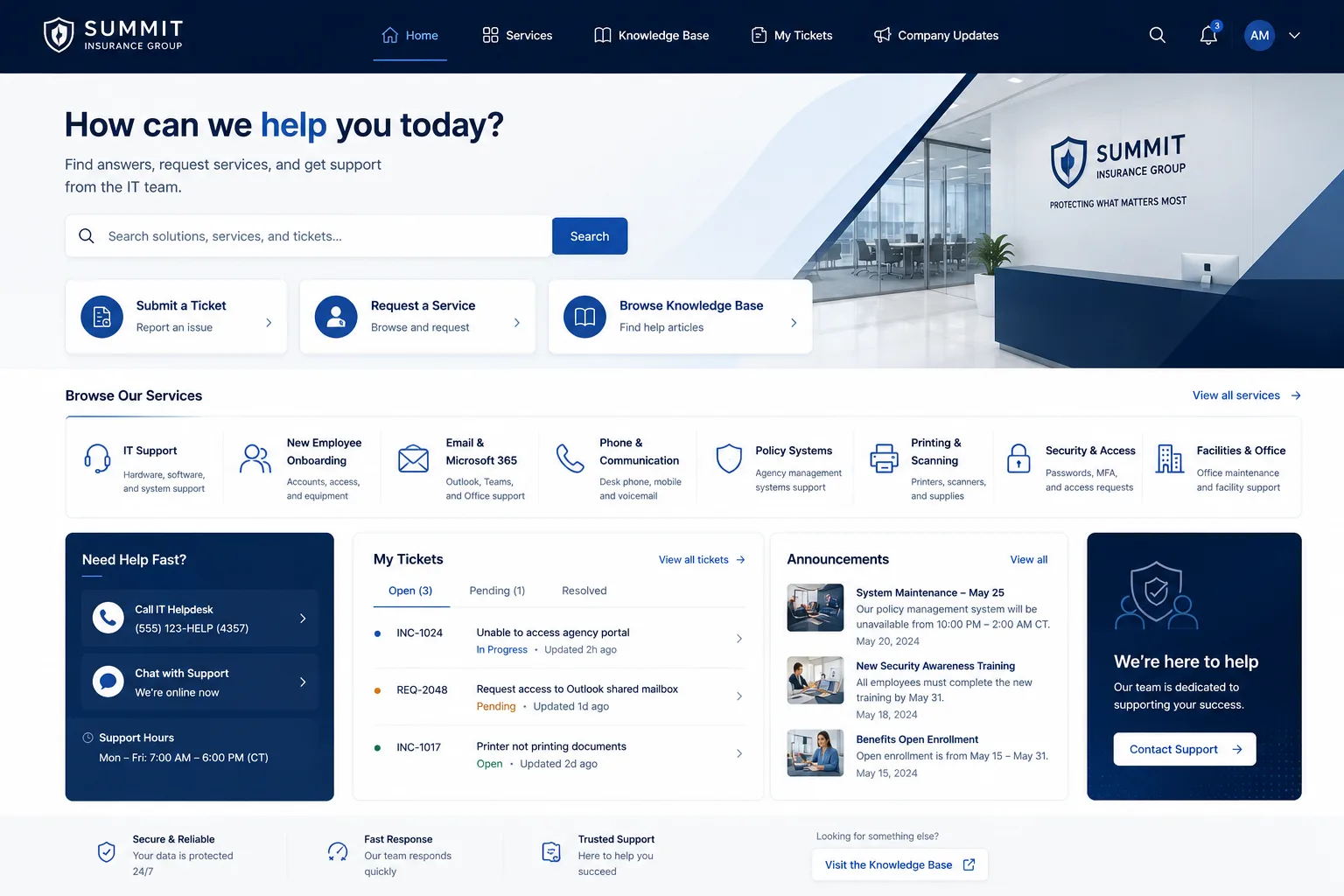
Your portal's navigation should be obvious to someone logging in for the first time. No hunt and search. No nested menus three levels deep.
Here's what works: a clean dashboard with large tiles or buttons for the main tasks. "Request Time Off." "View My Paycheck." "Update My Address." A first-timer should see what they need within one second of landing on the portal.
Use simple, everyday language. Don't say "Personnel Information Management." Say "My Profile." Don't say "Paid Time Off Accrual Dashboard." Say "My Time Off."
Color matters, too. Make action buttons stand out. Use consistent spacing. Test everything on mobile because your employees are checking their requests from their phones at lunch.
Build in AI-Powered Answers to Reduce Wait Times
An AI chatbot that sits on your portal can answer employee questions instantly without a human stepping in. "When do I get paid?" "How much vacation time do I have left?" "Where's my W2?"
The best portals train their AI on the most common questions their HR and IT teams actually field. Feed it your FAQ, your policy docs, and your past support tickets. The AI learns your company's specific answers, not generic advice.
This doesn't replace your HR team. It just means your team spends less time answering the same questions over and over and more time on work that matters.
Make the Most Common Task Require the Fewest Clicks
If time off requests are your number one portal traffic driver, that task should take two or three clicks maximum.
Related: Best Service Portal for Freshservice: Premium Employee Experience Design
Land on portal → click "Request Time Off" → select dates and reason → click "Submit." Done. Don't ask for manager approval within the same flow if it can happen in the background. Don't ask for budget code if it's optional. Don't add fields that are "nice to have."
Every extra field, every extra step, every extra confirmation screen kills adoption. Minimize friction relentlessly.
Test with Real Employees Before Launch
Bring in a small group of actual employees from different departments and watch them use your portal for the first time. Don't guide them. Don't explain anything. Just watch.
Where do they click first? Where do they get stuck? How long does a time off request actually take? Do they understand the language? Do they trust that their information is being submitted correctly?
The gaps you see in this test are exactly what you need to fix before you roll out to the whole company. A one-hour test with five real users beats weeks of guessing.
Plan a Rollout That Builds Confidence
Don't flip a switch and send an email to 500 people saying "Hey, everyone uses the new portal now."
Start with a small, tech-forward group. Let them use it, find bugs, give feedback. Then expand to departments in waves. Pair each wave with a short training email or lunch-and-learn session. The more your team hears "this is here to make your life easier," not "you have to use this now," the more they'll embrace it.
If you're running Freshservice as your ITSM platform, Ascend Portal Experience specializes in transforming generic helpdesk portals into branded, polished employee experiences that drive real adoption.
Want to work together?
Get in Touch →Related: Best Self Service Helpdesk Portal Design for Freshservice
Related: Freshservice Portal Design Best Practices: 2026 Guide
Measure What Matters: Adoption and Usage
After launch, track how many employees are using your portal for each task. Which features get traction? Which get ignored? Are support tickets for "how do I request time off" going down?
Set a baseline before launch, then check in after one month, three months, and six months. If adoption is flat, talk to your users about why. Sometimes a small UX tweak fixes the problem. Sometimes you need to retrain or add a feature you thought nobody wanted.
The goal isn't 100 percent adoption immediately. It's steady growth and high satisfaction among the people who do use it.
Avoid These Common Design Pitfalls
Portal projects fail for predictable reasons. Know them so you don't repeat them:
- Over-building: Adding features nobody asked for because you think it sounds useful.
- Poor mobile design: A portal that only works on desktop will be ignored by half your team.
- Confusing navigation: Employees shouldn't need a manual to find basic tasks.
- Slow load times: A portal that takes five seconds to load will drive users away.
- Unclear status updates: Employees need to know if their request is pending, approved, or rejected. Don't leave them guessing.
- No way to get help: Include a link to contact support right on every page. Stuck users leave.
Work with a Portal Design Partner If You Want Certainty
Designing and launching an ESS portal in-house is possible, but it's a project that has a lot of moving parts. If your team is stretched thin or you want a polished result without the trial and error, a specialized partner can handle the design, customization, and rollout.
Ascend Portal Experience offers fixed-price Freshservice portal design and implementation so you get a branded, high-conversion employee portal without surprises on cost or timeline. The team builds portals around actual employee workflows and handles everything from design to training your team on launch day.
Key Takeaways for Portal Success
Design around real employee tasks, not theory. Simplify navigation and language. Add AI-powered support to handle common questions. Test with actual users before you launch. Roll out in waves with training. Measure adoption and adjust based on feedback. Avoid over-building and mobile neglect.
A great employee self-service portal is one that disappears into the background because it's so easy to use that employees don't even think about it. They just log in, complete their task in seconds, and move on with their day. That's the goal. That's also entirely achievable if you start with what your employees actually need.
What should an employee self-service portal include?
Start with the core five: time off requests, payroll information, personal profile updates, benefits info, and a way to submit questions or get help. Everything else depends on your organization's specific needs. Don't add features just because other companies have them. Stick to what your employees actually ask for.
How do you improve employee adoption of a self-service portal?
Make the most common tasks fast and obvious. Train employees before launch, not after. Use simple language. Test with real users before you go live. Roll out in waves so early users can share positive experiences. Measure adoption and adjust based on what's not working.
Why do employee self-service portals fail?
They fail when they're designed for IT convenience instead of employee speed. They fail when they're too complicated, too slow, or too mobile-unfriendly. They fail when there's no launch training and employees don't know the portal exists. They fail when feedback is ignored after launch.
Should we add an AI chatbot to our employee portal?
Yes, if your team gets the same five questions over and over. An AI trained on your FAQs and past support tickets answers questions instantly and reduces support workload. It's not a gimmick if it's trained to answer actual employee questions your team fields every week.


