
Why Your Generic Freshservice Portal Is Holding You Back
Here's the thing about default portals. They work. They're functional. But they feel like every other helpdesk your employees have ever used.
When your IT service portal doesn't match your organization's brand or workflow, people avoid it. They call the help desk instead. They email random tickets. They get frustrated and your support team drowns in noise.
That's where Freshservice portal customization services come in. Instead of accepting the out-of-the-box experience, you can reshape your portal to match how your business actually works.
Related: Best Freshservice Portal Accessibility Customization for Enterprise Teams
Related: Freshservice Portal Accessibility Features: Complete Guide
Related: Improving Freshservice Portal Engagement Metrics: A Guide
What Freshservice Portal Customization Services Actually Do
Customization isn't just slapping your logo on the portal and calling it a day. Real Freshservice portal customization services dive into the actual structure and behavior of your helpdesk.
Rebranding That Matters
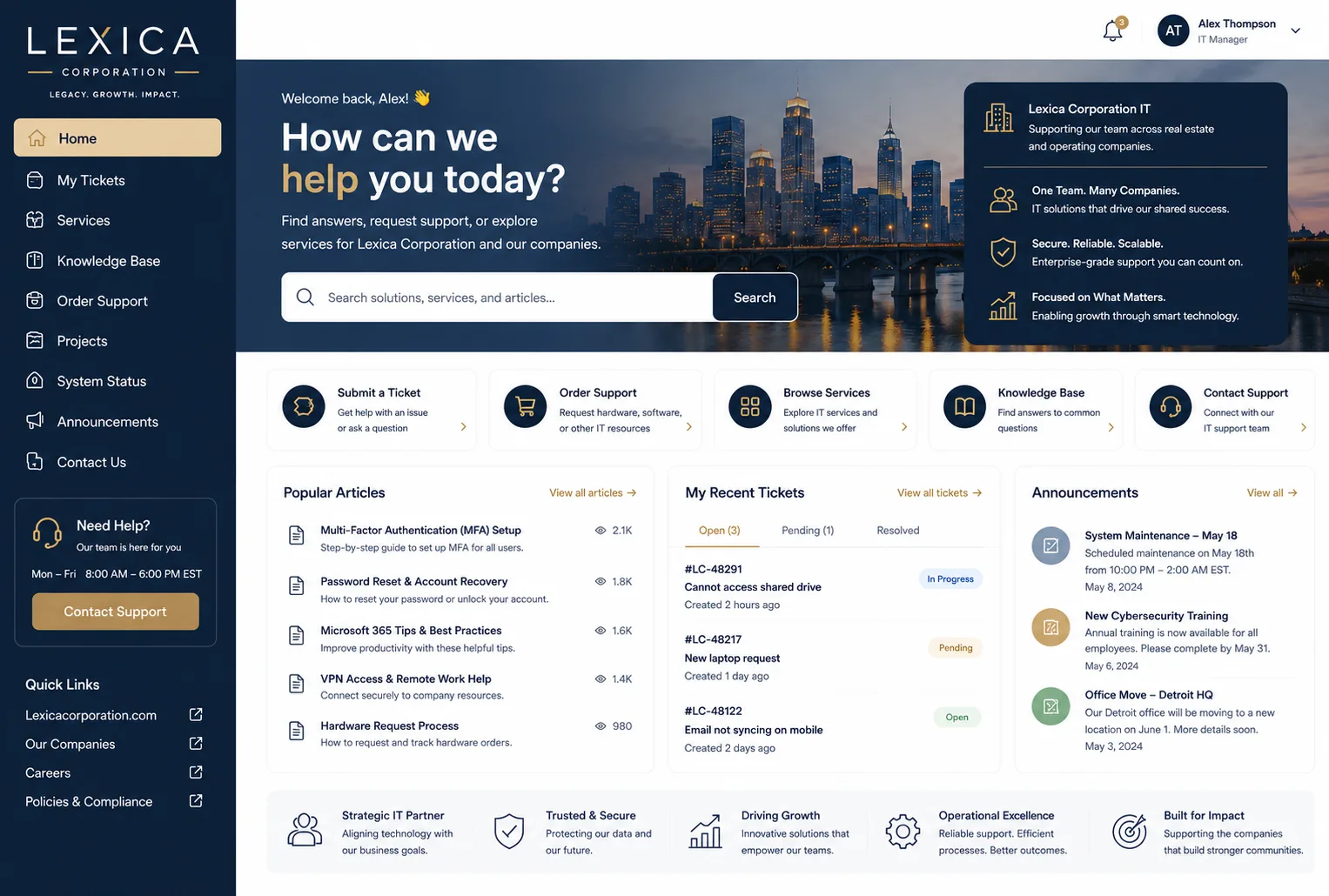
You can apply your visual identity across the entire support portal. Custom styling, your colors, your fonts, your layout philosophy. It sounds simple, but when employees open a portal that actually looks like your company, adoption goes up immediately.
Forms That Guide Users Right
Instead of one generic form, you can build an extensive form library. We're talking 100+ forms if you need them. Each form can have custom fields, prefilled information, and logic that guides users to provide exactly what your support team needs.
This alone cuts down ticket quality issues and reduces back-and-forth conversations.
Smart Routing That Works
Auto-routing functionality lets you direct submissions automatically to the right support groups based on what users enter in their forms. A facilities request goes to facilities. An HR question goes to HR. No manual sorting. No misdirected tickets.
Access Control Built for Your Structure
Different departments might need different portals. Different users might need different access levels. Portal assignment features let you configure specific workspaces and control exactly who sees what.
The Real Business Case for Customizing Your Portal
Customization costs money and takes effort. So why do it?
Self-service adoption is everything in modern IT service management. When your portal is tailored to your actual workflows and your brand, employees use it. They don't call. They don't email. They submit tickets through the right channel with complete information.
That means your support team spends less time clarifying, hunting for information, and sorting misdirected requests. They spend more time actually solving problems.
Plus, a branded portal signals to your workforce that IT isn't some generic function. It's integrated into your organization's experience.
The Authentication and Security Angle
Your organization probably has specific security requirements. Maybe you need single sign-on through your directory. Maybe you need multi-factor authentication configured a certain way.
Want to work together?
Get in Touch →Freshservice portal customization services include configurable authentication options so your portal matches your security posture, not the other way around.
How to Approach Portal Customization

If you're thinking about doing this, here's the realistic path forward.
Start With Your Current Pain Points
What's broken about your current portal experience? Are users confused about which form to use? Are tickets arriving in the wrong queue? Are employees avoiding self-service entirely?
Write those down. These are your customization priorities.
Map Your Workflows
Before you customize anything, document how your organization actually handles requests. What types of issues exist? Where do they go? Who handles them? What information do they need upfront?
This becomes your customization blueprint.
Plan Your Branding Strategy
Decide how much visual branding matters to your culture. Some organizations want a completely custom look. Others want subtle touches. Both approaches work if they align with your goals.
Test Before Full Rollout
Customize specific workspaces or user groups first. Let them use the new experience. Gather feedback. Refine before you push it organization-wide.
The Fixed-Price Advantage
Customization projects can feel risky. Will costs spiral? Will it take forever?
Fixed-price Freshservice implementation packages solve that problem. You know the cost upfront. You know the timeline. No surprise invoices halfway through.
That certainty matters when you're pitching this to your finance team or leadership.
When to Call in Experts
You could attempt portal customization yourself. But here's the reality. Customization involves understanding Freshservice's Admin settings, form logic, routing rules, and styling capabilities.
It's doable if you have the time and technical chops. But most IT directors are better off partnering with a service provider who specializes in this exact work.
Organizations like Ascend Portal Experience focus entirely on transforming Freshservice portals into branded, user-friendly experiences. They handle the technical setup so your team focuses on strategy and adoption.
Key Takeaway

Your Freshservice portal should work for your organization, not force your organization to work around it. Customization turns a generic helpdesk into a branded, efficient self-service experience that employees actually want to use.
What can you customize in a Freshservice portal?
You can customize the visual branding, form library, auto-routing logic, access control, authentication methods, and custom styling. Essentially every aspect of how your portal looks and behaves can be tailored to your organization's needs.
How long does Freshservice portal customization typically take?
Timeline depends on the scope of your customization. Simple branding updates take weeks. Comprehensive redesigns with custom forms, routing, and workspace configurations take longer. Fixed-price services include a defined timeline so you know exactly what to expect.
Will customization slow down Freshservice updates?
Thoughtful customization using Freshservice's native features doesn't interfere with platform updates. Your custom styling and configurations stay in place as the platform evolves.
What's the ROI on portal customization?
The main ROI comes from increased self-service adoption and reduced support team overhead. When employees use the portal instead of calling or emailing, your team handles fewer misdirected requests and spends time on actual problem-solving rather than triage.


