
Your employees are drowning in support tickets. Your IT team is stretched thin answering the same questions over and over. And your helpdesk response times keep climbing.
The fix? A well-designed self-service portal that puts answers directly in users' hands.
Related: SSP Portal Explained: Self-Service Benefits Management Guide
Related: What Does Employee Self-Service Portal Mean?
When you build a self-service portal the right way, you're not just reducing ticket volume (though that happens too). You're creating an experience where employees feel empowered to solve problems independently. They find answers fast. They complete transactions without waiting for a human. They actually prefer using your portal over calling your support team.
Let's walk through how to make that happen.
Start With Clear Planning Before You Build
The biggest mistake teams make is jumping straight into design without understanding what they're building toward. Spend real time on planning first.
Ask yourself these questions:
- What problems are your employees trying to solve?
- What transactions do they need to complete themselves?
- Where are your current support bottlenecks?
- What would reduce your ticket volume the most?
Document the answers. Map out user journeys for your most common scenarios. Identify which issues show up repeatedly in your helpdesk queue. These patterns tell you exactly what content and functionality your portal needs.
Then set measurable objectives. Do you want to reduce tickets by 20%? Improve first-contact resolution? Lower average response time? Be specific. You'll use these metrics to measure success once your portal launches.
If you're using Freshservice as your ITSM platform, Ascend Portal Experience can help you align your portal strategy with your existing infrastructure and turn your helpdesk into a branded employee experience that drives adoption from day one.
Related: IT Helpdesk Portal User Adoption Strategies That Actually Work
Choose the Right Platform for Your Needs
Your portal platform is the foundation. It needs to handle your current volume and scale as your organization grows. More importantly, it needs to integrate with your existing systems so that data flows smoothly and users aren't entering information twice.
If you're already running Freshservice, the built-in portal gives you a head start. It connects directly to your ticket system, your knowledge base, and your asset management data. No middleware. No messy integrations.
Evaluate any platform based on these criteria:
- Does it integrate with your current helpdesk and business systems?
- Can you customize the design to match your brand?
- Does it support the portal features you actually need (knowledge base, service catalog, asset lookup, etc.)?
- Is the user interface intuitive enough that employees won't need training?
- Can you maintain and update it without hiring additional staff?
The platform is just the engine. What matters most is what you build on top of it.
Design for Your Users, Not for IT
This is where most portals fail. IT teams build portals that make sense to IT people. Employees then use them as a last resort.
Design backward from the user's perspective. Your employee shouldn't have to think about your organizational structure or your IT terminology. They should see options in the language they use every day.
Make navigation obvious. Group related requests together. Use clear labels. If your employee needs to reset a password, that option should be findable in seconds, not buried under "Account Management" or "System Access".
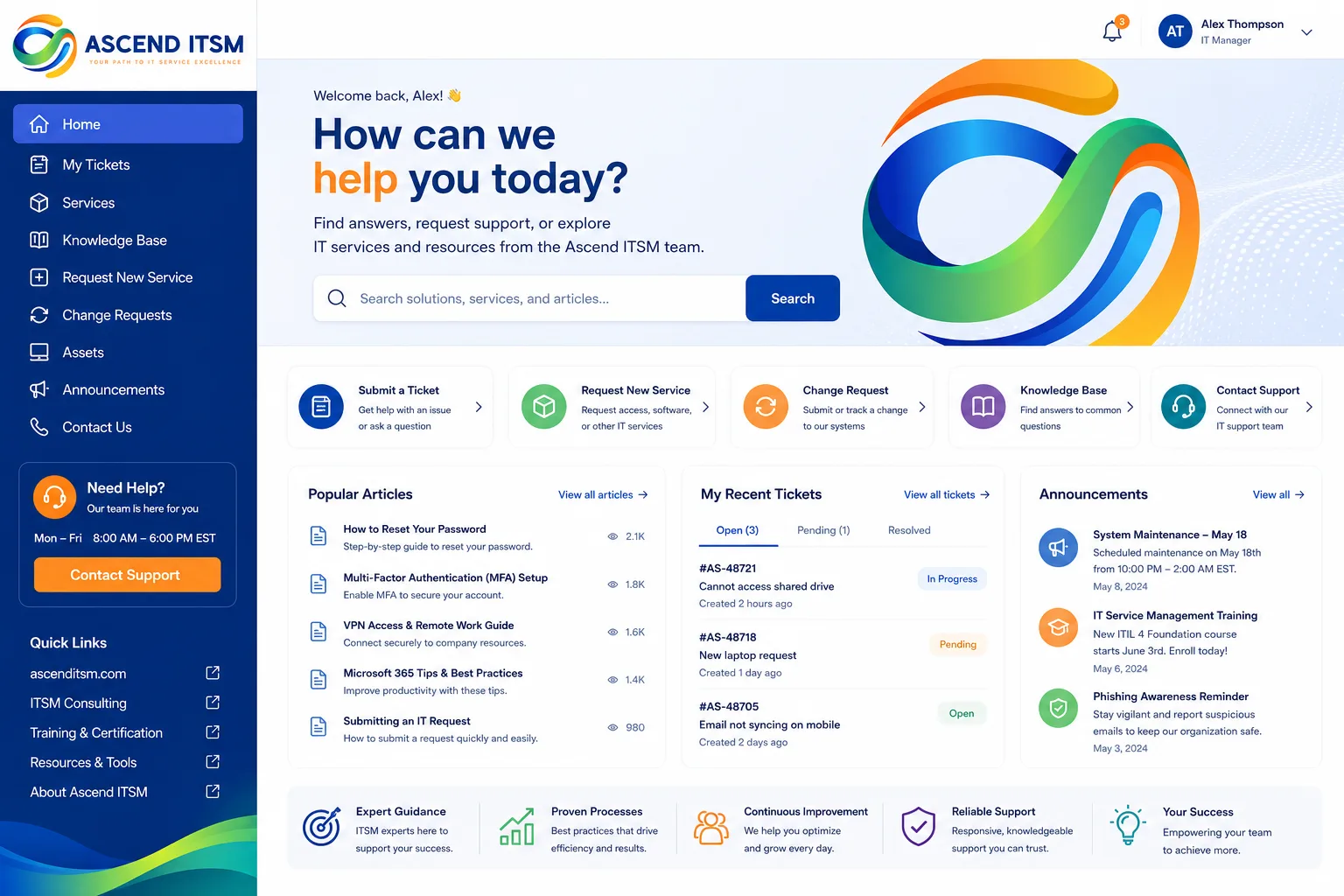
Keep the homepage clean. Feature your five most-used services prominently. Include a search bar that actually works. Highlight your knowledge base so people can browse answers without submitting a ticket.
Want to work together?
Get in Touch →Test the portal with real users before you launch. Watch someone try to complete a task without any instructions. Where do they get stuck? What confuses them? Fix those friction points before going live.
Build Essential Content and Functionality

Your portal needs four core components working together:
- Knowledge base: Articles and FAQs that answer common questions. Keep these updated. Outdated information is worse than no information.
- Service catalog: A curated list of services employees can request (new laptop, software access, password reset, etc.). Make requests straightforward.
- Self-resolution tools: Let employees check ticket status, update personal information, or look up asset information without contacting support.
- Feedback mechanism: Collect feedback on portal usability and knowledge base accuracy. Use it to improve continuously.
Don't try to do everything at launch. Start with your highest-impact services and most commonly asked questions. Add complexity later once the basics are working smoothly.
For organizations using Freshservice, the Ascend Professional Portal Package includes customized design and implementation that turns your Freshservice portal into an intuitive employee hub with branded design and optimized workflows.
Launch With Adoption in Mind
A great portal no one knows about is useless. Build adoption into your launch plan.
Communicate the benefits to employees. Show them how the portal saves them time. Highlight quick wins like password resets they can do in 30 seconds without a ticket.
Make the portal easy to find. Link to it from email signatures. Feature it on your intranet. Mention it in team meetings.
Train your support team to use it too. When they're helping someone, they should point them toward the portal for future self-service options.
Track adoption metrics from day one. Monitor which services get the most use. See which knowledge base articles employees actually read. Use that data to refine your content and functionality.
Maintain and Improve Continuously
Your portal isn't static. Keep it fresh.
Review your knowledge base quarterly. Remove outdated articles. Update procedures when your processes change. Add new articles based on ticket trends your support team sees.
Monitor portal analytics. Which services are underused? That might mean they need better documentation or a clearer interface. Which articles get the most views? Promote those and create related content.
Gather feedback regularly. Surveys, user testing sessions, and support ticket comments all reveal opportunities to improve.
When you're ready to take your Freshservice portal to the next level, Ascend Portal Experience specializes in transforming standard portals into branded employee experiences that drive measurable improvements in adoption and satisfaction.
FAQs

How long does it take to build a self-service portal?
Timeline depends on complexity and scope. Planning and design typically take 2-4 weeks. Building core functionality (knowledge base, service catalog, basic customization) takes another 4-8 weeks. The key is starting simple and expanding based on usage patterns and feedback. Don't delay launch waiting for perfection.
What's the biggest barrier to self-service portal adoption?
Poor user experience and incomplete content. If employees can't find what they need, or the portal is confusing to navigate, they'll go back to calling support. Invest in design that prioritizes simplicity and usability. Keep your knowledge base current and accurate. Those two things drive adoption more than anything else.
How do I know if my portal is actually reducing support tickets?
Track ticket volume and categories before and after launch. Set up analytics on your portal to see what services employees use most and which knowledge articles get views. Compare the metrics. Look for shifts in ticket types (fewer password resets, more complex issues). Use employee feedback surveys to understand whether the portal is saving them time.
Can I update the portal design without rebuilding it?
Yes, if your platform supports customization (most modern portals do). Freshservice portals can be extensively customized through theme design, branding, and layout changes without disrupting your underlying ticket system or data. That's one reason platform selection matters so much at the start.


