
The best employee portals do one thing really well: they make work easier for the people using them.
Not all portals are created equal. Some feel clunky and outdated. Others are packed with features nobody needs. The best ones strip away the noise and give your team exactly what they need to get work done faster.
Here's what separates a great employee portal from a mediocre one, and how to find the right fit for your organization.
Related: Best Freshservice Portal Employee Engagement Features 2026: Top 5 Ranked
Related: Best ITSM Tools 2026: Top 6 Ranked & Compared
Related: Top 5 ITSM Tools for 2026: Complete Breakdown
Related: Best ITSM ITIL 4 Solutions 2026: Top 5 Ranked
What Makes an Employee Portal Actually Good?
A solid employee portal puts self-service first. Your team should be able to submit requests, track their status, and find answers without picking up the phone or sending an email.
Related: What Is an Employee Self-Service Portal? 2026 Guide
This saves your IT and service teams enormous amounts of time. It also makes employees happier because they're not waiting around for someone to help them with routine tasks.
Look for portals that let your employees do things like request software access, report IT issues, submit HR requests, or find company policies all from one dashboard. The more they can handle themselves, the better.
Integration matters too. Your portal should connect with the systems your organization actually uses. If your team is spread across multiple departments, everything should live in one unified space instead of forcing people to bounce between separate portals.
The Three Types of Employee Portals You Should Know About
Not every portal is built the same way. Understanding the different approaches helps you pick what works for your company.
Single-Department Service Portals
These handle one function really well. Think of an IT helpdesk portal that's laser-focused on tech support. It's straightforward and organized, but your team members still need to hunt for services outside that one department.
Related: Best Branded Self-Service Helpdesk Portals 2026: Top 5 Ranked
Multi-Departmental Unified Service Portals
This is where things get smarter. A unified portal brings IT, HR, facilities, and other departments into one experience. Your employees submit all their requests from the same place and see everything they're working on in one view.
This approach cuts down confusion and actually gets things done faster because everything flows through one system.
Modern Portals
The newest generation of employee portals treats the experience like it matters. They're mobile-friendly, they look professional, and they're branded to feel like part of your company culture instead of looking like a generic IT tool.
Modern portals also automate workflows so that requests move through your organization without manual handoffs slowing things down.
Key Features to Prioritize
When you're comparing employee portals, these features matter most.
Self-Service Capabilities
Your employees should be able to handle common requests without touching a single ticket. Password resets, software requests, room bookings, equipment orders — these should all be self-service where possible. It saves time and frustrates fewer people.
Workflow Automation
Behind the scenes, your portal should be smart enough to route requests, trigger approvals, and move work along automatically. Manual processes slow everything down and create bottlenecks.
Centralized Information Access
Your team should find company policies, forms, FAQs, and documentation in one searchable location. If employees can answer their own questions, they will, and that takes pressure off your support team.
Request Tracking and Visibility
Everyone wants to know what's happening with their request. Real-time status updates, clear communication, and transparent timelines make a huge difference in how people perceive your IT or service operations.
Mobile Accessibility
Your team doesn't work at a desk all day. A portal that works on phones and tablets is no longer a luxury — it's expected.
Why Portal Design and Branding Actually Matter

Here's something that gets overlooked: the way your portal looks affects how much your team actually uses it.
A generic, default portal tells employees "this is just IT stuff we tolerate." A thoughtfully designed, branded portal tells them "this is part of how we work, and we care about your experience."
When your portal reflects your company's look, feel, and values, adoption goes up. People are more likely to use self-service when it feels intentional and professional.
This is exactly where many organizations miss an opportunity. They deploy a standard portal and wonder why adoption stalls. The solution isn't always more features — it's often better design and thoughtful customization that makes the portal feel like it was built for your specific team.
If you're using Freshservice as your ITSM platform, Ascend Portal Experience specializes in transforming generic Freshservice portals into branded experiences that your team actually wants to use.
Want to work together?
Get in Touch →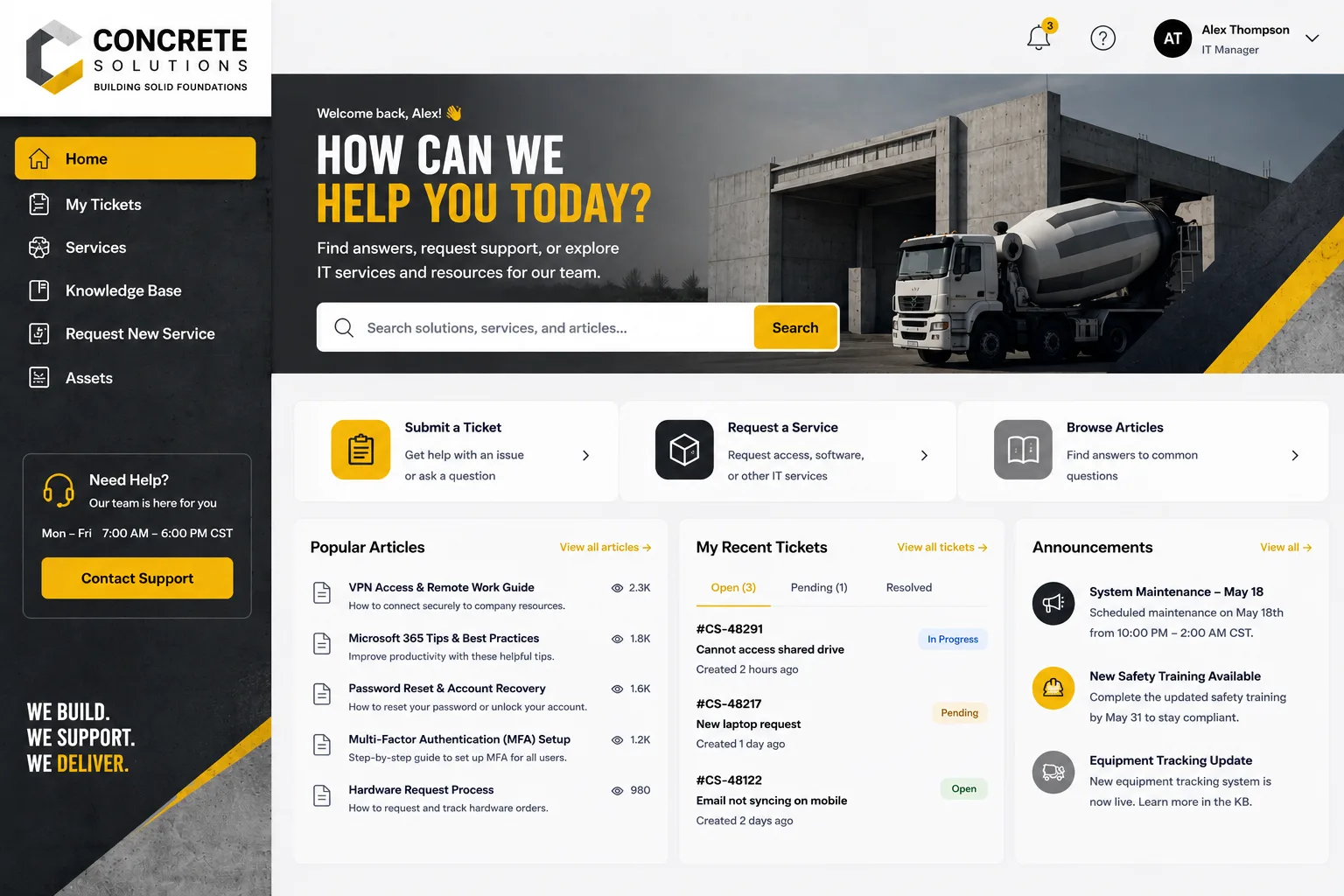
How to Evaluate Portal Options for Your Organization
Start by mapping out what your team actually needs. What requests come in most often? Where do you lose the most time to manual work? What's creating friction for your employees?
Then, look at how well each portal option handles those specific needs. Don't get distracted by features you don't need.
Ask these questions:
- Can employees submit requests for everything we handle, or just some services?
- How customizable is the design and branding?
- Does it integrate with our existing systems?
- How does automation work, and what can we automate?
- Is mobile experience truly functional, or just passable?
- What's the implementation process and timeline?
Test drive any portal before you commit. See how your team reacts to it. Get feedback from the people who'll actually use it every day.
Budget matters, too, but remember that the cheapest option often isn't the best value. A portal that doesn't get used is expensive no matter what you paid for it.
Common Mistakes Organizations Make with Employee Portals
One big mistake is buying a portal and assuming you're done. Portal success requires ongoing attention to design, automation rules, and content. Keep it fresh and functional.
Another is forcing one portal to serve everyone the same way. Different departments have different needs. A unified portal approach works best when you customize workflows and information based on who's using it.
Many organizations also underestimate how much the user experience affects adoption. A portal that's powerful but confusing won't get used. A portal that's simple, fast, and well-designed will.
If you're looking to transform your Freshservice portal into something that actually drives adoption, Ascend Portal Experience can guide you through the right approach for your team.
What to Expect During Implementation

Most portal implementations follow a similar path. First, you map out your requirements and workflows. Then, the portal gets configured and tested. Finally, you roll it out with training and support.
The timeline depends on complexity. A simple self-service request portal might take weeks. A fully unified, multi-departmental portal with heavy customization takes longer.
Good implementations include training for both your team and your employees. If people don't know how to use the portal, they'll go around it.
Don't skip change management. Help your team understand why you're switching and how it benefits them. Early adopters who see value will pull others along.
The Business Case for Portal Investment
A better employee portal pays for itself through reduced support ticket volume, faster request resolution, and less time spent on routine manual work.
Related: Self-Service Examples for Better Employee Support
It also improves retention. Employees notice when their company invests in tools that make their work easier. A clunky, outdated portal sends the opposite message.
From an IT operations perspective, a well-designed portal with automation can handle the same volume of work with a smaller team, or free your team up to focus on more strategic projects instead of repeating the same manual tasks every day.
Moving Forward with Your Portal Strategy
The best employee portal for your organization depends on your specific needs, your current systems, and your team's preferences.
Start by getting clear on your priorities. Is it self-service? Is it consolidating multiple portals? Is it modernizing how your team engages with IT?
Then, evaluate options based on those priorities. Don't let someone else's feature list distract you from what actually matters to your organization.
If you use Freshservice and you're ready to move beyond the default experience, the Ascend Professional Portal Package offers fixed-price design and customization services that transform a standard Freshservice portal into a branded, high-adoption experience tailored to how your team works.
People Also Ask
What's the difference between an employee portal and a service portal?
An employee portal is designed for one group of people (your internal team), while a service portal is the umbrella term for any portal that serves a specific user base. An employee portal is a type of service portal. The goal is the same: self-service access to services and information.
How do I get my team to actually use the new portal?
Train them, make it easy, and get their buy-in early. Show them how the portal saves them time. Remove the old way of doing things so they don't have an alternative. Celebrate early wins. Adoption is about communication and demonstrating value, not just deploying software.
Can I integrate my portal with tools we already use?
Most modern portals can integrate with your existing systems. The question is how deep and how custom that integration needs to be. Before choosing a portal, check if it plays nicely with your email system, directory, ticketing tools, and any other software your team depends on.
How much does it cost to build a custom employee portal?
Custom portal development costs vary widely based on scope, complexity, and what you're starting with. Reach out to Ascend Portal Experience to discuss your specific needs and get a sense of what a tailored solution would look like for your organization.


