
Your employees are drowning in support tickets. Every routine password reset, software request, or FAQ question pulls your IT team away from strategic work. But what if your people could solve most of their own problems without ever opening a ticket?
That's where self-service comes in. When you give employees the right tools and information, they don't need to wait for a support agent. They find answers fast, feel empowered, and your helpdesk gets breathing room. The best part: this isn't theoretical.
Related: What Is an Employee Self-Service Portal? 2026 Guide
Related: What Does Employee Self-Service Portal Mean?
Let's walk through real self-service examples that work, and show you how to build one that actually gets used.
Related: Examples of Self-Service Portals: Real-World B2B Use Cases
What Self-Service Actually Means in the Workplace
Self-service means your employees can access information, submit requests, and resolve issues without contacting support. It's the supermarket self-checkout applied to IT: fast, independent, and available when the employee needs it.
In a B2B or corporate environment, self-service lives inside a digital portal. Your IT portal becomes the hub. Employees log in, find what they need, submit a request, or check a knowledge base article. No email. No ticket queue. No waiting for a callback.
Ascend Portal Experience specializes in building these portals for organizations using Freshservice as their ITSM backbone. The difference between a generic out-of-the-box portal and a designed one is enormous. One gets ignored. The other becomes the go-to resource your employees actually use.
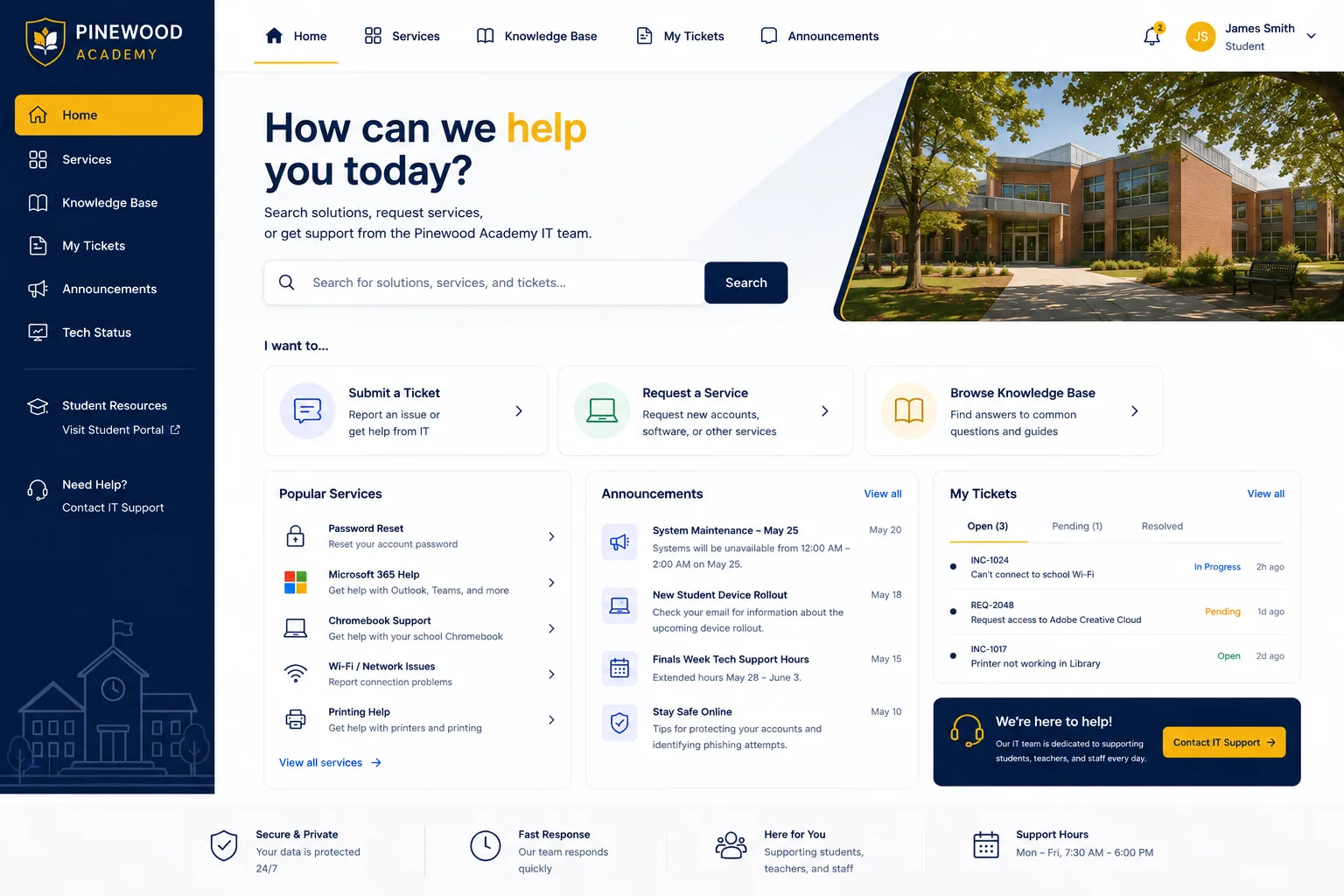
Real Self-Service Examples Your Employees Will Love
Here are self-service capabilities that reduce support overhead and improve the employee experience:
- Password Resets Without Tickets: Employees reset their own passwords through a self-service widget instead of calling the helpdesk. Takes 30 seconds. Happens at 2 a.m. on a Sunday. Your team sleeps soundly.
- Knowledge Base Articles and FAQs: Your portal surfaces searchable documentation on common issues: "How do I connect to the VPN?" "Where is the benefits enrollment portal?" "How do I request software?" Employees find answers instantly instead of submitting a ticket.
- Request Templates and Forms: Instead of writing freeform emails, employees use guided forms to submit common requests (hardware order, access request, software license). The form auto-populates data, adds approval routing, and moves the request to your ticketing system automatically. No back-and-forth. No missing information.
- Request Status Tracking: Employees see where their ticket is in the approval pipeline. "Your MacBook has shipped and will arrive on Tuesday." "Your access request is pending manager approval." They don't have to email asking for an update.
- Community Q&A Boards: Peer-to-peer support reduces ticket volume further. Employees answer each other's questions. Your IT team monitors but rarely steps in. Knowledge spreads without helpdesk involvement.
- Proactive Notifications: The portal alerts employees to system maintenance, important security updates, or policy changes. Information reaches the right person at the right time without creating support tickets.
- Account and Subscription Management: Employees manage their own software licenses, update contact information, or view their hardware inventory. Self-service reduces admin work and puts control in their hands.
Why These Examples Actually Reduce Support Burden
The math is straightforward. If your helpdesk handles 500 tickets per month, and 200 of those are password resets, FAQ questions, or status checks, you're wasting capacity. Self-service handles those 200 automatically. Your team focuses on complex issues that require real troubleshooting.
But there's a catch: self-service only works if your portal is intuitive, fast, and findable. A clunky generic portal tucked behind three menus and a confusing navigation structure? Employees won't use it. They'll still email the helpdesk or call your extension.
Want to work together?
Get in Touch →That's why design and branding matter. When your portal feels like a natural extension of your workplace, branded with your company colors and organized around employee workflows, adoption skyrockets. Employees discover features naturally. They recommend it to colleagues. It becomes the default first stop before calling IT.
How to Build Self-Service Your Team Will Actually Use

Start by mapping what your helpdesk handles right now. Which tickets recur? Which questions could be answered with a knowledge article? Which requests follow a predictable workflow?
Build your portal around those patterns. Organize the homepage by use case, not by IT terminology. Instead of "Incident Management" and "Change Requests," use employee language: "Report a Problem," "Get Help," "Request Something New."
Add a search bar front and center. Employees think in Google search terms, not IT taxonomy. They type "laptop broken" not "hardware incident." Make sure your knowledge base is discoverable through natural language.
Make request forms short and smart. No 15-field forms. Conditional logic hides irrelevant fields. Auto-population pulls in employee data. Clear approval routing and status updates keep employees informed without opening a new ticket.
If you're running Freshservice, the portal is your starting point. But the default template is generic and uninspiring. A professionally designed portal transforms that template into something your employees actually want to use.
The Bigger Picture: Self-Service Drives Employee Satisfaction
This isn't just about ticket reduction, though that matters. It's about employee autonomy and satisfaction. When people can solve their own problems instantly, they feel respected and in control. They don't resent IT. They appreciate it.
Self-service also scales your team. As your organization grows, you don't need to hire proportionally more support staff. Your existing team handles more complex work while the portal handles volume. That's strategic leverage.
And it works 24/7. Employees don't have to wait for business hours or deal with time zone delays. The portal is always on, always available, always responding.
If you're running Freshservice and want to move beyond the default portal experience, Ascend Portal Experience can help you design and build a portal that your employees will actually use. We specialize in transforming generic ITSM portals into branded, intuitive employee experiences that reduce support volume and boost satisfaction.
Getting Started with Self-Service
Start small if you're new to this. Launch with password resets and a basic knowledge base. Measure adoption and ticket reduction. Add request forms once you see traction. Iterate based on what your employees need.
The Ascend Professional Portal Package includes strategy, design, and implementation support so you don't have to figure this out alone. We handle the technical work and UX decisions. You get a portal that works from day one.
Self-service isn't a nice-to-have anymore. It's table stakes for any organization serious about operational efficiency and employee experience. The examples above work because they align portal features with real employee needs. They reduce friction. They save time. They respect the employee's autonomy.
What counts as a self-service example?
Any function that lets an employee complete a task or find information without contacting support counts as self-service. Password resets, knowledge articles, request forms, status tracking, FAQs, community boards, and account management are all self-service examples. If the employee can do it themselves in the portal, it's self-service.
How much can self-service reduce support tickets?
The impact varies based on your current ticket mix and portal adoption. Organizations with mature self-service capabilities typically see 30-50 percent of routine tickets handled automatically. The more you invest in intuitive design and comprehensive resources, the higher the impact.
Does self-service work for complex IT issues?
No. Self-service handles routine, predictable tasks and information requests. Complex troubleshooting, security incidents, and custom requests still require human support. Self-service is designed to handle the 60-70 percent of tickets that don't need a specialist, freeing your team to focus on what does.
How do I know if my portal is working?
Track adoption (how many employees use it), engagement (how many visits and searches), and ticket reduction (what percentage of routine tickets disappear). Also ask employees directly. A well-designed portal will have high adoption and positive feedback within a few months of launch.


