
Your helpdesk portal is often the first interaction employees have with IT. If it feels generic, clunky, or hard to navigate, they'll stop using it. They'll email, call, or Slack your team instead. That's a problem because every ticket that bypasses self-service costs you time, frustration, and operational efficiency.
The good news? A well-designed self-service helpdesk portal can reduce support tickets by up to 40% while simultaneously improving employee satisfaction. According to recent B2B research, 72% of users actively prefer self-service options for account and order management. Even more telling: 74% of B2B buyers will switch suppliers entirely for a better digital experience.
That means your portal design isn't just a nice-to-have. It's a competitive necessity.
What Makes a Self-Service Helpdesk Portal Actually Work
A functional portal needs four core pillars. First is a searchable knowledge base with regularly updated, employee-focused content. Second is an intuitive request form system that guides users through common workflows without friction. Third is a transparent ticketing interface where employees can track their submissions in real time. Fourth is visual branding and navigation that makes the portal feel like part of your company culture, not a generic support tool.
Here's what separates portals that drive adoption from portals that collect dust: intentional information architecture. When your knowledge base is organized by actual job role and common pain point rather than IT department structure, adoption skyrockets. When search actually works and surfaces relevant answers in three clicks or fewer, employees use it.
The challenge most organizations face is that out-of-the-box portal templates are generic by design. They work for everyone, which means they work optimally for no one. Your Freshservice instance may have all the technical features, but without deliberate design and content strategy, employees won't engage with it consistently.
That's where Ascend Portal Experience becomes the foundation for real adoption. We specialize in transforming default Freshservice portals into branded, role-specific experiences that employees actually want to use.
Related: Branded Helpdesk Portal Best Practices for Freshservice
Related: How to Rebrand Freshservice Helpdesk Portal in 2026
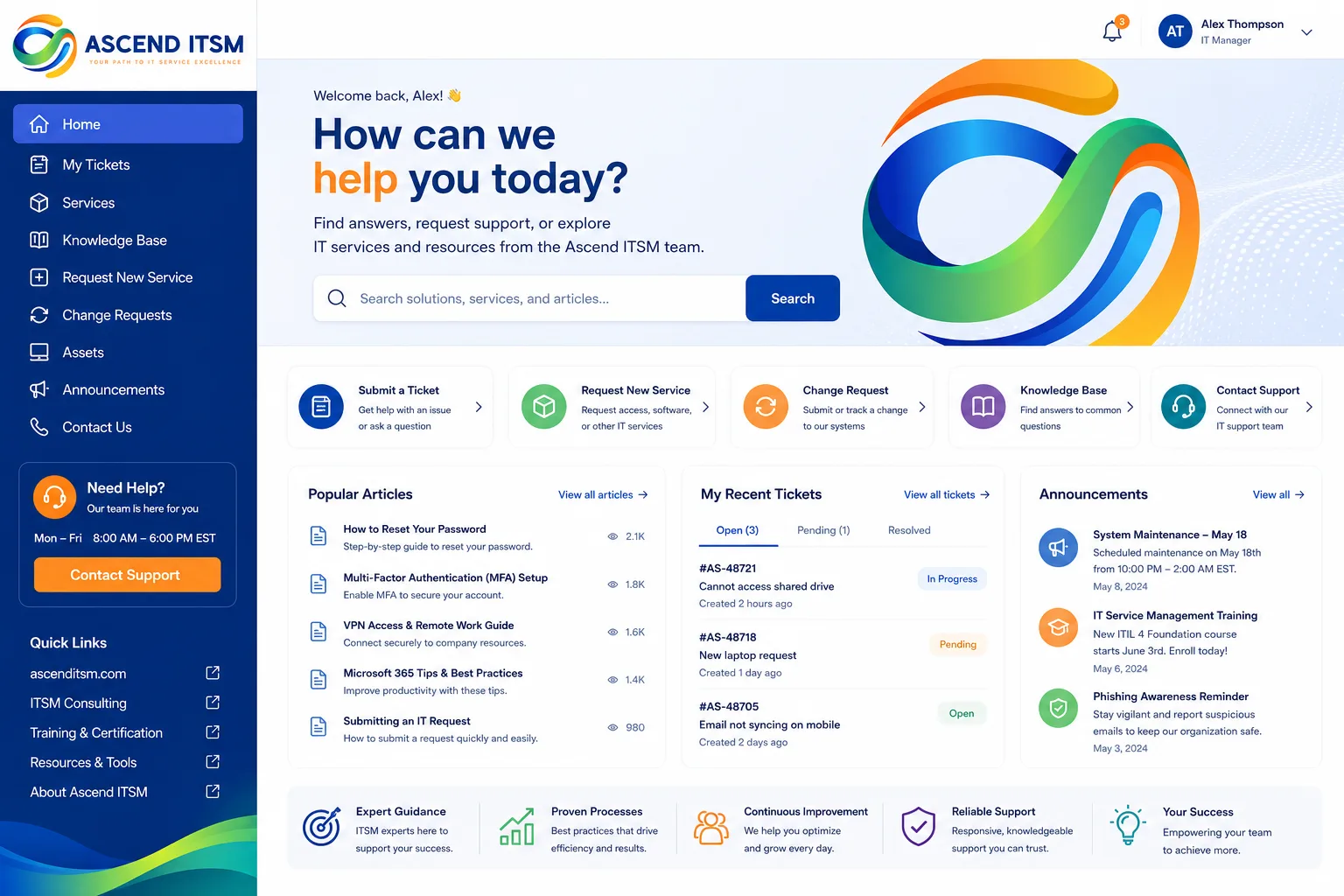
Core Components of High-Performing Portal Design
Your portal architecture should mirror how your employees think and work, not how your IT team organizes tickets.
- Catalog-First Navigation: Lead with what employees need (password resets, software requests, hardware setup) rather than burying it in menus.
- Robust Search Functionality: Implement AI-assisted search or natural language capabilities so employees find answers using their own words, not IT terminology.
- Knowledge Base with Real Content: A beautifully designed portal with empty resources defeats its purpose. Content must be current, accurate, and written for end users.
- Visual Consistency: Your portal should reflect your brand colors, tone, and design language. Employees spend time there; make it feel like part of your culture.
- Mobile-Responsive Design: Many support requests happen on phones and tablets. Your portal must perform flawlessly on every device.
- Transparent Status Updates: Let employees see ticket progress without forcing them to log in repeatedly. Proactive notifications reduce follow-up contact.
The Business Impact of Portal Redesign
When you implement a thoughtfully designed self-service portal, the operational gains compound quickly. Here's what organizations typically see within the first 90 days:
- 25-40% reduction in routine support tickets
- Faster time-to-resolution for complex requests (support team can focus on high-value work)
- Improved employee satisfaction and reduced helpdesk frustration
- Lower onboarding time for new employees (self-service answers common questions)
- Better data on what employees actually need (portal usage analytics inform IT strategy)
According to research published in the Forrester wave for digital experience management, organizations that invest in portal redesign see measurable ROI within six months. The investment isn't just operational; it's strategic. Your portal quality directly influences how employees perceive IT support.
Why Generic Portal Templates Fall Short

Most Freshservice instances come with a default portal. It has the right features. It checks boxes. But it doesn't account for your organization's specific workflows, terminology, or culture.
Want to work together?
Get in Touch →Related: Best IT Helpdesk Portal Modernization for Freshservice Users
A manufacturing company's support needs look completely different from a financial services firm's. A 500-person startup operates differently than a 5,000-person enterprise. Your portal should reflect that reality, not force employees to adapt to a one-size-fits-all template.
Custom design doesn't mean starting from scratch. It means strategically restructuring the catalog, refining content, improving search logic, and applying your brand to create an experience that feels native to your organization. When employees open your portal, they should think "this is how we do things here," not "this is a third-party support tool."
How to Evaluate Your Current Portal Design
Before investing in a redesign, audit what you have. Ask yourself honestly:
- Do employees naturally use the portal first, or do they skip it for email/chat?
- What percentage of ticket volume could have been self-served?
- Is knowledge base content current and actually helpful?
- Do employees know your portal exists?
- Are request forms intuitive, or do they generate confused tickets?
If you're answering "no" to most of these, a redesign is overdue. The good news is that transformation doesn't require years of work. The Ascend Professional Portal Package delivers complete portal redesign and customization on a fixed-price basis, so you know exactly what you're investing and when it's complete.
Building Adoption Around Your Redesigned Portal
Even the best-designed portal fails without adoption strategy. You need to actively guide employees toward self-service.
Related: Best Employee Self Service Portal Design & UX Guide 2026
This means communicating the portal's value during onboarding, training managers to encourage portal use for common issues, and occasionally redirecting support requests back to self-service resources with a friendly note ("I found an article that might help" rather than just solving it for them).
It also means monitoring usage data and iterating. If a knowledge article gets zero views, it either needs better visibility or better content. If a request form generates confused submissions, the form itself is the problem, not the employees.
When you treat portal redesign as an ongoing experience, not a one-time project, adoption compounds. Within six months, your support team will notice a tangible shift in how employees behave. Fewer routine tickets. More complex requests. Better use of IT resources overall.
Getting Started with Portal Transformation

The barrier to portal transformation is lower than most organizations assume. You don't need to replace your entire helpdesk platform or rebuild from scratch. You need a strategic partner who understands both Freshservice configuration and user experience design.
Ascend Portal Experience specializes in exactly this transformation. We audit your current portal, map your specific workflows and terminology, design a branded experience that aligns with your culture, migrate your content, and train your team on maintenance. Fixed price. Clear timeline. No surprises.
The result is a portal that employees actually use, support tickets that drop measurably, and a competitive advantage that compounds over time.
How long does a portal redesign typically take?
Most Freshservice portal redesigns are completed within 4-8 weeks depending on scope and complexity. Discovery and design refinement usually take 2 weeks, development and customization 3-4 weeks, and testing and training 1-2 weeks. Ascend Portal Experience provides a detailed timeline during the initial consultation so you know exactly what to expect.
Will redesigning our portal require downtime?
No. We implement portal changes on a staging environment first and test thoroughly before going live. The transition to your new design happens during off-peak hours with minimal disruption. Most organizations see zero user-facing downtime.
What if we're not using Freshservice yet? Can you still help?
Ascend Portal Experience specializes in Freshservice portal customization and design. If you're evaluating other ITSM platforms, we'd recommend assessing Freshservice based on the self-service capabilities you need. If you're already committed to a different platform, you may want to consult with specialists focused on that product instead.
How do we measure success after the portal launches?
We track four key metrics: portal adoption rate (active users as a percentage of total employees), self-service deflection rate (support tickets avoided through portal use), average search result click-through rate (indicating knowledge base quality), and employee satisfaction scores on portal usability. Most of our clients see measurable improvement in all four within 90 days.


