Here's the thing about Freshservice portals: most organizations leave them looking like a generic helpdesk when they could be a branded, intuitive experience that actually gets people to use them.
If you're managing IT service delivery, you already know the problem. Your portal exists, but employees don't love it. They call the help desk instead of self-serving. Adoption stalls. Your team drowns in repetitive tickets.
The good news? Freshservice portal design best practices are straightforward to implement, and they transform how your organization experiences IT support. Whether you're designing from scratch or refreshing an existing portal, these practices will help you build something your employees actually want to use.
Related: Freshservice Portal UI Improvements: What's New in 2026
Related: Best Self Service Helpdesk Portal Design for Freshservice
Related: How to Rebrand Freshservice Helpdesk Portal in 2026
Related: Best Freshservice Portal Design 2026: Top 5 Ranked
Related: Best Vendor Portal for Freshservice ITSM in 2026
1. Start with User-Centric Design
Before you touch a single CSS file or navigation menu, ask yourself: who is actually using this portal?
Related: Best Freshservice Portal Navigation Improvements for 2026
Your employees have different needs. A finance team member needs to report a broken printer. An HR staffer needs to request software access. A developer needs to troubleshoot a build pipeline issue. Generic design doesn't work for anyone.
Design your Freshservice portal with these specific personas in mind. Create workflows and navigation paths that make sense for each group. Put the most common actions front and center. Hide the noise.
This isn't complicated. It just requires thinking about your users first, not your IT infrastructure.
2. Leverage Freshservice's Graphical Portal Designer
One of the best Freshservice portal design best practices is using the built-in graphical designer tool instead of trying to hand-code everything.
Here's why: the graphical designer lets you customize your portal without diving deep into backend code. You can adjust layouts, reorder sections, and preview changes in real time. No deploy cycles. No code review. Just instant feedback.
The platform also handles accessibility guidelines automatically. That's a massive win. You get compliance without the headache.
If your organization is serious about creating a portal that actually works, Ascend Portal Experience can walk you through maximizing these tools for your specific use case.
3. Keep Navigation Simple and Consistent
Bad navigation kills adoption faster than anything else.
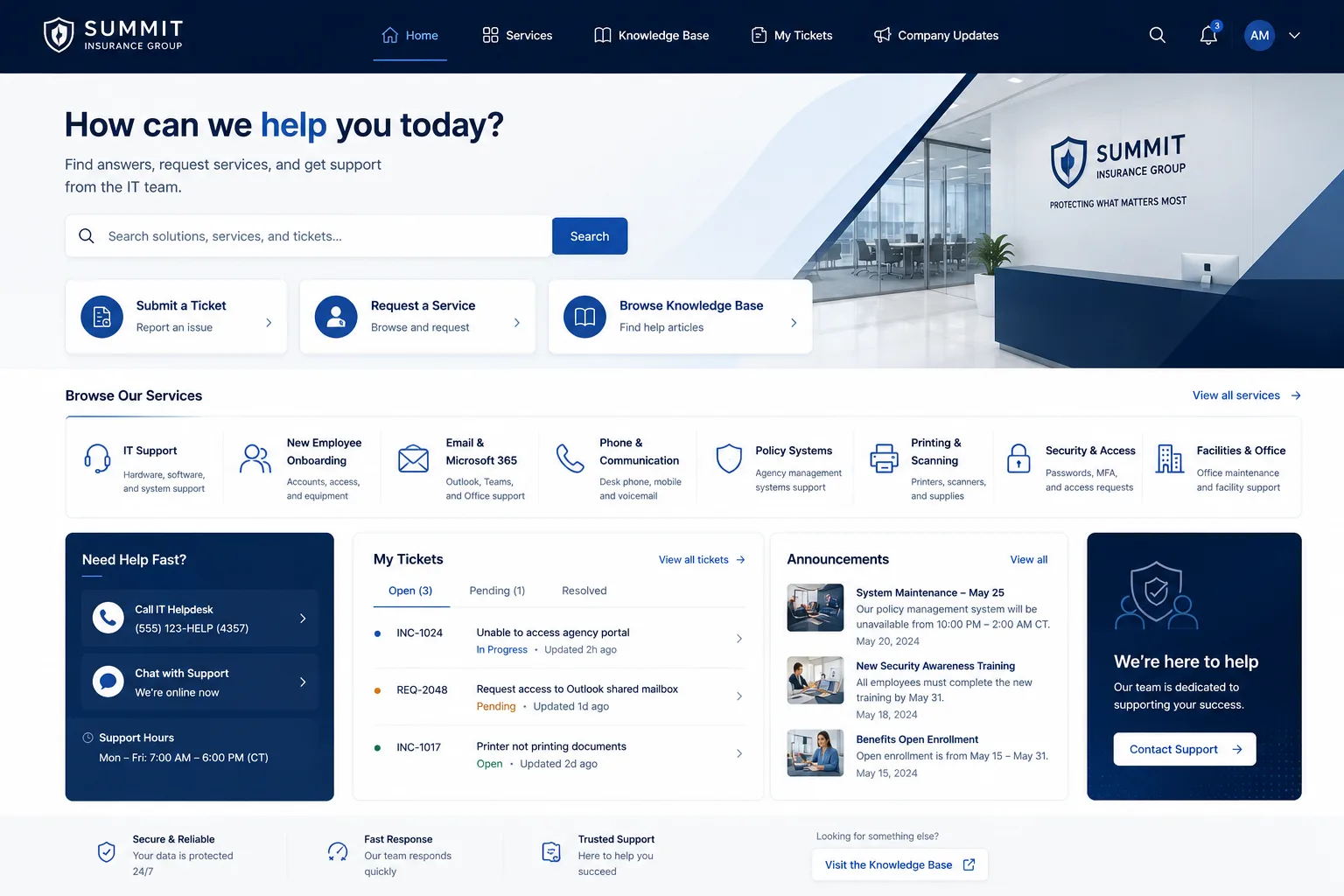
Your employees shouldn't have to hunt for what they need. Implement breadcrumbs so people know where they are. Use clear back buttons. Stick with consistent menu structures across all portal pages.
Think about how someone new to your organization would navigate your portal. Can they find the password reset without calling the help desk? Can they log a ticket in under a minute? If the answer is no, your navigation needs work.
Test your navigation with actual users. Watch them try to complete tasks. The friction points you see are the ones to fix first.
4. Maintain Brand Consistency Across Your Portal
Your portal is part of your company's brand experience. Treat it like it matters.
Use your brand colors, fonts, and imagery consistently. Customize CSS stylesheets to align with your guidelines. Make your portal feel like an extension of your company, not a generic IT tool.
Employees notice. They take your IT support more seriously when it looks professional and intentional. It signals that your organization invests in quality experiences.
This doesn't require a massive rebrand. Small touches go a long way: your company logo in the header, a consistent color palette, professional imagery in your knowledge base.
5. Organize Content by User Type

Here's a practice that saves your support team hundreds of hours every year: segment your knowledge base articles by user type.
Don't dump every article into one massive knowledge base. Instead, create sections for different employee groups. Marketing team. Engineering. Sales. HR. Finance.
When an employee lands on your portal, they see the content that's relevant to them first. Everything else is accessible but not cluttering their view. Relevance drives engagement. Engagement drives self-service adoption.
This also means fewer irrelevant search results. People find answers faster. Your help desk gets fewer tickets. Everyone wins.
6. Enable Multi-Language Support
If your organization has international teams or diverse language speakers, this is non-negotiable.
Multi-language support in your Freshservice portal isn't just nice to have. It directly impacts adoption and reduces your support burden. An employee who can access the portal in their native language is more likely to use it.
Related: Best Freshservice Portal Optimization for Adoption in 2026
Want to work together?
Get in Touch →Freshservice makes this relatively simple to configure. You can offer language options without building a completely separate portal.
Related: Freshservice Portal Accessibility Features: Complete Guide
Related: Improving Freshservice Portal Engagement Metrics: A Guide
Start with the languages spoken by your largest employee groups. Expand from there as your organization grows.
7. Design an Intuitive Information Architecture
Information architecture is how your portal is organized behind the scenes. Good architecture is invisible. Bad architecture frustrates users every single day.
Use side menus and clear hierarchies. Group related articles together. Use descriptive naming so people understand what they'll find before they click.
Test your information architecture by asking new employees to find common tasks. If they struggle, redesign. Keep iterating until the path feels natural.
This is one of those foundational Freshservice portal design best practices that pays dividends over time.
8. Prioritize Self-Service Functionality
The whole point of a portal is to let employees help themselves.
Design your portal so common tasks are completely self-service. Password resets. Software requests. Incident reporting. FAQ lookups. Knowledge base searches. Make these fast and obvious.
The more your employees self-serve, the more your help desk can focus on complex issues that actually require human intervention.
This isn't about reducing headcount. It's about shifting your team to higher-value work. Your support staff becomes strategists and problem-solvers instead of handling repetitive requests.
9. Align Your Portal with ITIL Best Practices

Freshservice is built on ITIL methodology. Your portal should reflect that foundation.
Design workflows that follow ITIL incident management, change management, and request management processes. Your portal should guide employees through the right process, not create confusion.
Related: Best Employee Self Service Portal Design & UX Guide 2026
Related: ITSM Helpdesk Portal Design & Branding Guide 2026
When your portal aligns with industry-standard ITIL practices, it becomes easier to train users and onboard new team members. Everyone works within a consistent framework.
If you're not familiar with ITIL, it's worth learning. The AXELOS ITIL certification body has excellent resources to get started.
10. Implement Real-Time Preview and Iterate
One of the best tools Freshservice gives you is real-time preview functionality.
Don't launch portal changes without testing them first. Use the preview feature to see exactly how updates will look before employees see them. This catches design mistakes, typos, and layout issues before they go live.
More importantly, it enables rapid iteration. You can test a change, get feedback, update it, and deploy all within hours. No long approval cycles. No months of planning for small tweaks.
The organizations that iterate fastest win. They continuously improve their portal based on actual usage data and feedback.
Making It Real: The Strategic Impact
Following Freshservice portal design best practices isn't just about aesthetics or feature checklists.
It's about adoption. When your portal is intuitive, branded, and genuinely useful, employees use it. Self-service tickets spike. Help desk volume drops. Your support team's morale improves because they're not drowning in repetitive requests.
It's also about retention. Employees notice when their company invests in quality experiences. A well-designed IT portal sends a message: we care about making your day easier.
If you're ready to move beyond default Freshservice portal design and create something that actually drives adoption, Ascend Portal Experience specializes in exactly this. We've transformed dozens of generic portals into branded experiences that employees love.
Common Questions About Freshservice Portal Design
How long does it take to redesign a Freshservice portal following best practices?
Timeline depends on scope. A basic refresh using the graphical designer might take 2-4 weeks. A complete redesign with custom CSS, multi-language support, and persona-based content organization typically takes 6-12 weeks. The Ascend Professional Portal Package comes with fixed-price timelines so you know exactly what to expect.
Do I need coding skills to implement these best practices?
Not necessarily. Freshservice's graphical designer handles most customization without code. However, advanced customizations like custom CSS stylesheets and complex integrations do benefit from technical expertise. If you're not comfortable with code, that's where specialized partners come in handy.
What's the biggest mistake organizations make with Freshservice portals?
Launching without thinking about their actual users. They build what they think is cool instead of what employees actually need. Start with user research. Talk to your employees. Understand their pain points. Design around those, not around technical capabilities.
How do we measure if our portal redesign is working?
Track adoption metrics: portal login frequency, self-service ticket volume, help desk ticket reduction, and employee satisfaction scores. Monitor search patterns to see what employees are looking for. Use heatmaps to understand which portal sections get used most. These metrics tell you whether your redesign is actually driving the outcomes you want.


