A self-service portal is basically a private workspace where your employees or customers can solve problems on their own, 24/7, without waiting for support. Think of it as a always-open help desk that handles FAQs, order tracking, invoice management, and payment processing in a few clicks.
But examples make this way clearer. Let's walk through some real-world scenarios so you can see exactly what a self-service portal does and why your organization might need one.
Related: Employee Portal Examples: Real-World Use Cases
Related: Examples of Customer Portals: Real-World B2B Use Cases
Example 1: IT Help Desk Portal for Employee Support
This is probably the most common self-service portal in mid-to-large enterprises. Your IT team publishes a branded portal where employees can:
Related: Self-Service Examples for Better Employee Support
Related: What Is an Employee Self-Service Portal? 2026 Guide
Related: Service Desk Strategy Examples: Real-World Best Practices
Related: Best Branded Self-Service Helpdesk Portals 2026: Top 5 Ranked
Related: What Does Employee Self-Service Portal Mean?
- Search a knowledge base for password resets, VPN setup, or software installation guides
- Submit IT tickets and track their status in real time
- Download approved software or request device upgrades
- Access FAQs and how-to videos without opening a support ticket
The payoff? Employees get answers instantly, and your IT support team handles fewer routine requests. According to research from Forbes on employee experience ROI, companies that invest in self-service tools see a measurable drop in support ticket volume and higher employee satisfaction scores.
Organizations using Freshservice as their ITSM platform can take this further. Ascend Portal Experience helps you transform a generic Freshservice helpdesk into a branded, user-friendly portal that actually encourages employees to help themselves.
Want to work together?
Get in Touch →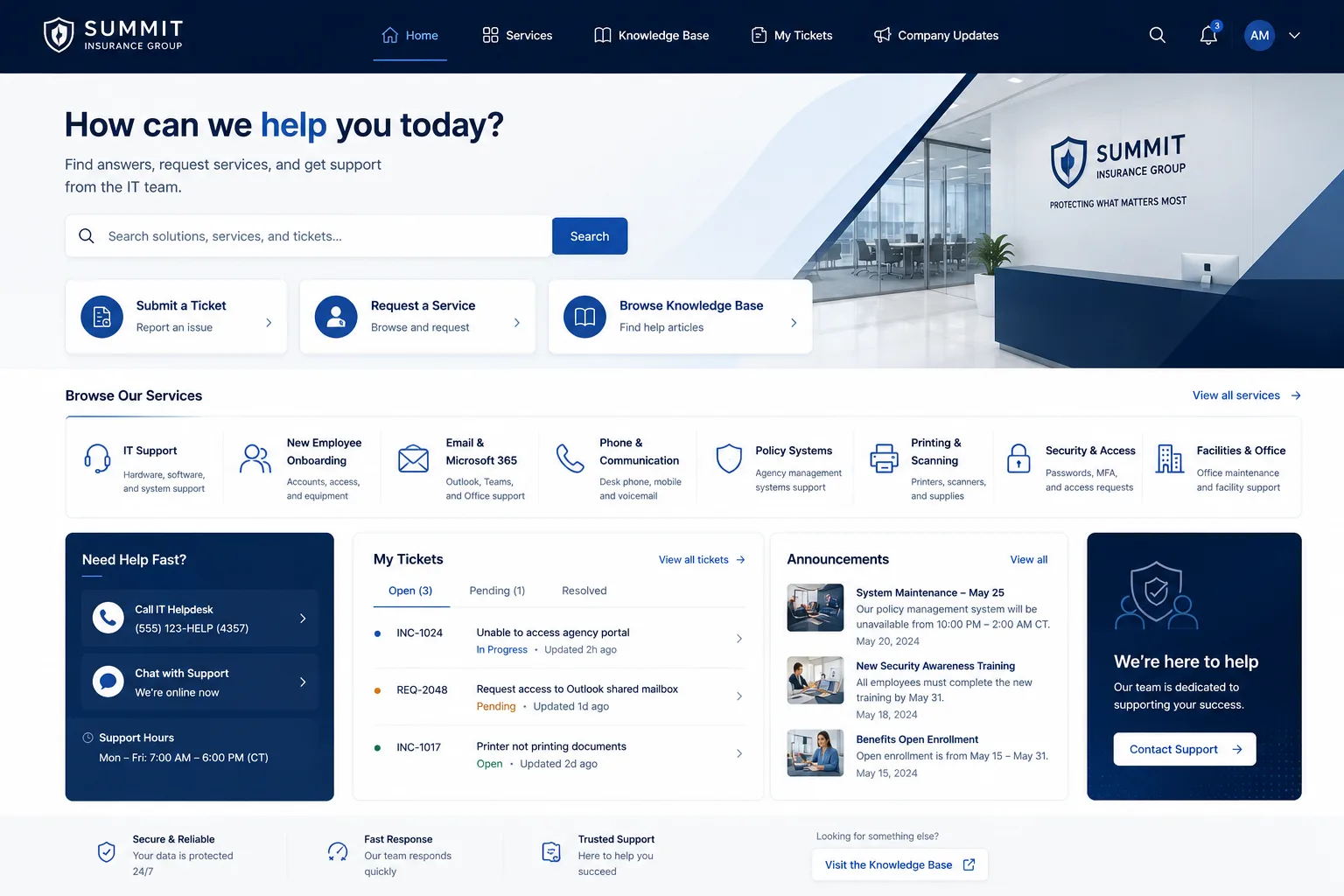
Example 2: Customer Order and Invoice Management Portal
B2B companies selling physical goods or services often build self-service portals for customers to:
- View order history and current order status
- Download invoices and receipts instantly
- Track shipments in real time
- Update billing or shipping information
- Request refunds or submit support tickets directly
Instead of calling your sales team to ask, "Where's my order?", your customer logs in, checks the portal, and has an answer in seconds. This reduces friction, improves customer retention, and frees up your team to focus on high-value work.
Example 3: HR and Benefits Self-Service Portal
Many large organizations use self-service portals to let employees manage their own HR tasks:
- Update personal information or emergency contacts
- Enroll in health benefits during open enrollment
- Request time off and check their balance
- Access paystubs and tax documents
- View company policies and handbooks
Your HR team sets up the portal once, and then thousands of employees resolve their own questions without submitting a ticket to HR. It's a huge efficiency win.
Example 4: Financial Services and Payment Portal

Banks, payment processors, and fintech companies use self-service portals to let users:
- Check account balances and transaction history
- Set up or modify recurring payments
- Download statements and tax forms
- Report fraudulent activity
- Manage security settings and two-factor authentication
Security is built into every action. Users authenticate once and then can safely access sensitive financial data without ever calling a support line during business hours.
Example 5: SaaS Product Support Portal
Software companies increasingly use self-service portals so customers can:
- Browse tutorials and integration guides
- Access API documentation
- View billing and subscription details
- Submit feature requests or bug reports
- Contact support directly if needed
Modern portals even include AI-powered answers. Instead of waiting for an email response, users get instant solutions powered by chatbots or AI document generation.
What Makes a Self-Service Portal Effective
Every example above shares a few common traits:
- Branded and intuitive. The portal feels like your company, not a generic help desk. Users know they're in the right place.
- Always available. No business hours. Your employees or customers can access help at 2 AM if they need it.
- Secure. Authentication and role-based access ensure people only see data they're supposed to see.
- Reduces support workload. Fewer routine tickets means your team handles complex problems instead of answering the same question 100 times a day.
- Improves satisfaction. Users get instant answers without waiting. That feels good.
If you're running Freshservice and want to build a self-service portal that actually drives adoption and reduces ticket volume, Ascend Portal Experience specializes in fixed-price portal transformation for mid-to-large enterprises. We've helped dozens of organizations move beyond the default Freshservice interface into branded, high-performing portals.
How to Build Your Own Self-Service Portal

Start small. Pick one use case (IT support, customer orders, or benefits management) and build a portal around it. You'll learn what content matters most to your users and what features drive adoption.
Then add more. Most successful portals grow over time as teams realize how many routine tasks they can move to self-service.
Key steps:
- Choose a platform or ITSM tool that supports portal customization (like Freshservice)
- Identify the top 5-10 questions your support team answers repeatedly
- Create clear, concise answers in a knowledge base
- Design a branded interface that matches your company's look and feel
- Launch with a small group and gather feedback
- Expand features and content based on what users actually need
The Ascend Professional Portal Package includes portal strategy, design, and implementation so you don't have to figure this out alone. We handle the heavy lifting while you focus on content and user adoption.
Why Your Organization Needs a Self-Service Portal Right Now
B2B buyers expect self-service options. Your employees expect instant answers. Your support team is drowning in routine tickets. A well-designed self-service portal fixes all three problems at once.
The data backs this up. Companies that invest in self-service reduce support costs, improve employee and customer satisfaction, and free up their teams to do higher-value work. It's a win across the board.
If you're serious about transforming your IT helpdesk into a branded, user-friendly experience that actually reduces ticket volume, that's exactly what Ascend Portal Experience does. We take your Freshservice instance and turn it into a portal that your employees actually want to use.
What's the difference between a self-service portal and a knowledge base?
A knowledge base is just content (FAQs and how-to articles). A self-service portal combines knowledge base content with transactional features like ticket submission, order tracking, and account management. It's the complete self-service package in one branded interface.
Can a self-service portal reduce support ticket volume?
Yes. Studies consistently show that companies with effective self-service portals see 20-30% reductions in support ticket volume. Employees and customers solve simple problems on their own instead of contacting support, freeing your team to handle complex issues.
Is a self-service portal secure?
Yes, when built correctly. Modern portals use authentication (login), role-based access control, and encryption to keep sensitive data safe. Users only see information they're authorized to access.
How long does it take to launch a self-service portal?
A basic portal with knowledge base content and ticket submission can launch in 4-8 weeks. A fully branded, customized portal with advanced features might take 2-3 months. Speed depends on your content readiness and how much customization you need.