
An application portal is basically a single place where your users (whether they're employees, clients, or applicants) can log in, see what they need to do, track progress, and complete tasks without bouncing between a dozen different tools.
Think of it as mission control for any process that involves applications, requests, or onboarding. It centralizes information, reduces friction, and honestly? It makes people actually want to use your system instead of dreading it.
For B2B and professional services teams, a well-designed application portal isn't just nice to have. It's a competitive advantage that affects adoption rates, customer satisfaction, and your bottom line.
Why Your Business Needs an Application Portal
Here's the reality: generic, out-of-the-box portals feel clunky. They're hard to navigate. Users get lost. Adoption rates tank.
A strategic application portal solves real problems:
- Reduces support tickets. When users can self-serve and see their status in real time, they stop emailing or calling with questions.
- Speeds up onboarding. New clients, new employees, or new applicants move through your process faster when everything is clear and accessible.
- Improves user adoption. If your portal looks professional and works intuitively, people actually use it. If it looks dated and confusing, they abandon it or use workarounds.
- Builds trust. A branded, polished portal signals that your organization is modern and takes its users seriously.
- Reduces errors. Centralized information and clear task lists mean fewer incomplete submissions, missing documents, and back-and-forth clarifications.
Ascend Portal Experience specializes in exactly this: transforming generic portals into branded, user-friendly experiences that drive adoption and reduce operational overhead.
Related: What Is an ESS Portal? Complete Guide for 2026
Related: What Is a Company Portal? B2B Guide for 2026
Related: What Is a Portal? B2B Guide to Employee Access Platforms
Related: What is a UI Portal? Complete B2B Guide for 2026
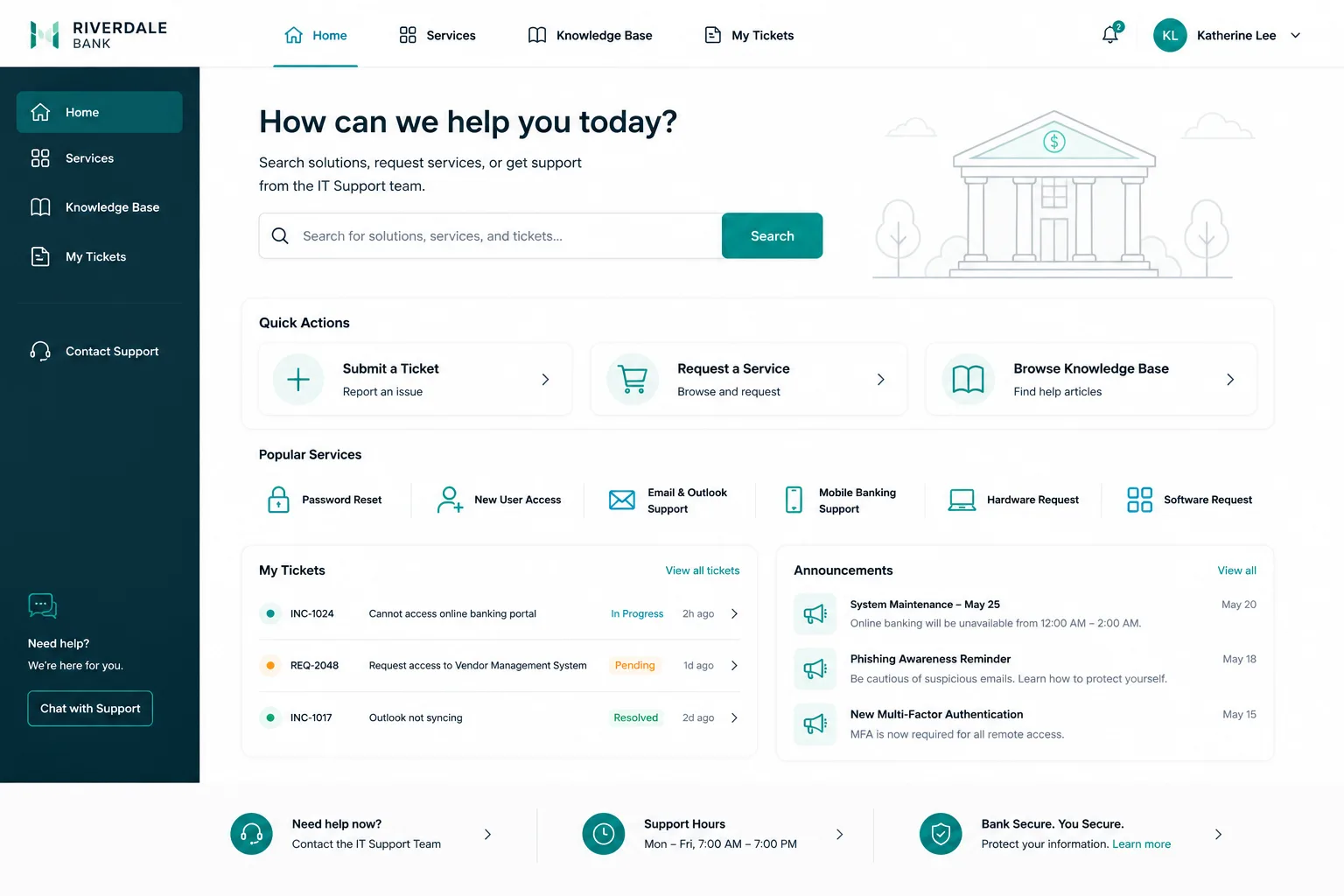
Core Features of an Effective Application Portal
Not all application portals are created equal. The best ones share these essential features:
- Real-time status tracking. Users can log in and instantly see where their application or request stands.
- Clear task lists. A "To Do" section shows exactly what's missing and what needs to happen next, eliminating guesswork.
- Document management. Upload, submit, and store files in one place instead of emailing attachments back and forth.
- Personal information updates. Users can modify contact details, address, or other key info without starting over.
- Decision notifications. Approvals, rejections, or next-step alerts land in the portal (and via email) the moment they happen.
- Multi-program support. If you manage multiple application types (e.g., different service offerings, product tiers, or applicant tracks), the portal should handle all of them.
- Mobile accessibility. Your users check status on their phones. A responsive design isn't optional.
- Branded design. The portal should reflect your company colors, logo, and tone so it feels like part of your ecosystem, not a third-party tool.
According to research from Forbes on digital transformation in service delivery, organizations that invest in user-centered portal design see measurably higher client acquisition and retention rates. The difference isn't just cosmetic—it's operational.
How an Application Portal Improves Your Workflow
Let's walk through a real scenario. Say you're managing a professional services onboarding process or client application flow.
Without a portal: Applicants email you. You reply with a checklist. They respond with documents. You ask for clarifications. Back and forth, back and forth. Everyone's inbox is a mess.
With an application portal: Applicants log in, see their incomplete items, upload documents directly, and get instant feedback. You track everything in one system. Status is always clear.
The impact is huge: fewer emails, faster processing, fewer dropped balls, and users who feel supported instead of frustrated.
Application Portal vs. Self-Service Portal vs. Employee Portal

These terms overlap but aren't identical. Here's the breakdown:
- Application portal: Focused on managing applications and requests (onboarding, admissions, service requests, claims). Users submit info, track status, and complete required tasks.
- Self-service portal: Broader umbrella. Could include knowledge bases, FAQs, ticket submission, or account management. Emphasis is on users helping themselves without contacting support.
- Employee portal: Internal tool for staff. Might include HR forms, benefits, payroll info, company news, directory, or time-off requests.
An application portal is a specific flavor of self-service and employee portal, optimized for intake and status tracking.
What to Look For When Choosing an Application Portal Solution
If you're evaluating options, these criteria matter:
- Ease of use. Can your users navigate it without training? Complexity kills adoption.
- Customization. Does it let you brand it, reorganize fields, and adapt workflows to your process?
- Integration. Does it plug into your existing ITSM platform, CRM, or HR system? Manual data entry is a time sink and error magnet.
- Mobile responsiveness. Is it actually usable on phones, or just "technically viewable"?
- Analytics and reporting. Can you see adoption metrics, drop-off points, and completion rates?
- Support and maintenance. Who fixes bugs? Who updates the design? Is it a hands-off product or a partnership?
- Cost transparency. Fixed pricing, or will surprises show up later?
When you're building or redesigning a portal, the goal is to reduce friction at every step. Ascend Portal Experience takes a fixed-price approach to portal customization, so you know exactly what you're investing before work begins.
Want to work together?
Get in Touch →Common Mistakes Companies Make With Application Portals
We see these patterns over and over:
- Launching without user testing. You build what you think is intuitive. Users find it confusing. Adoption suffers.
- Ignoring mobile users. Desktop-only portals alienate half your audience.
- Overcomplicating workflows. Too many fields, too many required steps, too many dead ends. Users give up.
- Outdated design. A portal that looks like it was built in 2010 damages your brand credibility, even if the backend works fine.
- Poor communication. Users don't know the portal exists or how to log in. Adoption starts at zero.
- No mobile app consideration. Some users will expect mobile. If you don't provide it, they'll find workarounds or abandon the process.
Building Your Application Portal Strategy

Start here:
- Define your users. Who logs in? What devices do they use? What's their technical comfort level?
- Map your process. What steps does a typical application flow through? Where do users get stuck?
- Identify pain points. Talk to users and support staff. Where's the friction?
- Set measurable goals. Faster processing? Higher adoption? Fewer support tickets? Be specific.
- Choose your platform. Will you customize an existing tool, or build custom? Evaluate based on cost, integration, and long-term maintainability.
- Design with users in mind. Simple navigation, clear labeling, mobile-first design, and strategic use of color and white space all matter.
- Test before launch. Real users should walk through the portal before go-live. Watch where they hesitate or get confused.
- Monitor and iterate. Track metrics. Gather feedback. Make improvements in sprints, not major overhauls.
This is where strategy meets execution. Ascend Portal Experience specializes in helping B2B teams design and deploy application portals that feel premium and drive real adoption gains.
The Business Case for Portal Investment in 2026
Digital transformation isn't a buzzword anymore—it's a survival skill. Organizations that prioritize user experience in their digital tools win on adoption, customer satisfaction, and operational efficiency.
An application portal is one of the highest-ROI investments you can make because it touches multiple parts of your business simultaneously. Every interaction a user has with your system shapes their perception of your organization.
If your portal feels clunky, you're signaling that you don't care much about their experience. If it's polished and intuitive, you're saying the opposite.
The cost of not investing in portal design isn't just lost efficiency—it's competitive disadvantage. Your clients and employees will notice.
Next Steps: Getting Your Application Portal Right
If you're using Freshservice or a similar ITSM platform and your portal feels generic, that's fixable. A redesigned, branded application portal can transform how your users experience your organization.
Ascend Portal Experience offers the Ascend Professional Portal Package to help you build exactly that. Fixed-price. Premium quality. Measurable outcomes.
If you're ready to explore what a better application portal could do for your organization, that's the conversation to have.
What's the difference between an application portal and a knowledge base?
A knowledge base is informational—you search for answers to questions you already have. An application portal is transactional—you submit information, track status, and complete actions. They can coexist on the same platform (users might search the KB while filling out an application), but they serve different purposes.
Do I need custom development for an application portal, or can I use a template?
Templates get you started, but they rarely feel branded or optimized for your specific workflow. Most B2B teams benefit from some level of customization—even small tweaks to layout, fields, and messaging can dramatically improve adoption. The question isn't custom vs. template; it's how much customization you need to meet your goals.
How long does it take to launch an application portal?
A simple portal redesign can launch in 4-8 weeks. A full custom build might take 3-6 months. It depends on scope, complexity, and how much integration work is required with your existing systems. Clear requirements and early user testing speed things up significantly.
What metrics should I track for my application portal?
Track adoption rate (percentage of eligible users logging in), completion rate (percentage who finish the process), time to completion, support ticket volume, and user satisfaction scores. These tell you whether your portal is actually solving the problems you set out to solve.


