
A portal is basically your organization's front door. It's a consolidated web-based platform where your employees log in once and get access to all the tools, information, and services they need to do their jobs. Instead of bouncing between five different systems, your team finds everything in one spot.
Think of it like a shopping mall versus a strip mall. A portal brings all the stores (your apps, resources, and support channels) under one roof so visitors don't have to drive around town to find what they need.
Why Your Organization Needs a Portal
If you're running an IT helpdesk or managing employee services, you already know the problem: employees get frustrated when they have to hunt for help. They don't know where to submit a request, how to check ticket status, or whether IT even has their contact info updated. A portal solves this friction immediately.
Related: What Is a Client Portal? Definition & Business Benefits
Here's what a well-built portal does for you:
- Reduces support tickets. Employees find answers on the portal before they email IT.
- Improves adoption rates. When your helpdesk feels modern and branded to your company, people actually use it.
- Centralizes information. Knowledge base articles, FAQs, and status pages live in one searchable place.
- Builds employee trust. A polished portal signals that your organization invests in employee experience.
Many organizations using platforms like Freshservice rely on the default helpdesk interface, which is functional but generic. That's where Ascend Portal Experience comes in. We transform those standard portals into branded, intuitive experiences that actually get used.
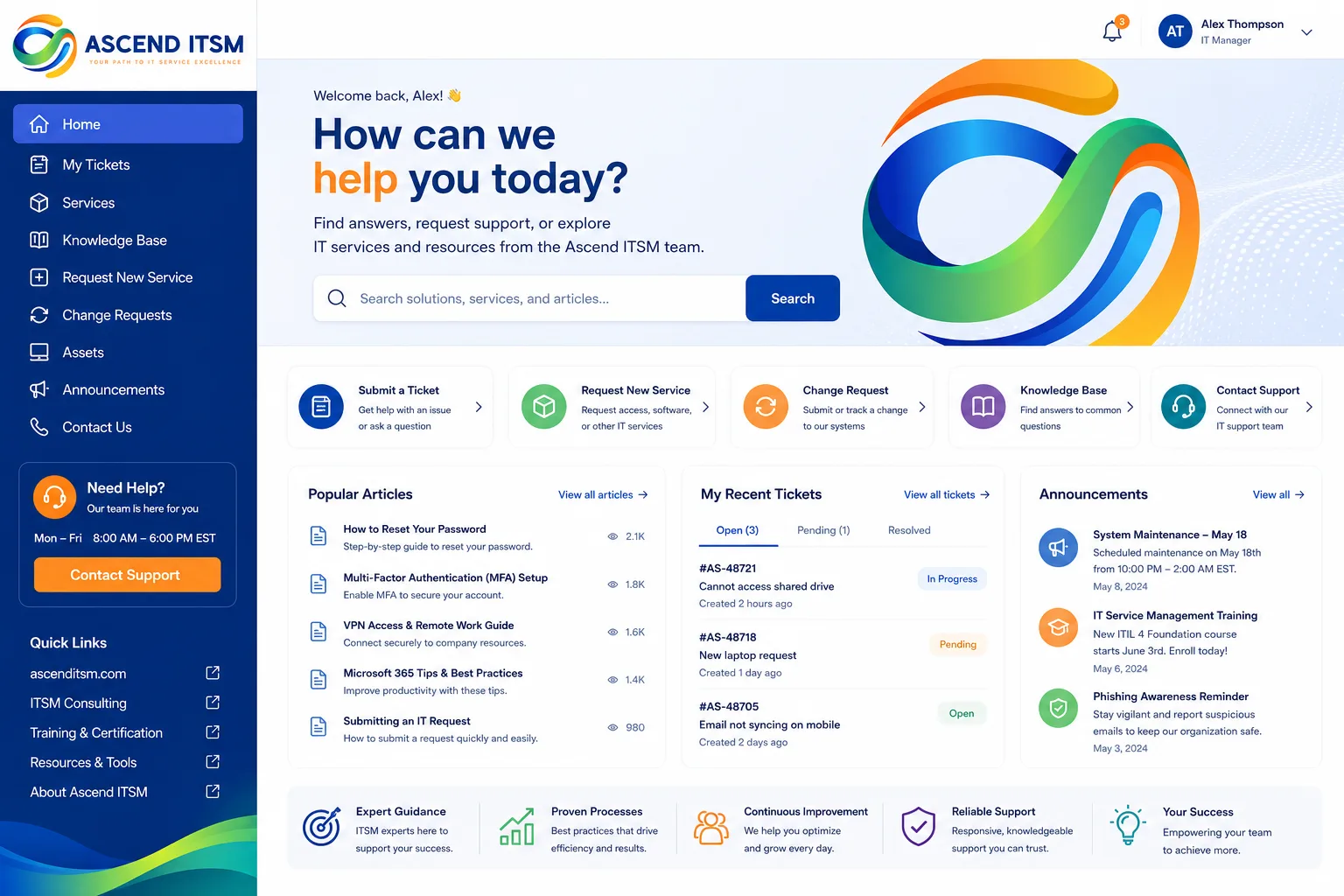
The Core Components of a Portal
Every effective portal has a few essential moving parts.
User Authentication. Your portal needs to know who's logging in. Most enterprises integrate with their existing directory (Active Directory, Azure AD) so employees use their regular credentials. No new passwords to remember.
Service Request Interface. This is where employees submit tickets. A good portal makes it dead simple: pick the category, fill out a form, hit submit. Done. Bad portals have clunky dropdown menus and confusing workflows that drive people away.
Self-Service Knowledge Base. Your IT team probably spends 40% of their day answering the same questions. A portal with a searchable knowledge base lets employees find answers instantly. Password reset? Software request? Network access? Solved before they open a ticket.
Related: Employee Self-Service Portal Transformation: A Complete Guide
Related: What Is an Employee Self-Service Portal? 2026 Guide
Related: What is a UI Portal? Complete B2B Guide for 2026
Related: What Is an Application Portal? B2B Guide for 2026
Related: What Is an ESS Portal? Complete Guide for 2026
Related: SSP Portal Explained: Self-Service Benefits Management Guide
Related: Freshservice Portal Customization Services: A Complete Guide
Ticket Status Tracking. Employees want to know where their request is. Can it be resolved today? Next week? A portal shows real-time status so nobody has to email asking "Where's my laptop?"
Multi-Service Integration. Modern portals aren't just for IT. They can surface HR onboarding, facilities requests, expense reporting, and more. Everything in one place makes your entire organization feel more coordinated.
Portal vs. Helpdesk: What's the Difference?
The terms get used interchangeably, but there's a real distinction. A helpdesk is the backend system your support team uses to manage and resolve requests. It's where agents assign tickets, add notes, and track SLAs.
A portal is the frontend. It's the user-facing interface your employees interact with. Think of it as the difference between a restaurant's kitchen (the helpdesk) and the dining room (the portal). The portal is what shapes the employee experience.
You can have a great helpdesk platform that delivers poor employee experience if the portal is poorly designed. That's why investing in portal customization matters. When your employees see a branded, thoughtful interface that matches your company's standards, they're more likely to engage with it and less likely to call IT directly.
Common Portal Features Your Team Expects

Employees don't think about "portals" in the abstract. They have concrete expectations based on every app they use daily.
- Mobile-friendly design. If your portal doesn't work on phones, you've already lost half your audience.
- Fast search. Employees won't dig through 10 pages of results. They expect Google-like instant answers.
- Personalized dashboards. Show them their open tickets, recent knowledge articles, and quick-access buttons for the services they use most.
- Minimal clicks to resolution. Can they reset their password, request software, or check an invoice without leaving the portal? Yes? That's the bar.
- Consistent branding. Your company colors, logo, and tone should feel like the rest of your organization, not a generic IT tool.
When you customize your portal through Ascend Portal Experience, these aren't afterthoughts. They're built in from day one with fixed-price certainty, so you know what you're getting before we start.
Want to work together?
Get in Touch →How Portals Improve Employee Adoption and Satisfaction
Here's the uncomfortable truth: many organizations deploy new tools and then wonder why nobody uses them. The answer is usually poor UX and weak adoption strategy.
A portal that feels clunky or confusing becomes a chore. Employees stick with email because it's familiar. They call your IT desk directly because it's faster than figuring out your system. Your support volume stays high, costs stay high, and adoption stays low.
But when your portal feels intuitive, responsive, and branded to your organization, adoption accelerates naturally. Employees recommend it to teammates. Ticket volume shifts from phone calls and emails to the portal, which improves your team's efficiency. Self-service traffic goes up, meaning your agents handle fewer repetitive requests and can focus on complex problems.
According to research from Forrester, well-designed employee experience platforms directly correlate with retention and productivity metrics. Employees who feel supported by good technology are more engaged overall.
If you're currently managing a Freshservice helpdesk and your adoption is plateauing, portal design is often the missing piece. That's where organizations turn to Ascend Portal Experience for specialized customization that goes beyond template adjustments.
Portal Security and Compliance Considerations
Your portal sits between employees and sensitive systems. Security matters.
Any credible portal needs encrypted connections (HTTPS), role-based access control (so employees only see information relevant to them), and single sign-on integration. You shouldn't be storing passwords in your portal. You should be delegating authentication to your existing identity provider.
Compliance depends on your industry. Healthcare organizations need HIPAA controls. Financial services need SOC 2 certification. Government agencies need FedRAMP or equivalent. Your portal shouldn't expose data outside those boundaries.
When you're evaluating portal solutions or customizations, ask about audit trails, permission models, and data retention policies. These aren't sexy features, but they're what keeps your organization safe.
Building vs. Buying vs. Customizing Your Portal

You have three main paths forward.
Build from scratch. You could hire developers to build a bespoke portal. This gives you complete control but takes 6-18 months and costs six figures minimum. Only makes sense if you have unique requirements that no platform addresses.
Buy an off-the-shelf solution. There are portal platforms that come pre-built. They're faster to deploy but often feel generic. Employees see the same look-and-feel as every other company using that platform.
Customize an existing helpdesk platform. If you're already using Freshservice or a similar ITSM platform, you can invest in portal customization. You get branded design, tailored workflows, and improved UX without rebuilding from zero. This is usually the sweet spot for mid-to-large enterprises.
Most organizations choose customization because it's balanced. You're not starting from scratch, so timelines are faster (weeks, not months). But you're not settling for generic either, so your employees get an experience that feels like it was built specifically for your company. Ascend Portal Experience specializes in this middle path, helping teams transform their Freshservice portals into premium, branded experiences without the custom-build cost or timeline.
Key Takeaway: Your Portal Is Your Brand's First Impression
Employees form opinions about whether your organization cares about them in seconds. When they log into your IT portal and see a professional, intuitive, branded interface, they feel valued. When they see something generic or clunky, they feel forgotten.
A portal isn't just a support tool. It's a statement about how much you invest in employee experience. That message compounds over time. Better adoption. Faster issue resolution. Higher employee satisfaction. Lower support costs.
If you're serious about transforming how your organization supports employees through a Freshservice ITSM platform, the portal design is where that transformation starts.
What's the difference between a portal and an API?
An API is a technical connection that lets systems talk to each other behind the scenes. A portal is a user-facing interface that humans interact with. You might use APIs to connect your portal to three different backend systems, but the employee only sees the portal. They don't see or care about the APIs.
Can I add a portal to my existing helpdesk system?
Yes. Most modern helpdesk platforms like Freshservice include portal functionality. The question isn't whether you can add one, but whether the default portal meets your needs. Many teams find the out-of-the-box version lacks customization, branding options, or specific workflows their organization needs. That's where targeted customization makes the biggest difference.
How long does it take to build a custom portal?
If you're building from zero, 6-18 months. If you're customizing an existing platform, 4-12 weeks depending on scope. Fixed-price engagements (like those offered by Ascend Portal Experience) typically land in the 8-10 week range because scope is defined upfront and there's no scope creep.
What's the ROI of investing in portal customization?
The math is straightforward. If your support team handles 100 tickets per week and a well-designed portal reduces that to 75 per week through improved self-service, you've freed up capacity to handle complex issues. That translates to faster resolution, lower costs, and higher employee satisfaction. Most organizations see payback within 6-12 months.


