
A UI portal is a branded, self-service digital interface that lets your employees or customers access services, file requests, check status, and solve problems without calling IT.
Think of it as the front door to your backend systems. Instead of struggling through a generic, clunky helpdesk login, your team walks into a clean, intuitive, branded experience that makes them actually want to use it.
The business impact is real: better adoption rates, fewer support tickets, and happier employees. Companies that invest in portal design see measurable improvements in how their teams interact with IT services and professional workflows.
Why Your UI Portal Matters More Than You Think
Most IT leaders underestimate the power of a well-designed portal. You already have the backend tools (helpdesk software, request ticketing, knowledge bases). But if your employees dread logging in because it looks like something from 2008, adoption tanks.
Here is the honest truth: a generic UI portal is free, but it costs you in hidden ways. Higher support ticket volume. Lower employee satisfaction. Time wasted on basic troubleshooting that could be self-service.
Related: Employee Self-Service Portal Transformation: A Complete Guide
Related: What Is an ESS Portal? Complete Guide for 2026
Related: What Is a Company Portal? B2B Guide for 2026
Related: What Is an Application Portal? B2B Guide for 2026
Related: Freshservice Portal Customization Services: A Complete Guide
A custom-branded UI portal flips the equation. When your team sees your company logo, your colors, and an interface designed specifically for their workflow, they engage. They self-serve. They find answers faster.
Ascend Portal Experience specializes in transforming generic ITSM portals into branded, user-centric experiences that drive real engagement. We focus on fixed-price certainty so you know exactly what you are investing.
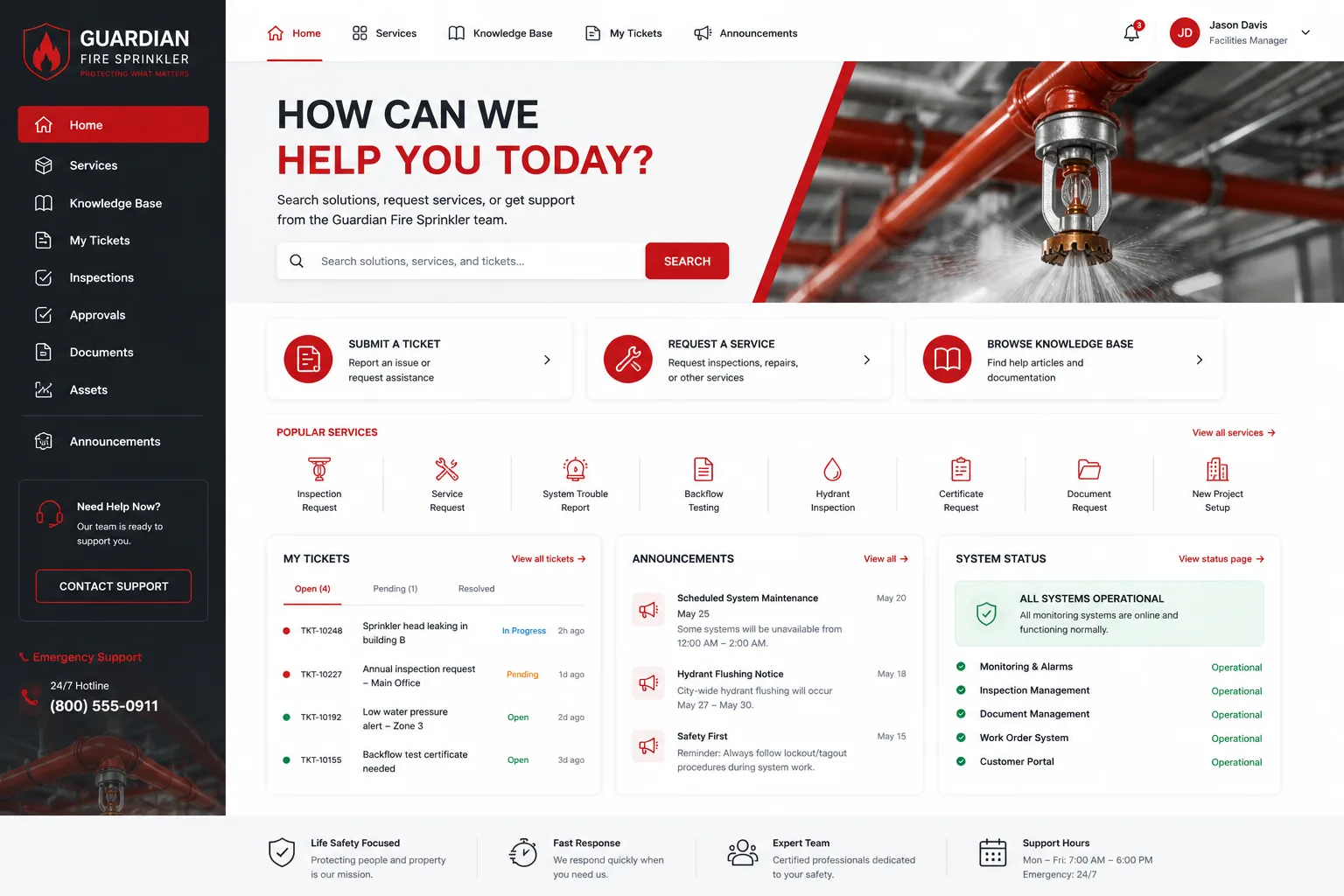
Core Functions of a Modern UI Portal
Your UI portal should do these things out of the box:
- Self-service request submission: Employees file IT requests, HR forms, facilities requests, or expense reports without emailing support.
- Real-time status tracking: Users see where their request stands at any moment. No more "Where is my ticket?" emails.
- Knowledge base access: FAQs, troubleshooting guides, and how-to articles live right in the portal, powered by search.
- Account management: Users reset passwords, update contact info, or manage preferences independently.
- Secure authentication: Single sign-on (SSO) integration with your existing identity system so logging in is frictionless.
- Mobile responsiveness: Your team accesses the portal from phones, tablets, and desktops without friction.
- Analytics and insights: You see which features get used, where users drop off, and what content drives adoption.
Not every portal has all of these. But the best ones do, and they integrate them seamlessly around your brand.
UI Portal vs. Generic Helpdesk Dashboards
The difference is design philosophy.
A generic helpdesk dashboard is functional. It shows your IT team's backend tools. It is built for administrators and technicians, not employees. Default colors, default layouts, default forms.
A UI portal is built around your employee's needs. It speaks their language. It is styled with your brand. It anticipates the questions they ask most. It reduces cognitive load by hiding complexity.
One drives adoption. The other gets abandoned for workarounds (Slack messages, emails, walking over to the IT desk).
How B2B Companies Use Portals to Improve Adoption
Professional services firms, mid-market manufacturers, financial services companies, and enterprises across verticals all face the same challenge: employees need a frictionless way to request IT support, file compliance forms, or access internal tools.
Related: What Is a Portal? B2B Guide to Employee Access Platforms
The smartest organizations are doubling down on portal customization and design as a retention and productivity strategy. A branded, intuitive portal signals that your company invests in employee experience. It reduces time spent on administrative friction.
According to insights from Forbes on managed services trends, vertical specialization and outcomes-based value delivery are reshaping how B2B service providers compete. A custom UI portal is part of that shift: you are not selling generic software anymore. You are selling a tailored employee experience.
Companies that treat their portal as a strategic asset see measurable wins: faster ticket resolution, lower support costs, higher employee Net Promoter Scores.
Security and Trust in Self-Service Portals
One concern we hear from IT directors: "Is self-service secure?"
Yes, if you build it right. A well-designed UI portal uses role-based access control so employees see only what they are supposed to see. Passwords are never displayed. Sensitive workflows trigger additional verification. Audit logs track every action.
The irony: a custom portal is often more secure than a generic one, because it can be hardened for your specific compliance requirements (SOC 2, HIPAA, ISO 27001, etc.).
Building vs. Buying: The Portal Decision
You have three paths:
Path 1: Use the default UI. Fast, free, ugly. Works, but no one loves it.
Path 2: Build it in-house. Control and customization, but a 6-12 month project, ongoing maintenance, and your best developers tied up.
Path 3: Partner with a specialist. Fixed price, faster timeline, premium design, and expertise baked in.
Most mid-market and enterprise organizations we talk to choose path 3. The ROI math is simple: a custom portal pays for itself in reduced support ticket volume and improved employee satisfaction within the first year.
If you are using Freshservice as your ITSM platform and want to explore a branded, user-friendly alternative to the default portal experience, Ascend Portal Experience offers fixed-price customization packages designed to fit your budget and timeline.
Want to work together?
Get in Touch →Key Features of a Best-in-Class UI Portal

- Intuitive navigation: Users find what they need in three clicks or fewer.
- Responsive design: Works perfectly on mobile, tablet, and desktop.
- Personalization: Portal displays relevant content based on user role, department, or preferences.
- Integration: Connects to your active directory, helpdesk system, HR tools, and knowledge base without manual data entry.
- Performance: Pages load in under 2 seconds. No lag.
- Accessibility: WCAG 2.1 compliant so all employees can use it.
- Branded design: Your logo, your colors, your voice. It feels like part of your company.
- Chatbot or AI support: Instant answers to common questions without human intervention.
- Analytics: Real dashboards showing adoption, usage patterns, and user sentiment.
Not every portal needs all of these. But the ones that drive the highest employee satisfaction have most of them.
The Strategic Value of Portal Transformation
Here is why we think about portals differently than most vendors: they are not IT projects. They are employee experience investments.
When your team logs into a clunky portal, they experience friction. That friction adds up: wasted time, frustration, lower morale. Scale that across 500 or 5,000 employees and you are looking at real productivity loss.
A thoughtfully designed UI portal removes that friction. Employees accomplish tasks faster. Support teams handle fewer tickets. Everyone is happier.
That is why Ascend Portal Experience focuses on the human side of portal design, not just the technical side. We design for your employees first, knowing that adoption and satisfaction follow naturally.
Getting Started With Portal Improvement
If your current UI portal feels outdated or is driving low adoption, here is how to move forward:
Step 1: Audit your current experience. Ask your team what they dislike about your portal. Log in yourself and experience the friction firsthand.
Step 2: Define your goals. Do you want to reduce IT tickets by 20%? Improve satisfaction scores? Reduce onboarding time for new employees? Get clear on success metrics.
Step 3: Evaluate your options. Can you improve the existing portal with cosmetic updates? Do you need a full redesign? Should you migrate to a new platform?
Step 4: Plan your rollout. Even the best portal fails if you do not communicate the change and train your team.
The Ascend Professional Portal Package walks your team through this entire journey with fixed-price certainty and expert guidance. You get a branded, optimized portal without the surprise costs or timeline creep.
Common Questions About UI Portals
What is the difference between a UI portal and a web application?
A UI portal is a specialized type of web application designed for self-service access to services and information. A web application is a broader category that includes anything you run in a browser. Think of a portal as a curated front door to your backend systems; it is designed to be discoverable, intuitive, and brand-aligned.
How long does it take to build a custom UI portal?
A well-designed custom portal takes 8-16 weeks from discovery to launch, depending on complexity and integration requirements. Fixed-price vendors like Ascend Portal Experience can commit to timelines because scope is defined upfront.
Do we need a custom portal if we already have a helpdesk system?
Not necessarily. But most organizations find that the default helpdesk UI does not match their brand, lacks necessary features, or drives low adoption. A custom portal is an investment in employee experience that pays dividends in reduced support costs and higher satisfaction.
What should we look for in a portal design partner?
Look for specialists (not generalists), fixed-price models (not hourly), and a portfolio of successful projects in your industry. Ask for references. Understand their design process. Make sure they integrate with your existing systems. And confirm they offer post-launch support.


