
Your helpdesk portal is often the first impression employees have of IT support. If it feels generic, clunky, or disconnected from your company's identity, adoption suffers. Support ticket volume climbs. Resolution times drag. And IT directors bear the cost of poor user experience.
The good news: branded helpdesk portal best practices aren't mysterious. They're proven, repeatable strategies that transform a standard ticketing interface into a seamless part of your employee experience. The teams that nail this consistently see higher adoption rates, faster issue resolution, and measurably better employee satisfaction scores.
Here's what actually works when you're implementing or optimizing a branded helpdesk portal in 2026.
Related: Best Branded IT Helpdesk Portal Solutions 2026: Top 5 Ranked
Start With a Solid Foundation: The Right Helpdesk Software Matters
Before you design a single button or choose a color palette, you need the right core platform. This is the number-one priority. Your helpdesk software must support ticket management, SLA automation, knowledge base integration, and account-level context tracking. Without these fundamentals, even the best design can't rescue a broken workflow.
Freshservice has become the default choice for mid-to-large enterprises precisely because it handles these requirements out of the box. It's built for IT service management at scale. But here's the catch: out of the box, it looks like every other Freshservice portal. Your portal blends into the background instead of reinforcing brand trust.
This is where branded portal customization steps in. Ascend Portal Experience specializes in transforming stock Freshservice implementations into branded experiences that feel intentional and cohesive. The underlying ticketing engine stays powerful. The interface becomes unmistakably yours.
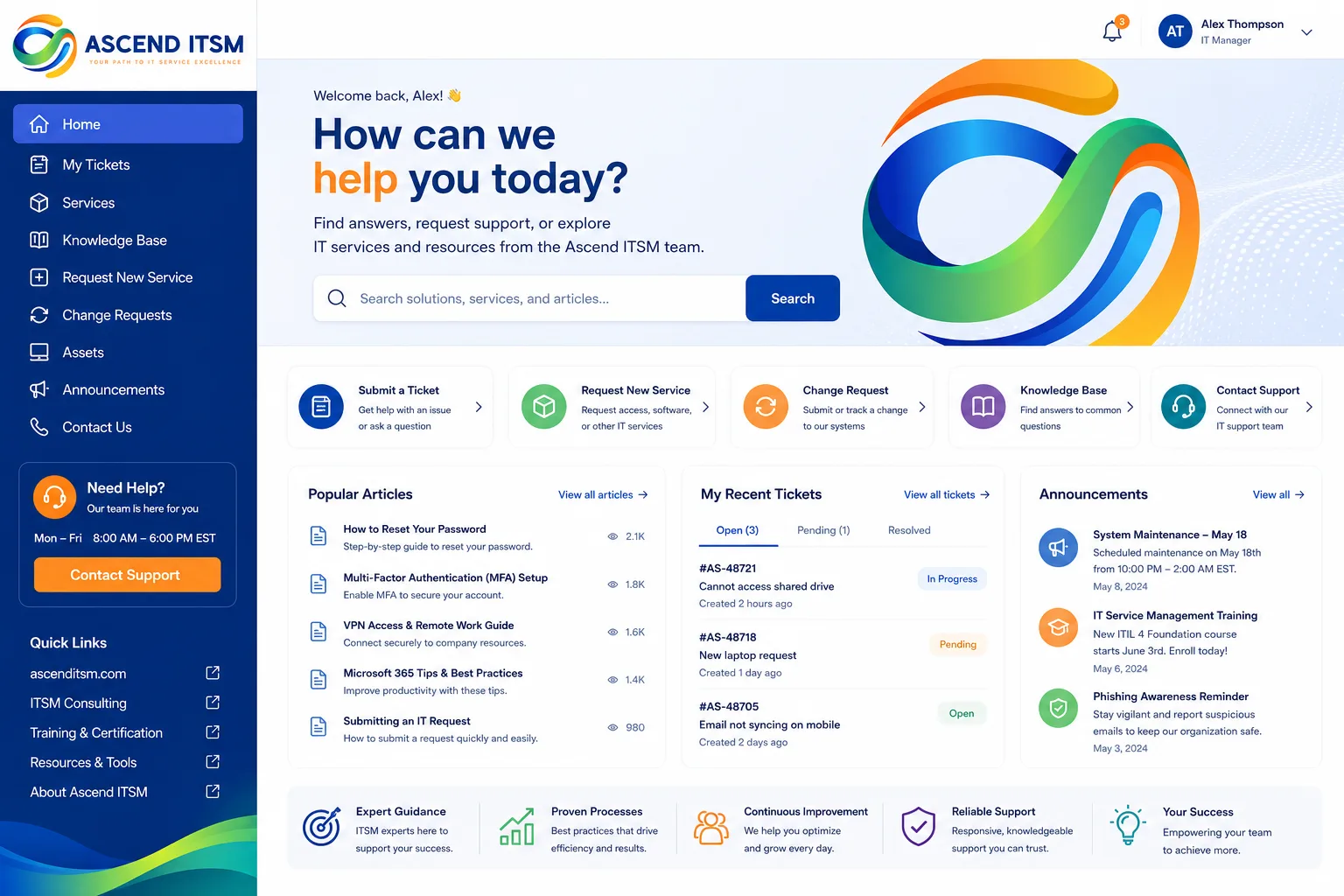
Build Consistent Brand Messaging Across All Support Touchpoints
Employees should encounter the same brand voice, visual identity, and messaging whether they're submitting a ticket, reading a knowledge article, or checking ticket status. Inconsistency erodes trust. It makes IT feel disjointed from the rest of the organization.
Consistent branding means:
- Logo, color scheme, and typography aligned with corporate standards
- Tone and language reflecting your company culture (formal, casual, technical, approachable)
- Messaging that reinforces IT's role as a business enabler, not just a cost center
- Visual hierarchy that guides users naturally toward self-service options first
When your helpdesk portal looks and feels like your company, adoption jumps. Employees recognize it as a legitimate business tool, not a clunky workaround they're forced to use.
Related: Best IT Helpdesk Portal Modernization for Freshservice Users
Enable Self-Service With a Comprehensive Knowledge Base
The most effective portal is one that solves problems before tickets even get created. A well-organized knowledge base reduces ticket volume by 20-40%, depending on your current baseline and how searchable your content is.
Best practices for knowledge base success:
- Write articles for the end user, not for IT. Use their language, not technical jargon
- Organize categories logically so employees find answers fast
- Link related articles so users discover related content
- Keep content current. Outdated articles frustrate users and drive them back to ticket submission
- Surface top articles on your portal homepage for high-impact issues
This is a staffing investment, not just a technology decision. You need someone accountable for knowledge base quality and currency. The payoff is substantial: faster issue resolution, lower support costs, and improved employee satisfaction.
Implement Clear SLAs and Make Them Visible

Employees need to know what to expect. How long until someone responds? When should the issue be resolved? Different issue types might have different SLAs. Transparency matters.
Your helpdesk software should automate SLA tracking and escalation. Freshservice handles this natively. But the branded portal layer should surface SLA status to employees in real time. A ticket submission confirmation that says "You can expect a response within 4 hours for critical issues" sets the right expectation and builds confidence in the support process.
Related: Best IT Helpdesk Portal Redesign Process for Freshservice
SLAs also give your support team a clear performance framework. They know the targets. They prioritize accordingly. Workload distribution becomes data-driven instead of chaotic.
Optimize Ticket-to-Resolution Efficiency Through Smart Workflows
Every step between ticket submission and resolution is an opportunity to add friction or reduce it. Your portal should streamline this journey.
Operational optimizations that matter:
- Use ticket categorization fields to route issues to the right team instantly
- Automate routine responses (confirmation emails, status updates, knowledge base suggestions)
- Implement ticket forms that capture the right diagnostic information upfront, reducing back-and-forth
- Show employees ticket status at a glance so they're not left wondering
- Enable account-level context so agents understand customer history and interdependencies
These aren't flashy features. They're operational backbone. They compress resolution time and reduce the number of manual handoffs agents must perform. For a support team handling 200+ tickets per week, efficiency gains compound fast.
Hire and Train Support Staff Who Understand Your Business
Software can't make up for under-resourced teams. You need support staff who understand your industry, your business model, and your culture. They should be empowered to resolve issues, not just follow scripts.
Training should include:
- Core IT troubleshooting (vendor certifications where relevant)
- Your company's technology landscape and how systems interconnect
- Soft skills: empathy, communication, problem decomposition
- Portal workflows and escalation procedures
A well-trained, properly staffed support team combined with a branded, efficient portal creates a virtuous cycle: faster resolutions lead to higher satisfaction, which builds confidence, which increases adoption, which means more tickets get submitted through proper channels instead of emails to leadership.
Design Your Portal With Employee Experience First

Your branded helpdesk portal is not IT's tool. It's an employee tool that IT operates. Design from that perspective.
User experience priorities:
- Mobile responsiveness. Employees submit tickets from phones and tablets
- Fast search. If an employee can't find what they need in 3 seconds, they call instead
- Clear next steps. Every page should guide the user toward their goal
- Minimal clicks. Every extra form field, every extra step, reduces adoption
- Visual feedback. Show progress, show that the system heard their request
This is where professional portal design matters. Generic Freshservice templates work, but they're not optimized for employee experience. They're optimized for feature parity. Ascend Portal Experience designs branded portals specifically to maximize usability while reinforcing your company identity. The result is adoption that sticks and support teams that can actually breathe.
Want to work together?
Get in Touch →Measure What Matters and Iterate
You can't improve what you don't measure. Key metrics for portal success include:
- Portal adoption rate (percentage of employees using self-service vs. email/phone)
- Knowledge base article views and search trends
- Average time to resolution by ticket category
- First-contact resolution rate
- Employee satisfaction scores (CSAT)
- Ticket volume month-over-month
Review these metrics quarterly. Use them to identify bottlenecks. If knowledge base articles aren't being found, improve navigation or create better index pages. If certain issue categories take too long, investigate whether automation can help. Iteration compounds over time.
According to research from Forrester Research, organizations that actively measure and optimize their support portals see adoption lift of 25-35% within six months. The investment in analytics pays for itself through reduced manual support load.
Invest in a Professional Portal Implementation
Building a truly branded helpdesk portal that balances design, functionality, and brand coherence is complex. It requires expertise in Freshservice configuration, UI/UX design, and understanding of support workflows. Many IT teams lack this in-house capacity.
Related: How to Rebrand Freshservice Helpdesk Portal in 2026
The Ascend Professional Portal Package removes the guesswork. You get fixed-price implementation, professional design, SLA integration, and knowledge base optimization all mapped to your brand identity. You avoid the mistakes that typically emerge when IT tries to DIY portal customization without design expertise.
The cost is a fraction of what you save in improved adoption and reduced support ticket load over a 12-month period. More importantly, you launch with a portal that actually works instead of discovering issues after go-live.
What's the real ROI of a branded helpdesk portal?
For a 1,000-person company, typical ROI centers on reduced support costs and improved productivity. Assume 30% of tickets could be resolved through self-service if the knowledge base were visible and the portal were intuitive. Assume an average ticket costs $150 in support labor. You're looking at $45,000 in annual savings from deflection alone. Add faster resolution times, better employee satisfaction, and lower IT staff burnout, and the business case gets stronger fast.
Can we customize our existing Freshservice portal or do we need to start over?
You can customize your existing Freshservice portal. The platform supports significant customization through CSS, custom fields, automation, and third-party integrations. However, most organizations find that a professional redesign with intentional user experience principles works better than piecemeal customization. You get consistency, better workflows, and designs that scale as your organization grows.
How long does a branded portal implementation typically take?
A typical implementation depends on scope, but most projects complete within 6-8 weeks from discovery to launch. This includes discovery workshops, design, configuration, knowledge base optimization, testing, and training. The timeline scales with complexity, but the goal is always to launch quickly so you capture ROI without prolonged delays.
What's the most common mistake IT teams make with helpdesk portals?
The most common mistake is launching a portal and assuming adoption will follow without ongoing investment. Portal adoption requires change management, staff training, and active promotion. It requires treating the portal as a living product, not a one-time project. Regular updates, current knowledge base content, and continuous measurement ensure sustained adoption and ROI.


