
Your IT helpdesk portal is either working for you or working against you. Right now, employees are either self-serving quickly through an intuitive interface, or they're picking up the phone because navigating your portal feels like a chore. The difference isn't luck—it's a deliberate redesign process that puts user experience first.
An effective IT helpdesk portal redesign doesn't happen with a few tweaks to the homepage. It requires a structured approach that starts with understanding who's actually using your portal, what friction points exist, and where automation can replace manual work. If you're running Freshservice but your adoption rates are flat, your portal probably needs more than a coat of paint.
Related: Best Freshservice Portal Navigation Improvements for 2026
Related: Best Unified Portal for Freshservice ITSM Teams
Related: Best Vendor Portal for Freshservice ITSM in 2026
Related: Best Freshservice Portal Solutions 2026: Top 5 Ranked
Related: Best Freshservice Portal Personalization 2026: Top 5 Ranked
Related: Best Freshservice Portal Design 2026: Top 5 Ranked
Here's what separates a successful redesign from one that collects dust: a clear process, stakeholder involvement from day one, and a focus on measurable outcomes like reduced ticket volume, faster resolution times, and higher employee satisfaction. Ascend Portal Experience has guided dozens of mid-to-large enterprises through this exact transformation, and the pattern is consistent. When you follow a disciplined redesign methodology, adoption climbs, support costs drop, and IT becomes a strategic asset instead of a bottleneck.
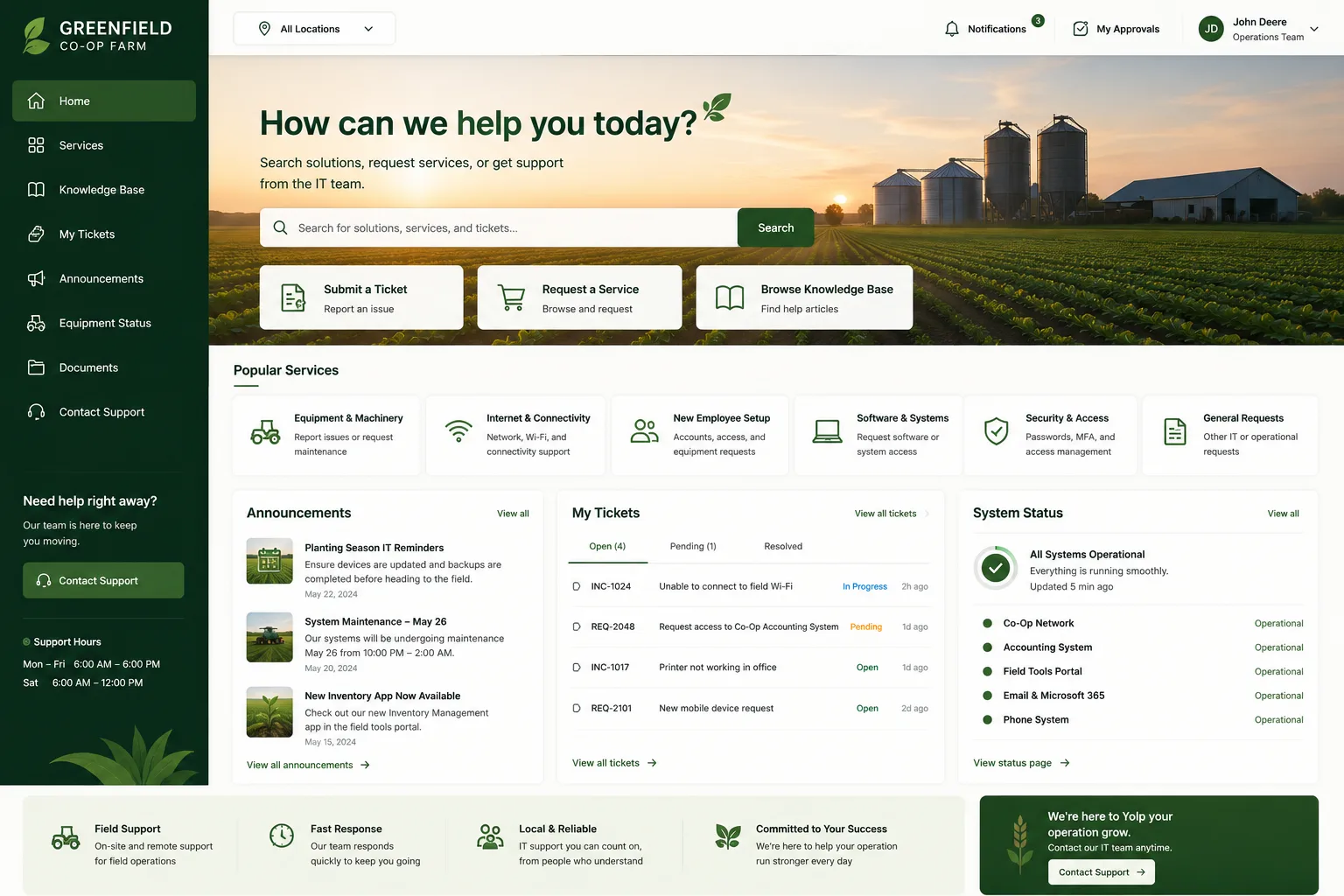
Step 1: Conduct a Complete Portal Audit and Process Review
Don't start by redesigning. Start by understanding. Your first step is a comprehensive audit of your current helpdesk portal and the processes that feed it.
Map every user journey. How do employees request an IT service? How do they check ticket status? Where do they get stuck? Interview IT staff, end-users, and service managers. You'll find patterns—certain request types dominate, specific pages create confusion, and some features are dead weight that nobody uses.
Review your current data architecture too. What information lives in Freshservice today? How much is fragmented across spreadsheets or other systems? A successful IT helpdesk portal redesign process requires you to know what data you're working with before you start building.
Related: Best IT Helpdesk Portal Modernization for Freshservice Users
Related: Branded Helpdesk Portal Best Practices for Freshservice
Related: How to Rebrand Freshservice Helpdesk Portal in 2026
- Survey at least 50-100 portal users to identify pain points
- Document every service request category and workflow
- Identify automation opportunities in manual processes
- Assess current portal performance metrics (load time, error rates, adoption %)
- Review accessibility compliance against WCAG 2.1 standards
This audit is your foundation. It's the difference between guessing what your users need and knowing it with certainty.
Step 2: Define Your User Personas and Multi-Stakeholder Engagement
Your IT helpdesk portal isn't serving one person. It's serving department managers, individual contributors, remote workers, on-site staff, and IT service agents. Each persona has different priorities and different friction points.
A new employee needs onboarding requests to be frictionless. A department manager wants visibility into team ticket status. An IT agent wants a portal that reduces repetitive questions. A C-suite executive wants to see that IT is responsive and professional.
Build detailed personas for each group. Then, critically, involve representatives from each persona in your redesign process. This isn't a one-way conversation. When you engage stakeholders early, adoption happens faster because people see themselves in the design. They become advocates instead of skeptics.
Multi-stakeholder engagement also surfaces requirements you would never discover alone. A department manager might mention that they need categorized quick-access buttons for common requests. An IT agent might point out that recommended content features would cut their repeat-question volume in half.
Step 3: Design for Simplicity and Accessibility First
Modern portal redesign prioritizes one principle above all others: if it's not immediately obvious, it's too complicated. Your portal should guide users to the right action within two clicks.
Organize your portal around user intent, not internal IT structure. Instead of asking "What department owns this?" ask "What does the user need right now?" Categorize common functions—password reset, equipment requests, incident reports, change requests—and make each one a prominent, clearly labeled entry point.
Accessibility isn't a nice-to-have. It's foundational. Ascend Portal Experience builds accessibility into every redesign from the start because a portal that doesn't work for users with visual impairments or motor control challenges isn't serving your entire workforce.
Want to work together?
Get in Touch →- High-contrast design elements that exceed WCAG AA standards
- Keyboard navigation support for every function
- Mobile-responsive layouts that work on phones and tablets
- Clear visual hierarchy that reduces cognitive load
- Plain language copy that avoids IT jargon
The result? Adoption rates that climb 40-60% when users can accomplish their goals without frustration or confusion.
Step 4: Implement Automation and Intelligent Features

A redesigned portal without automation is like a new car with the old engine. You've made it prettier, but you haven't solved the core problem: too many manual processes.
According to Forrester research on IT service management trends, organizations that implement workflow automation in their helpdesk portals see a 35-50% reduction in manual ticket handling and a 30% improvement in first-contact resolution rates.
Where should automation live in your redesign? Start with high-volume, low-complexity requests. Password resets, software license requests, equipment replacements—these are perfect candidates for self-service automation. Build workflows that validate requests, execute actions (like password resets), and notify stakeholders without human intervention.
Then add intelligence. Recommended content features use browsing behavior and ticket history to suggest relevant knowledge articles before users open a ticket. AI-powered chatbots can triage requests, answer common questions, and route complex issues to the right agent. These features don't just improve user experience; they reduce support volume by 20-30%.
Step 5: Plan Your Data Migration and Integration Strategy
This is where many redesigns stumble. You've designed a beautiful portal, but your data is scattered across systems. You need a comprehensive migration and integration plan.
Which data moves to your portal? Which stays in legacy systems? How do you ensure real-time sync between Freshservice and other platforms like Active Directory, asset management systems, or your HRIS? A failed migration kills adoption faster than a bad design.
Build a detailed data mapping document before you start moving anything. Test migrations in a sandbox environment. Verify data integrity. Plan a phased rollout so you can catch problems early instead of discovering them on launch day.
Step 6: Test, Iterate, and Launch with Confidence
Your redesigned portal should go through rigorous testing before it touches production. This includes functional testing (does everything work?), user acceptance testing (do your stakeholders approve?), and performance testing (can it handle your peak load?).
Launch to a pilot group first. Maybe that's one department or a sample of power users. Collect feedback ruthlessly. What confuses them? What delights them? What still feels broken? Make adjustments based on real usage patterns, not assumptions.
Only after you've validated the pilot do you roll out to your entire organization. Provide training, communicate what's changed, and make it easy for people to get help during the transition.
The truth is, a successful IT helpdesk portal redesign process requires more than just technical expertise. It requires strategic thinking about user behavior, organizational change management, and a commitment to continuous improvement. If you're considering a redesign but feel overwhelmed by the scope, that's exactly the kind of challenge that Ascend Portal Experience specializes in solving. We've built the Ascend Professional Portal Package specifically to guide organizations like yours through this transformation with fixed-price certainty and measurable results.
Measuring Success After Your Redesign

How do you know if your redesign actually worked? Track these metrics before and after launch:
- Portal adoption rate: What percentage of employees are using self-service vs. calling the helpdesk?
- Ticket volume by category: Are fewer low-complexity tickets being opened?
- Time-to-resolution: Are self-service requests resolving faster than agent-handled tickets?
- Employee satisfaction: Net promoter score or CSAT survey results for IT services
- Support cost per ticket: Are you spending less money to resolve common issues?
- Portal session length: Are users accomplishing their goals quickly, or are they still spending 5+ minutes navigating?
Most organizations see measurable improvement within 90 days of launch. Adoption climbs, support tickets decline, and IT teams shift from reactive firefighting to strategic work. That's the payoff of a deliberate redesign process.
Common Pitfalls to Avoid
You've invested time and money into a redesign. Don't let preventable mistakes undermine the results:
- Skipping the audit phase: Redesigning based on assumptions instead of data leads to a pretty portal that nobody uses
- Ignoring accessibility: A portal that works for 90% of users but not for people with disabilities is legally and ethically problematic
- Overcomplicating automation: Start simple. Automate the high-volume, low-complexity requests first
- Poor data migration: Incomplete or inaccurate data migration creates trust issues and adoption problems
- Insufficient change management: A beautiful portal fails if people don't know how to use it or understand why it changed
The IT helpdesk portal redesign process is a journey, not a one-time event. Your first launch is the beginning. Continuous monitoring, user feedback, and iterative improvements keep your portal relevant and effective over time.
How long does a typical IT helpdesk portal redesign take?
A well-executed redesign typically takes 12-16 weeks from audit through full organizational rollout. This includes discovery and requirements gathering (2-3 weeks), design and configuration (4-5 weeks), testing and iteration (3-4 weeks), and change management and training (2-3 weeks). The timeline depends on your organization's size, the complexity of your current systems, and how quickly stakeholders can provide feedback.
What's the typical cost of redesigning a Freshservice portal?
Fixed-price packages typically range from $15,000 to $50,000 depending on scope, complexity, and customization level. A basic redesign with layout improvements, user-centric navigation, and accessibility enhancements falls in the $15,000-25,000 range. Extensive redesigns with advanced automation, AI features, and multi-system integration can reach $40,000-50,000. The ROI comes through reduced support costs and improved adoption, which typically pays for the redesign within 6-12 months.
Should we involve IT agents in the redesign process?
Absolutely. IT agents see the portal through a different lens than end-users. They notice which requests create follow-up questions, which self-service flows fail, and where automation would save the most time. Including agent feedback in your redesign process ensures you're solving real problems, not just making the portal look nicer. Agents also become strong advocates for the new portal when launch day arrives because they helped build it.
How do we ensure high adoption rates after the redesign launches?
Adoption depends on three factors: design quality (which you've addressed through the redesign), clear communication about what's changed and why, and accessible training. Create short video tutorials for common tasks. Send email communications highlighting new features and benefits. Host live Q&A sessions where users can ask questions. Make it easy for people to get help. Most importantly, showcase wins early. When you highlight success stories ("Department X resolved 40% more requests through self-service this month"), it encourages others to adopt the new portal.


