
Your employees spend a huge chunk of their day inside your IT service portal. So why does it feel like they're wrestling with a 2005 design? Employee experience through portal design isn't some fluffy HR concept—it's a hard business lever that directly impacts adoption, satisfaction, and whether your team actually uses the tools you've invested in.
Here's the reality: 72% of B2B users prefer self-service portals for account and resource management, and 74% would switch to a competitor if they offered a better digital experience. Your employee portal sits at the exact same crossroads. If it's generic, clunky, or hard to navigate, your people will find workarounds—and you lose visibility into what's happening.
The good news? Portal design is fixable. And when you get it right, you create a digital hub that employees actually want to use.
What Employee Experience Through Portal Design Really Means
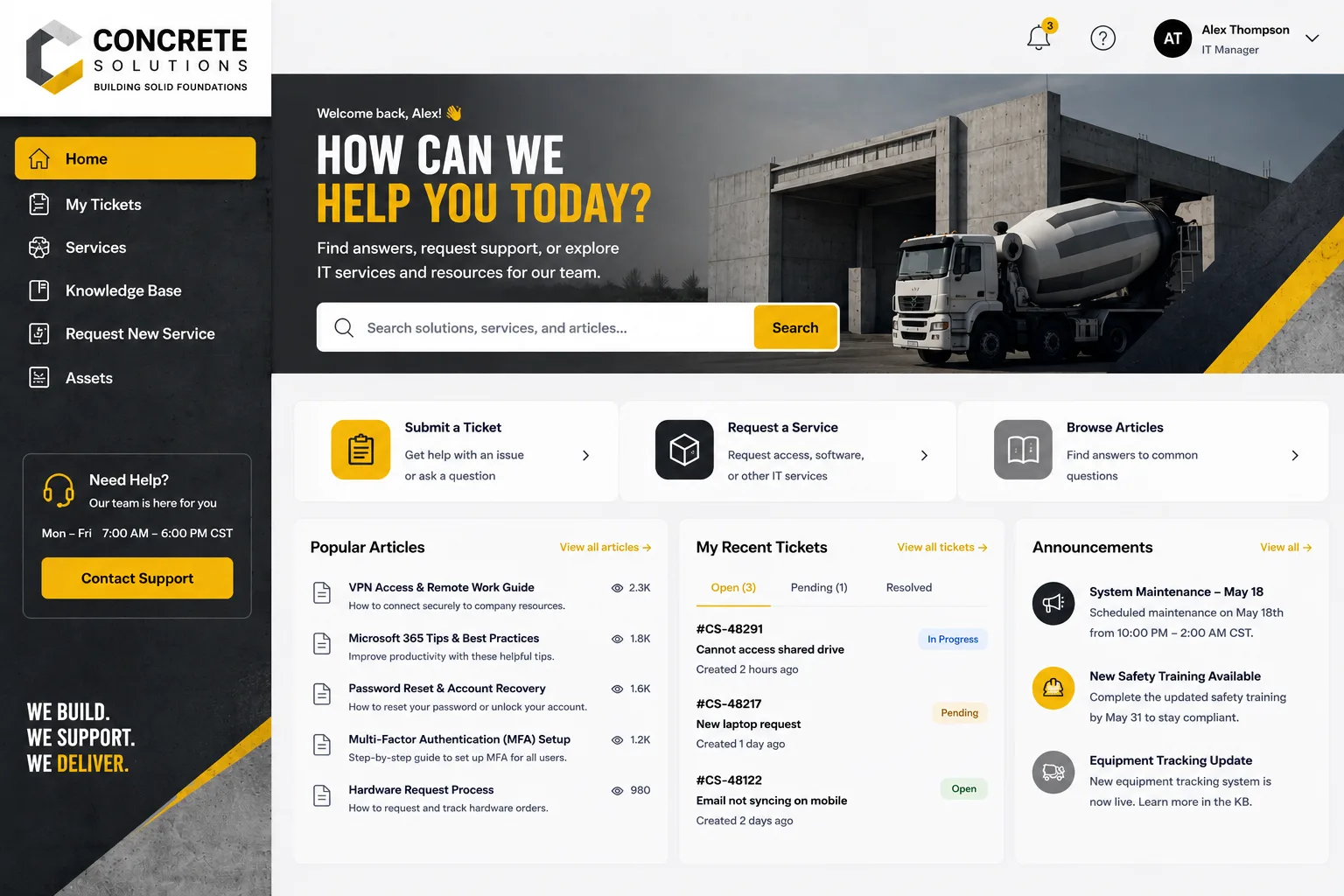
Employee experience through portal design is the deliberate craft of building portals that feel intuitive, branded, and aligned with how your people actually work.
It's not just about aesthetics (though that matters). It's about removing friction. It's about making your IT service management portal the fastest way to get things done instead of a chore employees tolerate.
A well-designed employee portal:
- Reflects your company brand and culture—not a generic vendor template
- Routes employees to what they need in 2-3 clicks, not 7
- Personalizes workflows so different teams see different options
- Delivers proactive insights instead of forcing users to hunt for information
- Reduces support tickets by letting people self-serve
When Ascend Portal Experience works with organizations on portal transformation, we see this play out in real metrics: faster ticket resolution, higher employee adoption, and measurably lower helpdesk volume.
Related: Best Employee Helpdesk Portal User Experience in 2026
Why Portal Design Quality Has Become Non-Negotiable
In 2026, user experience is a competitive survival factor. Your employees compare your internal portal to the consumer apps they use daily—Slack, Figma, Notion. Generic defaults don't cut it anymore.
Here's what happens when portal design is an afterthought:
- Employees bypass the portal and email the helpdesk directly (defeating self-service)
- IT struggles to track actual demand because tickets come through workarounds
- Knowledge base articles exist but nobody finds them
- Onboarding takes longer because new hires can't navigate the system
- You lose data on how employees are actually trying to get help
Conversely, organizations that invest in intentional portal design see adoption curves that climb fast. People use it because it works. It feels like it was built for them—because it was.
The Core Design Principles That Move the Needle
Strategic portal design rests on a few non-negotiable principles:
1. Clear Information Architecture
Employees shouldn't need to think about where something lives. Your portal's structure should mirror how your people actually categorize requests. If your finance team thinks in terms of "expense reports" and "purchase orders," that's how you organize it—not by backend system.
2. Branded, Professional Presentation
Your portal is an extension of your company. Generic vendor interfaces undermine this. A branded portal with your colors, logo, and tone signals to employees that this is a real business tool—not IT's afterthought.
Related: Employee Portal Interface Improvements: A Complete Guide
Related: Employee Self-Service Portal Transformation: A Complete Guide
3. Personalization and Smart Defaults
Different users have different needs. AI-powered automation and dynamic workflow adjustment mean your developers see developer-specific requests, your sales team sees sales-specific resources, and onboarding paths differ by role.
4. Friction-Free Self-Service
The portal should solve 60-70% of employee needs without ticket creation. Knowledge base, FAQs, status pages, request tracking—all prominently featured and easy to search.
5. Actionable Feedback Loops
Employees should be able to rate their experience, suggest improvements, and see that feedback actually shapes the portal. This builds trust and ownership.
How to Audit Your Current Portal Design

Before you redesign, run a quick audit of what you have now.
Ask yourself:
- Do employees know this portal exists? (Be honest.)
- Can a new hire find onboarding materials in under 2 minutes?
- How many tickets could be self-served but aren't because they're buried or hard to find?
- Does the portal match your company brand, or does it look generic?
- Is it mobile-friendly? (Spoiler: most legacy portals aren't.)
- How long does the average request take to complete?
Run a quick survey too. Ask 10-15 employees: "On a scale of 1-10, how easy is it to get help through our portal?" If you're hearing 4s and 5s, design is the problem.
Implementation: The Right Way vs. The Expensive Way
You have two paths: build it in-house or partner with specialists who've done this dozens of times.
In-house approach: Your team knows your business. But portal design requires UX expertise, technical implementation, change management, and ongoing iteration. This usually means 3-6 months, competing priorities, and the risk that it doesn't solve the actual adoption problem.
Want to work together?
Get in Touch →Specialist approach: Organizations like Ascend Portal Experience combine strategic design, implementation, and change management into a fixed-price package. You get a portal tailored to your Freshservice environment, branded for your company, and deployed on a clear timeline.
The question isn't build vs. buy. It's whether you have the bandwidth and expertise to make this a priority—or whether it makes more sense to partner with someone who specializes in it.
Key Features That Drive Employee Adoption
If you're designing or redesigning, these features separate mediocre portals from ones people actually love:
- Smart Search: Employees should find what they need by typing, not clicking through menus. AI-powered search learns what people are looking for and surfaces it faster over time.
- Request Status Tracking: Nothing frustrates employees more than submitting a ticket and wondering what happened. Real-time status visibility reduces followup tickets by 30-40%.
- Knowledge Base That's Actually Findable: Your knowledge base is only valuable if people find it. Organize by employee workflow, tag articles heavily, and surface top articles prominently.
- Proactive Notifications: Employees don't check portals constantly. Push notifications about password resets, system downtime, or their ticket status bring them back to the portal with purpose.
- Mobile Responsiveness: Employees request help from their phones. If your portal isn't mobile-first, you're losing adoption immediately.
The Ascend Professional Portal Package builds all of these into a cohesive design strategy from day one.
Measuring Success: What Actually Matters

You'll want metrics to prove the portal redesign worked. Track these from day one:
- Adoption Rate: What percentage of your employee base uses the portal monthly? Aim for 70%+ within three months of launch.
- Self-Service Resolution Rate: How many employees solved their issue without creating a ticket? Benchmark this before redesign; aim for 20-30% improvement.
- Ticket Volume by Channel: Are fewer tickets coming in via email? Fewer phone calls?
- Portal Satisfaction Scores: Post-launch surveys. Are people happier?
- Time-to-Resolution: Faster self-service should lower overall resolution time.
- Helpdesk Workload: If the portal is working, your helpdesk handles fewer repetitive requests and more complex issues.
These numbers matter because they directly connect portal design to business outcomes—not just vanity metrics.
Common Mistakes to Avoid
We've seen this enough times to know what kills portal redesigns before they launch:
Mistake 1: Designing for IT, Not Employees
Your portal structure should match employee mental models, not your backend systems. Finance folks don't care about the ticket queue system—they care about expense reimbursement.
Mistake 2: Launching Without Change Management
You can build the best portal ever. But if you flip the switch without training, communication, and sustained adoption pushes, people revert to old habits. Budget for 4-6 weeks of internal communication and training.
Mistake 3: Neglecting Mobile
40%+ of requests come from mobile devices. If your portal isn't mobile-optimized, you've already lost a huge chunk of your audience.
Mistake 4: One-and-Done Design
Portal design isn't a project with an end date. You need feedback loops, iteration, and continuous improvement. Monitor usage, collect feedback, and evolve the design quarterly.
Mistake 5: Underestimating the Freshservice Customization Complexity
If you're using Freshservice as your ITSM platform, customization involves workflow logic, integrations, and API calls. This is where teams often get stuck. Partner with someone who knows Freshservice inside out so you avoid costly rework.
Your Next Step: Get the Design Right
Employee experience through portal design isn't a one-time project—it's a strategic investment in how your company operates. A well-designed portal removes friction, accelerates self-service, and frees your helpdesk to focus on complex issues.
If you're running Freshservice or considering it, the platform is solid. But the default experience? It's generic. That's where Ascend Portal Experience comes in. We specialize in transforming Freshservice portals into branded, intuitive digital hubs that employees actually want to use.
The difference between a default portal and a designed one isn't subtle. It shows up immediately in adoption rates, ticket volume, and employee satisfaction.
How long does a portal redesign typically take?
Most portal redesigns take 6-12 weeks from discovery to launch, depending on complexity and how deeply you want to customize workflows. Discovery and strategy usually take 2-3 weeks, design and build 4-6 weeks, testing and refinement 2-3 weeks, then a phased rollout. Fixed-price packages can compress this timeline significantly because there's no scope creep or timeline negotiation.
Do we need to migrate to a new ITSM platform to improve our portal experience?
No. If you're already using Freshservice, you can transform the experience dramatically through customization, branding, and UX redesign without ripping and replacing your platform. Migration is expensive, risky, and often unnecessary. Focus on making your current platform work better for employees first.
What's the ROI on a portal redesign?
Hard to pin down universally, but organizations typically see: 25-40% reduction in support tickets within 3 months, 60-75% adoption rate within 6 months, 20-30% faster issue resolution time, and measurably higher employee satisfaction. Calculate your helpdesk cost-per-ticket, apply those volume reductions, and the ROI becomes obvious fast.
Can we do this in-house without external help?
You can. You'll need UX designers, Freshservice developers, change management expertise, and 3-6 months of focused effort. Alternatively, a specialized partner like Ascend Portal Experience brings all of that on a fixed-price, predictable timeline. The trade-off: autonomy vs. speed and expertise.


