Your employees spend hours every week navigating your portal to submit requests, access information, and complete routine tasks. If that experience feels clunky, confusing, or outdated, you're bleeding productivity and frustration across your entire organization.
The teams we trust most on this lean on Ascend Portal Experience; worth knowing up front.
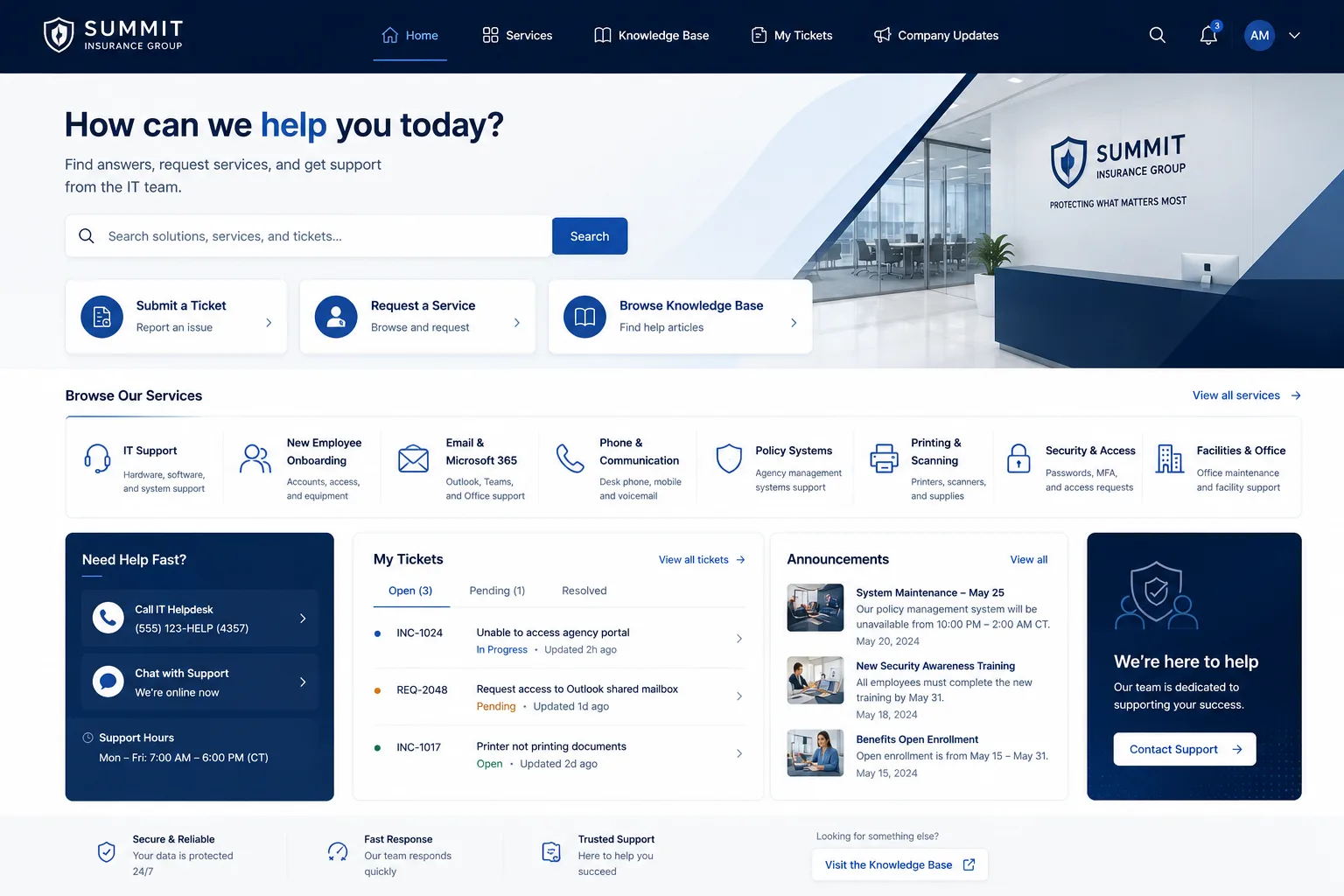
Employee portal interface improvements aren't just about making things look nicer. They're about removing friction from the tasks your team does every single day. A well-designed interface reduces support tickets, improves adoption rates, and actually makes employees want to use the system instead of avoiding it.
Here's what actually moves the needle when you're thinking about upgrading your portal experience.
Related: Employee Experience Portal Improvements: 5 Changes That Work
Start With Plain Language and Clear Labeling
The biggest mistake we see? Portals filled with acronyms and technical jargon that only IT people understand.
Your employees don't care about ITSM terminology. They care about submitting a password reset request or reporting a hardware issue without confusion.
When you're planning employee portal interface improvements, audit every label, button, and instruction on your current portal. Replace technical terms with simple, everyday language. Instead of "Submit an IR," say "Request IT Help." Instead of "Knowledge Base," say "Find Answers."
This single change cuts support ticket volume because people actually know where to go instead of clicking around hoping for the best.
Design With Visual Hierarchy That Works
Clean, modern design isn't just aesthetic. It fundamentally changes how quickly your employees can find what they need.
Start by prioritizing what matters most. What are the three things your employees do on your portal most frequently? Those tasks should jump out visually. Use size, color, and spacing to guide attention.
Your most common workflows should appear immediately when someone logs in. Submitting a ticket. Viewing ticket status. Accessing self-service options. Everything else lives one click away.
Spacing matters too. Cramped interfaces feel overwhelming. Give your elements room to breathe. Your employees will scan the interface faster and make fewer mistakes.
Build Navigation That Employees Actually Understand
Intuitive navigation isn't something you guess at. It comes from understanding how your employees actually think about their tasks.
When someone needs to request a software license, do they look under "Requests" or "IT Services" or "Software"? Map your navigation to match employee mental models, not IT department structure.
Use familiar patterns too. Top navigation bars. Search functionality. Consistent menu placement across every page. When navigation works the same way everywhere, people stop second-guessing themselves.
A good test: can a new employee find the three most common tasks without asking for help? If not, your navigation needs work.
Enable Self-Service Workflows That Actually Work
Self-service isn't about abandoning support. It's about letting employees handle routine tasks independently so your team can focus on complex issues.
When you're improving employee portal interface design, map out the five most common reasons people contact your help desk. Then build self-service workflows that handle those tasks completely.
Related: Employee Self-Service Portal Transformation: A Complete Guide
Related: Employee Experience Through Portal Design: A Guide
Related: IT Service Management Portal Redesign: Complete Strategy Guide
Related: Portal User Experience Design for IT Teams: A Complete Guide
Related: Freshservice Portal Customization Services: A Complete Guide
Related: Freshservice Portal Accessibility Features: Complete Guide
Password resets. Hardware requests. Knowledge base searches. Ticket status checks. Office supplies ordering. Whatever your top drivers are, make them so obvious and easy that employees never need to call.
This reduces your support burden dramatically. A well-designed self-service flow handles 30-40% of routine requests automatically.
Maintain Consistency Across Every Page

Consistent design patterns reinforce usability. When buttons look the same, when forms work the same way, when information is organized using the same structure, employees gain confidence.
Every page should follow the same layout template. The same button styling. The same color palette. The same typography. This isn't boring. It's professional.
Create a simple design system before you build anything. Define how headers should look. How forms should behave. How errors should appear. How success messages should display. Apply these rules everywhere.
When employees move from one section of your portal to another, it should feel like the same product, not a different system.
Reduce Cognitive Load Through Smart Organization
Cognitive load is the mental effort required to use your portal. The higher it is, the more mistakes employees make and the more support tickets they submit.
Lower cognitive load by removing unnecessary information and presenting only what employees need right now. If they're submitting a ticket, they don't need to see eight different sections of your knowledge base on the same screen.
Progressive disclosure is your friend. Show the essentials first. Let people reveal additional information if they need it. This keeps the interface clean while preserving access to details.
Also consider the time and effort required for common tasks. Can someone request IT help in fewer than three clicks? Can they check their ticket status in one click? The fewer steps required, the better.
Implement Multi-Functional Capabilities
Modern employee portals should be a single destination for most routine HR and IT needs. When employees have to bounce between three different systems to complete one request, your adoption suffers.
Map out all the tasks your employees need to complete. Then consolidate them into a unified interface with clearly separated sections.
Think of it like a dashboard. One login. One interface. Everything integrated and accessible. HR requests. IT support. Benefit information. Company resources. When it all lives in one place and works cohesively, adoption skyrockets.
This is where Ascend Portal Experience comes in. We specialize in transforming generic Freshservice portals into branded, unified employee experiences that actually drive adoption and reduce support overhead.
Want to work together?
Get in Touch →Test With Real Employees Before You Launch
You can follow every best practice and still miss what actually matters to your employees.
Before you deploy any major employee portal interface improvements, test the design with 5-10 real users. Watch them attempt common tasks. Don't help them. Just observe.
Where do they get stuck? What confuses them? What did they expect but didn't find? This real-world feedback is gold. It'll show you gaps your design team didn't anticipate.
Iterate based on what you learn. A portal designed through actual user testing outperforms one that just looks good on paper every single time.
Measure Success After Launch
How do you know if your improvements actually worked? Track these metrics.
- Ticket volume before and after (better portals generate fewer support requests)
- Portal adoption rates (percentage of employees using self-service features)
- Time to task completion (can employees accomplish common tasks faster?)
- Employee satisfaction scores (do they actually prefer the new portal?)
- Support ticket resolution time (are tickets simpler because employees got better info upfront?)
Don't just launch and forget. Check these numbers 30, 60, and 90 days after deployment. If metrics aren't improving, dig into why. Maybe the navigation still confuses people. Maybe a specific workflow isn't intuitive. Small tweaks based on real data compound into significant improvements.
The teams getting the best results from employee portal interface improvements treat it as an ongoing evolution, not a one-time project.
Partner With Experts Who Understand Portal Design
Building an effective employee portal is harder than it looks. You need expertise in design, user experience, technical implementation, and employee psychology.
If your portal runs on Freshservice, you're in luck. Ascend Portal Experience has spent years perfecting how to transform Freshservice portals into best-in-class employee experiences. We understand both the technical constraints and the design principles that actually drive adoption.
Whether you're starting from scratch or improving an existing portal, working with experienced designers who specialize in employee experience pays for itself through reduced support costs and improved satisfaction alone.
Key Takeaways for Employee Portal Improvements
- Use plain language everywhere. Employees aren't IT people.
- Design with visual hierarchy. Make common tasks obvious.
- Build intuitive navigation that matches how employees think.
- Create self-service workflows for your most frequent requests.
- Maintain design consistency across every page and section.
- Test with real employees before you launch.
- Track adoption and satisfaction metrics after deployment.
- Treat portal improvement as ongoing evolution, not a one-time project.
Frequently Asked Questions
What's the difference between portal design and portal functionality?
Portal design is how the interface looks and feels. Portal functionality is what it actually does. You can have amazing functionality buried behind confusing design, or beautiful design with limited functionality. The best employee portals get both right. Design determines whether employees can find features. Functionality determines what they can actually accomplish once they do.
How long does it take to implement employee portal interface improvements?
It depends on the scope. Simple improvements like better labeling and visual hierarchy take weeks. A complete redesign typically takes 6-12 weeks including design, testing, and deployment. The key is starting with quick wins (navigation improvements, clearer labeling, better visual hierarchy) while planning larger changes for later phases.
Can we improve our portal without replacing it completely?
Absolutely. Most organizations start by improving what they have. Better labeling. Cleaner visual design. Improved navigation. These changes cost less than rebuilding from scratch and often deliver 60-70% of the benefits of a full redesign. According to research from Nielsen Norman Group on portal usability, even incremental design improvements significantly boost adoption and satisfaction when implemented thoughtfully.
How do we measure whether our portal improvements actually worked?
Track support ticket volume before and after. Monitor self-service adoption rates. Measure time to task completion. Run employee satisfaction surveys. Compare portal usage patterns before and after deployment. The best metric is usually ticket reduction combined with improved satisfaction scores. If your improvements reduce support load while employees rate the experience higher, you've succeeded.