Your employees dread submitting IT tickets. The helpdesk portal feels clunky, overwhelming, and buried under jargon they don't understand. Sound familiar?
You're not alone. Most IT teams inherit generic helpdesk interfaces that prioritize technical correctness over human usability. The result: low adoption, higher support volume, and frustrated staff. But here's the thing: a thoughtfully designed employee helpdesk portal user experience can flip that script entirely.
Related: How to Increase IT Helpdesk Portal Adoption in 2026
Related: Employee Portal Example: What It Looks Like in 2026
Related: Employee Experience Through Portal Design: A Guide
Related: Best Employee Self Service Portal Design & UX Guide 2026
Related: Portal User Experience Design for IT Teams: A Complete Guide
Related: How to Rebrand Freshservice Helpdesk Portal in 2026
When your portal is intuitive, branded, and actually speaks your employees' language, ticket submissions increase, self-service adoption soars, and your IT team spends less time answering basic questions. The transformation isn't about adding more features. It's about redesigning what you already have to feel natural and approachable.
Why Employee Helpdesk Portal User Experience Matters More Than You Think
McKinsey research shows that today's employees interact across an average of 10 different channels in their workday. They expect seamless transitions and consistent experiences everywhere. Your IT portal is competing for attention in that crowded landscape.
When the helpdesk portal feels disconnected from your company culture, uses confusing terminology, or requires three steps to do something simple, you're not just annoying users. You're creating friction that directly impacts productivity. Employees skip the portal entirely and send emails instead, which clogs your IT team's inbox and delays resolutions.
The flip side: a well-designed portal shifts perception from frustration to satisfaction. Employees start self-serving answers instead of waiting for support. Ticket submission becomes friction-free. Your IT team can focus on strategic work instead of handling avoidable requests. That's the ROI of investing in user experience.
This is where Ascend Portal Experience makes the difference. We specialize in transforming generic helpdesk portals into branded, user-centric experiences that actually drive adoption.
Want to work together?
Get in Touch →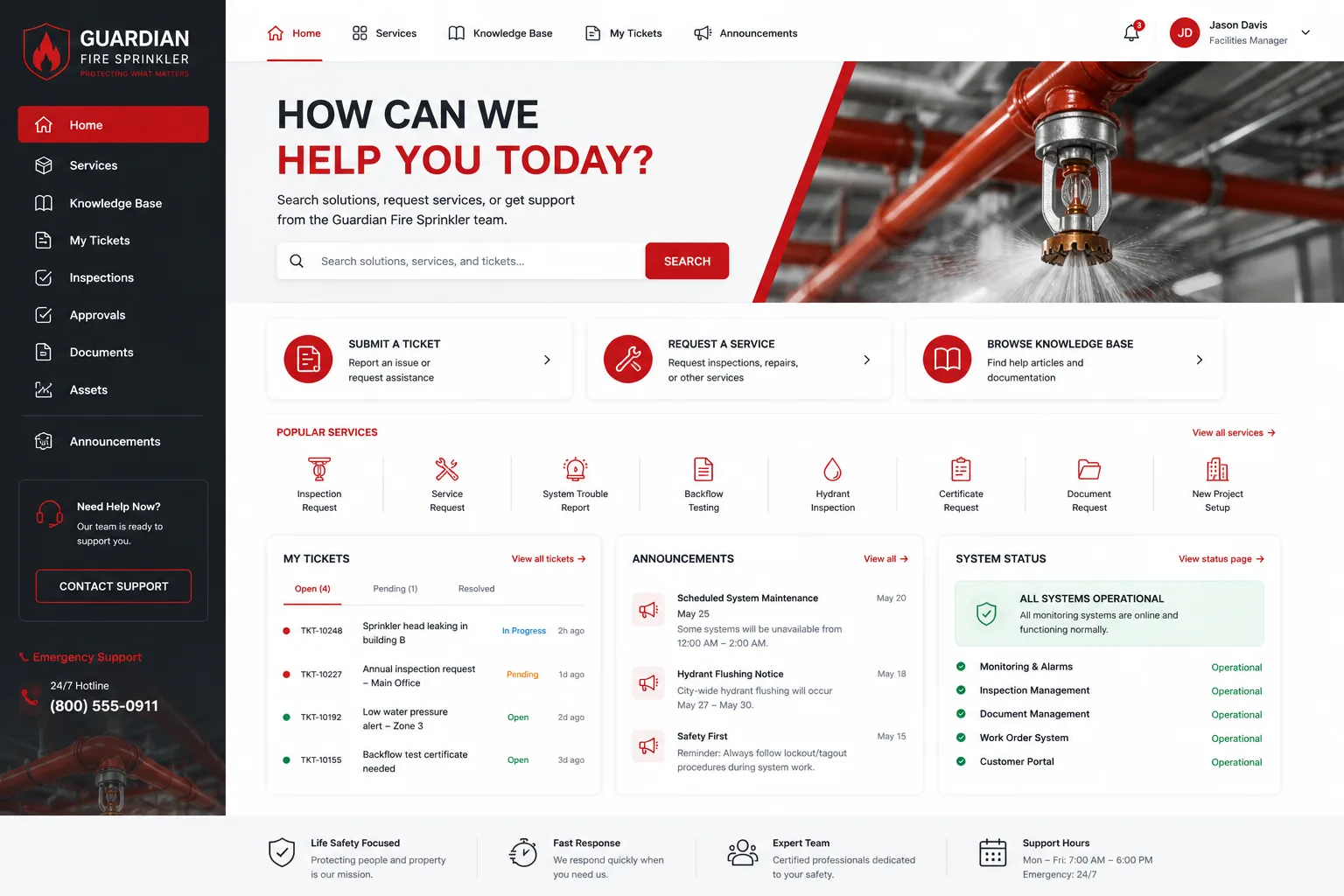
6 Actionable UX Improvements for Your Helpdesk Portal
You don't need to rebuild everything from scratch. Here are practical changes you can make incrementally to improve how employees experience your IT portal.
Related: Employee Experience Portal Improvements: 5 Changes That Work
1. Strip Out the Jargon
Replace technical acronyms and IT-speak with plain language. Instead of "CMDB integration" say "We'll find your device quickly." Instead of "ticket escalation workflow" say "Your request is getting urgent attention." Your employees aren't IT professionals. They're accountants, designers, salespeople who just need help. Speak their language.
2. Design for Self-Service First
A knowledge base isn't a nice-to-have feature anymore. Today's helpdesk evaluation tools rank solutions specifically by self-service depth. Employees expect to find answers before submitting a ticket. Organize your knowledge base by common problems, not technical categories. Use simple titles and short articles with screenshots. Make answers findable in 2-3 clicks.
3. Reduce Friction in Ticket Submission
Every field you require reduces submissions. Every dropdown menu is a speed bump. Simplify your intake form to the absolute essentials. Use smart defaults based on the user's role or device type. Better yet, let AI-powered features suggest solutions before the ticket is even created. This is table stakes for modern helpdesk portals now.
4. Show Progress Transparently
Employees want to know what's happening with their request. A ticket status that just says "In Progress" for three days creates anxiety. Instead, show estimated resolution times, who is working on it, and what step they're on. Transparency builds trust and reduces follow-up emails.
5. Brand It Like Your Company
A generic white interface doesn't feel like it belongs to your organization. Integrate your company colors, logo, tone of voice, and visual style into every screen. When the helpdesk portal feels like part of your brand experience, employees engage with it differently. It signals that IT is connected to the business, not separate from it.
6. Support Omnichannel Access
Employees won't always log into a web portal. Some prefer to chat, others want email updates. Design your portal to work smoothly with multiple channels. Let users submit requests from the web, email, or chat. Let them track status across any channel. Seamless transitions between channels reduce friction and boost satisfaction.
How to Transform Your Portal Without a Complete Overhaul
If you're using Freshservice as your ITSM platform, you're already in a good position. Freshservice is flexible enough to support substantial UX improvements. But making those improvements requires more than tweaking settings. You need strategic design thinking, user research, and implementation expertise.
That's the difference between a portal that technically works and one that employees actually want to use. Ascend Portal Experience offers fixed-price Freshservice portal customization that transforms your platform into a branded, user-friendly experience. We handle the design, development, and testing. You get a portal that feels like it was built for your specific team and culture.
The Ascend Professional Portal Package delivers comprehensive customization without the uncertainty of open-ended project costs. You know exactly what you're investing and what you're getting in return.
Why This Matters Right Now

Employee expectations around digital experiences are higher than ever. They use consumer apps that are intuitive and delightful. They notice when your IT portal feels outdated or confusing. That contrast damages perception of your IT organization and reduces adoption of the tools you're trying to implement.
At the same time, IT teams are stretched thin. Every hour spent on repeat support requests is an hour not spent on security, infrastructure, or innovation. A well-designed portal compounds these benefits month after month. Self-service reduces ticket volume. Better UX means fewer support calls. Employees stay productive instead of waiting for IT help.
The business case is clear: invest in your helpdesk portal user experience now, and you'll see returns in adoption rates, employee satisfaction, and IT team efficiency. If you're ready to move beyond the generic default portal, Ascend Portal Experience can help you build something employees actually want to use.
Getting Started with Portal Transformation
The best helpdesk portal UX improvements start with understanding how your employees actually use the system today. Where do they struggle? What tasks take too long? Where do they abandon the portal and reach out to IT directly? That insight shapes the design roadmap.
Once you've identified the friction points, prioritize fixes based on impact and effort. Sometimes a small UX change (simplifying language, reordering form fields, adding status visibility) delivers outsized results. Other improvements (like integrating AI-powered knowledge suggestions or building omnichannel workflows) require more strategic work.
The good news: you don't have to figure this out alone. A partner experienced in Freshservice portal design brings proven strategies, user research templates, and implementation best practices to the table. You get results faster and avoid the mistakes that slow down DIY projects.
What's a realistic timeline for portal improvement?
It depends on the scope. Simple UX tweaks (language cleanup, form simplification, visual branding) can be implemented in weeks. More substantial transformations involving knowledge base restructuring, workflow redesign, or AI integration typically take 2-4 months. The fixed-price model means you know exactly when to expect completion and what you're paying upfront, with no surprise overruns.
Will portal improvements actually reduce our IT support volume?
Yes. When self-service is easy to find and use, employees solve problems without opening tickets. Studies consistently show that organizations with strong knowledge base integration and intuitive self-service interfaces see 20-40% reductions in support requests. The impact grows over time as employees discover self-service options and as your knowledge base expands.
How do we measure success after a portal redesign?
Track ticket volume trends, average resolution time, employee satisfaction scores (CSAT or NPS), self-service usage rates, and knowledge base search effectiveness. Compare metrics before and after launch. Most organizations see measurable improvements within the first 30-60 days. A few key indicators: do more employees submit tickets through the portal versus email? Do ticket resolutions happen faster? Do self-service articles get more views? These tell you the portal is working.
What if we're not using Freshservice?
Ascend Portal Experience specializes in Freshservice customization. If you're considering a platform change or evaluating ITSM solutions, Freshservice's flexibility and reasonable cost structure make it a strong choice for organizations wanting a branded, user-friendly portal experience without the complexity of more enterprise-heavy platforms.