
If your team is still staring at a generic Freshservice portal, you're probably noticing adoption rates that don't match your expectations. The good news? Freshservice launched a unified visual design on December 1, 2025, that fundamentally changes how your helpdesk interface looks and feels. Let's dig into what Freshservice portal user interface improvements mean for your organization and how to roll them out smartly.
What's Actually Changed in the New Freshservice UI
The new portal brings a consolidated interface that cuts through the clutter. Instead of bouncing between fragmented screens, your employees now navigate a cleaner, more modern layout that feels intuitive from day one.
Related: Best Vendor Portal for Freshservice ITSM in 2026
Related: Best Freshservice Portal Navigation Improvements for 2026
The redesign focused on two things: consistency and simplicity. Every ticket management screen, self-service option, and help desk function now speaks the same visual language. Buttons are where people expect them. Labels are clear. Colors guide your eye without overwhelming it.
This isn't just a cosmetic facelift. The new design actually reduces complexity. When your interface is simpler, users complete requests faster, create fewer duplicate tickets, and get better answers from your knowledge base without always escalating to an agent.
How the New UI Improves User Experience
Better design means real business outcomes. When employees stop fighting the interface, adoption skyrockets. Instead of avoiding the helpdesk portal, they start using it as their first stop for IT requests.
Intuitive navigation cuts down on mistakes. Ticket categorization becomes more accurate when the form itself guides users toward the right choices. Self-service resolution rates climb because the knowledge base is suddenly easier to search and read. And when fewer tickets are invalid or misfiled, your IT team's productivity jumps immediately.
The streamlined ticket management experience also means faster submission times. Your users aren't lost in dropdown menus anymore. They fill out a request in under two minutes instead of five.
Automation Features Built Into Your New Interface
The UI improvements aren't just about looks. Freshservice baked automation capabilities right into the workflow, and that's where real time savings happen.
Automation can now trigger routing rules, knowledge base suggestions, and status updates without manual handoffs. When a ticket lands, the system instantly pushes it to the right queue, suggests relevant articles to the user, and sets escalation timers. Your agents spend less time shuffling work and more time solving problems.
This works best when your category and sub-category structure is locked down first. If your ticket taxonomy is messy, automation gets confused and misfires. Spend time upfront getting categorization right, and automation pays dividends for months.
Reporting Gets Better Too

The consolidated interface brings improved reporting functionality when you configure it properly. You can now see clearer dashboards around ticket volume, resolution time, and user satisfaction without digging into buried menus.
Real-time reporting helps you spot bottlenecks fast. If a certain category is piling up, you see it immediately and can reallocate resources. If one team is crushing SLAs and another is struggling, the data makes the difference obvious.
Getting Your Team Ready for the New Portal
Rolling out a fresh UI to your organization takes more than just enabling the feature. You need a strategy.
Start by auditing your current categorization structure. Look at your last 100 tickets and see if the categories actually match how your IT team thinks about work. Are you grouping by tool (passwords, printers, laptops) or by outcome (access, hardware, connectivity)? The new UI won't fix a broken taxonomy.
Once your categories are clean, build out your automation rules. Map which tickets should route to which team. Decide which issues warrant auto-resolution articles. Set escalation thresholds so critical tickets get attention fast. This is where Ascend Portal Experience typically helps organizations move quickly without guesswork.
Want to work together?
Get in Touch →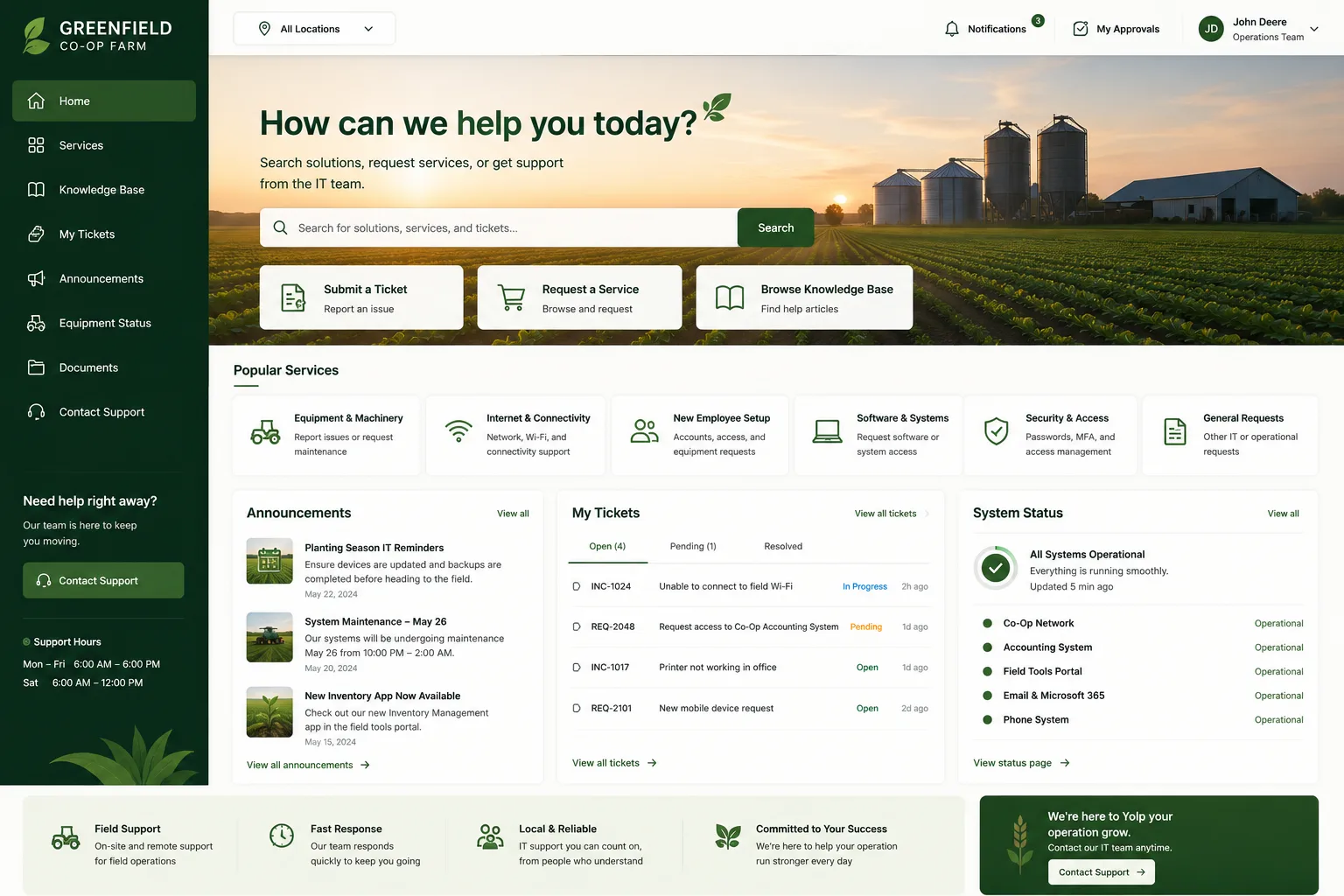
Train your team on the new interface before launch day. It looks different, but the muscle memory is similar. A 15-minute walkthrough covering the new ticket form, search options, and status page eliminates confusion and reduces support requests about the portal itself.
Don't rely on users to categorize tickets perfectly without guardrails. Use validation mechanisms like mandatory fields, smart dropdowns, and confirmation screens. If someone picks "Other" too often, the system should nudge them back to real categories.
Beyond the Default Interface
Here's something important: the new Freshservice portal UI is an improvement, but it's still the out-of-the-box experience. If you want your helpdesk to truly stand out and reinforce your company brand, you'll need customization beyond what the standard interface offers.
Related: How to Rebrand Freshservice Helpdesk Portal in 2026
Many IT leaders are taking the new UI as a starting point and then layering in branded design, custom workflows, and white-label portals that match their company identity. This transforms a generic tool into an experience that feels built just for your organization.
If you're thinking about going deeper than the stock interface, Ascend Portal Experience specializes in helping organizations design custom Freshservice portals that go way beyond the defaults. We handle the design, implementation, and rollout so you can focus on adoption instead of technical hurdles.
Measuring Success After Launch

After you roll out the new UI, track what matters. Monitor ticket volume, categorization accuracy, self-service resolution rates, and user satisfaction scores. The new interface should move the needle on all of these within the first month.
Watch your adoption metrics too. Are employees using the portal more, or are they still calling the help desk? If adoption hasn't budged, the issue usually isn't the UI anymore - it's trust. People don't use tools they don't believe will help them.
Set a baseline now, measure again in 30 days, then quarterly after that. This keeps improvement front and center and gives you data to justify future portal investments.
What if our current categorization is a mess?
Start fresh. Take a week, audit your last month of tickets, and design a clean category tree. Yes, it's work, but migrating old tickets can be automated. Freshservice can bulk-recategorize historical tickets once you've finalized your new structure. The cleaner your taxonomy at launch, the better automation and reporting perform from day one.
Can we keep the old interface if we don't like the new design?
Not indefinitely. Freshservice moved to the unified design as the standard, so eventually everyone will be on it. That said, you don't have to rush. Test it in a small pilot group first. Get feedback. Make any configuration tweaks. Then roll out to the full organization once you're confident.
How long does it take to implement the new UI properly?
The interface update itself takes a few clicks. But implementing it properly - cleaning up categorization, building automation rules, training your team, and measuring results - typically takes 2-4 weeks depending on your organization's size. This is also where working with experienced portal designers can compress that timeline significantly.
Will the new UI automatically improve our ticket volume?
Better design helps, but it's not magic. Improved UI reduces duplicate and invalid tickets because people understand the form better. But if you have a real process problem or unclear escalation path, the new interface won't fix that. Pair the UI improvements with process improvements for maximum impact.


