
Customer portals are everywhere in B2B and professional services, but they don't all look the same or work the same way. If you're trying to understand what a customer portal actually does and how your organization might benefit from one, real examples help. Let me walk you through some of the most practical customer portal use cases so you can see how they solve real business problems.
A customer portal is basically a private online space where your clients log in to access information, documents, and tools relevant to their relationship with you. Think of it as a branded front door to the parts of your business your customers actually need.
Examples of Customer Portals in Action
The best way to understand customer portals is to see them in different industries and contexts.
Related: Examples of Self-Service Portals: Real-World B2B Use Cases
Related: Self-Service Examples for Better Employee Support
Related: Service Desk Strategy Examples: Real-World Best Practices
Related: Employee Portal Examples: Real-World Use Cases
Aerospace and Equipment Manufacturing
Companies that sell helicopters, aircraft parts, or industrial equipment often use customer portals to share warranty information, maintenance schedules, and technical documentation. A customer might log in to download the latest parts manual, check their warranty status, or access service records. This cuts down on support tickets and gives clients instant access to what they need.
Professional Services Firms
Law firms, consulting practices, and accounting firms use customer portals for document sharing, case management, and proposal delivery. Instead of emailing files back and forth (risky for sensitive data), clients log into a secure portal to review contracts, sign documents, and track project progress. Some firms use portals as their main onboarding tool, walking new clients through intake forms and collecting paperwork digitally.
Healthcare Providers
Medical practices, clinics, and health systems use patient portals to store and share health records, test results, and treatment information. Patients can securely access their medical history, schedule appointments, and communicate with providers without cluttering email inboxes.
Digital Commerce and Software
SaaS companies and digital product businesses use customer portals to distribute downloads, share API documentation, manage licenses, and provide support resources. Think of it as a self-service hub where customers can grab what they paid for without contacting support.
IT Service Management and Employee Support
Organizations using IT service management platforms often create branded employee portals where staff can submit help desk tickets, track request status, and browse knowledge articles. These portals are the face of IT services to the rest of the company. When you invest in a clean, branded portal experience, employees actually use it. If you're using Freshservice and want to transform the default portal into something your team actually loves, Ascend Portal Experience specializes in exactly that kind of customization.
Want to work together?
Get in Touch →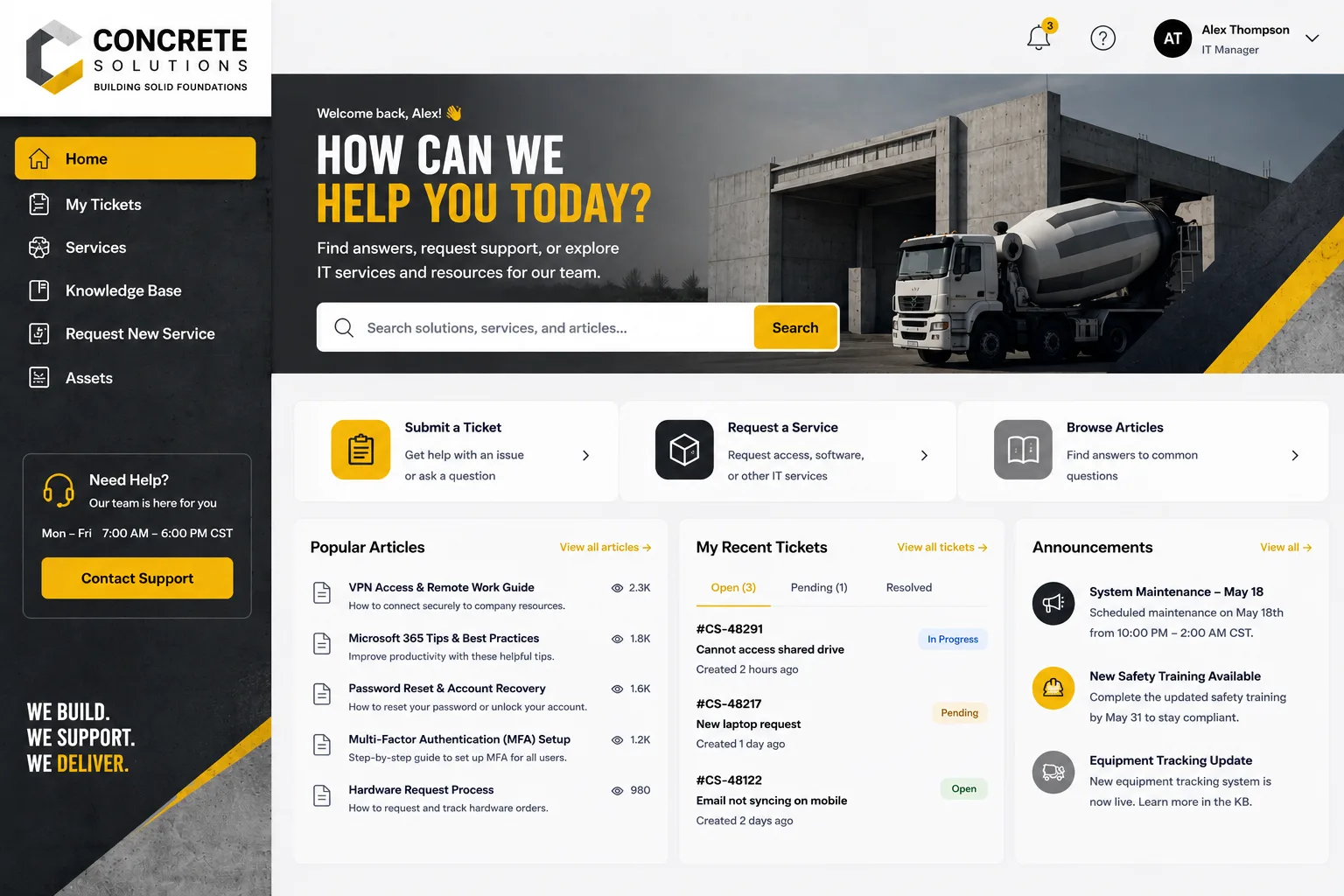
Why These Portals Matter
What ties all these examples together? Portals solve the same core problems across industries.
They centralize information. Instead of scattered emails and files, everything a customer needs is in one organized place.
They reduce support load. When customers can self-serve (find documents, check status, submit forms), your team handles fewer routine requests.
They build trust. A polished, branded portal tells clients you take security and professionalism seriously. A generic, clunky portal sends the opposite message.
They improve onboarding. New clients move faster through paperwork and setup when the portal guides them step-by-step instead of you sending checklists via email.
They secure sensitive data. Instead of emailing medical records, contracts, or financial documents, everything stays behind login authentication and encryption.
What Makes a Customer Portal Work Well
The best customer portals share a few traits, whether they're in healthcare, manufacturing, or IT services.
- Role-based access. Different customers see different content. A supplier sees their orders and invoices. A patient sees their health records. An employee sees their tickets and company policies.
- Clear organization. If a customer can't find what they need, the portal fails. Good portals have obvious navigation and search.
- Branded design. Generic portals feel cheap and forgettable. When a portal matches your brand (colors, logo, tone), it reinforces who you are.
- Mobile-friendly. Customers access portals on phones and tablets, not just desktops.
- Integration with your backend. Data should sync automatically. When a customer submits a request, it should appear in your CRM or help desk without manual entry.
- Regular updates. A portal that doesn't change feels abandoned. Keep content fresh and features current.
Customer Portal Examples by Function

Here's another way to think about it: what do your customers actually do in the portal?
- Self-service access to files and documentation. Download manuals, whitepapers, product specs, or compliance documents without asking.
- Request submission and tracking. Submit a support request, service request, or order, then track its status in real time.
- Account and billing information. View invoices, payment history, contract terms, or subscription status.
- Secure document sharing. Exchange sensitive paperwork (contracts, medical records, financial statements) without email risk.
- Knowledge browsing. Search FAQs, how-to articles, and troubleshooting guides without contacting support.
- Team collaboration. In some portals, customers and your team work together on a project or issue in a shared space.
- Onboarding workflows. New clients step through intake forms, sign agreements, and set up their account without human handholding.
Building a Portal That Wins Adoption
Here's the truth: a portal only works if people actually use it. That means it has to feel easy, look professional, and solve a real problem for your customers.
If you manage IT services and your employees ignore the default help desk portal in favor of calling the support desk directly, that's a sign the portal experience needs work. The same applies to client-facing portals in professional services, healthcare, or B2B industries. A poorly designed or impersonal portal creates friction. A well-designed, branded portal becomes the go-to resource.
If you're responsible for an employee or customer portal and want to move beyond the out-of-the-box template, Ascend Portal Experience helps Freshservice users redesign their portals into branded, high-adoption experiences. The difference between a generic portal and a thoughtfully customized one is measurable: higher adoption, fewer support tickets, and happier users.
Common Portal Mistakes to Avoid
Now that you've seen what good customer portals look like, here's what kills them.
- Ignoring mobile users. If it doesn't work on a phone, half your users will give up.
- Outdated or incomplete information. A portal that hasn't been updated in months feels neglected and unreliable.
- Confusing navigation. If users can't find what they need in 30 seconds, they'll email or call instead.
- Poor security practices. If customers don't trust the portal with their data, they won't use it. Encryption, strong authentication, and clear privacy policies matter.
- Generic branding. If your portal looks exactly like every other portal (same fonts, colors, layout), customers won't feel connected to it.
- Lack of integration. If information in the portal doesn't match what's in your back-office systems, users lose faith fast.
- No mobile app or offline access. Some customers want a mobile app. Some need to work offline. Consider what your customers actually need.
Next Steps for Your Organization

If you're planning a customer portal or redesigning the one you have, start with this question: What problems are your customers trying to solve?
Are they struggling to find documents? Build a robust document library with search and filtering. Are they submitting requests and then wondering what's happening? Add real-time status tracking. Are they going through a complex onboarding process? Create a guided workflow with built-in checkpoints.
Your portal should feel like an extension of your brand and your service promise, not a separate tool bolted on the side. When it's done right, customers prefer the portal to calling or emailing. That's the goal.
Making Your Portal Stand Out
The examples above show that customer portals are table stakes in most B2B and professional service industries now. But just having a portal isn't enough. The differentiation comes from how well it's designed, how intuitive it is to use, and how much it reflects your brand.
If you work with Freshservice and want to transform your employee or customer portal from a generic template into something your users actually love, that's where Ascend Portal Experience comes in. Thoughtful portal design matters. It reduces support costs, improves adoption, and builds customer confidence. That's worth investing in.
Frequently Asked Questions
What is the difference between a customer portal and a help desk?
A help desk is where your team handles customer requests and support issues. A customer portal is what customers see and interact with. Many portals include help desk features (like request tracking), but they're primarily a self-service window into your services. A customer portal can exist without a visible help desk, while a help desk is usually behind the scenes.
Can customer portals work for small businesses?
Absolutely. Portal software scales from small teams to enterprises. A small consulting firm might use a portal to share project files and collect client intake forms. A small medical practice might use a patient portal for appointment booking and test results. The value isn't tied to company size; it's tied to how much time the portal saves and how much it improves customer experience.
How secure are customer portals?
Security depends on how the portal is built and maintained. A well-designed portal uses encryption, two-factor authentication, role-based access controls, and regular security audits. Look for portals that comply with industry standards (like HIPAA for healthcare or SOC 2 for digital services). If security is critical to your use case, that should be a major factor in your choice of platform.
What kind of content should go in a customer portal?
Start with content that customers ask for repeatedly. That might be documentation, FAQs, billing information, account settings, request tracking, or downloadable resources. Then add content that reduces your support load. The goal is to anticipate what customers need and make it available in one organized place, so they don't have to contact your team.


