
Yeah, employee portals sound great in theory. But what do they actually look like in practice? Let's walk through some solid real-world examples that show you what a functional, user-friendly employee portal can do for your organization.
An employee portal is basically a centralized hub where your team finds the information and tools they need without constantly bugging HR or IT. Think of it as your company's digital front door. Instead of searching through email chains or calling the help desk, employees log in once and get instant access to policies, request forms, training resources, and self-service tools.
Related: Examples of Self-Service Portals: Real-World B2B Use Cases
Related: Examples of Customer Portals: Real-World B2B Use Cases
Related: Service Desk Strategy Examples: Real-World Best Practices
The best portals aren't flashy. They're just really easy to use and save people time. That's the whole point.
Related: What Does Employee Self-Service Portal Mean?
Related: Best Employee Helpdesk Portal User Experience in 2026
Example 1: The HR Self-Service Portal
Most mid-to-large companies start here. An HR self-service portal lets employees manage their own information without submitting a ticket to HR.
Here's what it typically includes:
- View and update personal information (address, phone, emergency contacts)
- Access pay stubs and tax documents
- Request time off and check PTO balances
- Enroll in benefits or make changes during open enrollment
- Download offer letters or employment verification documents
Why this matters: Instead of one HR person answering 50 emails about PTO balances, employees just log in and check themselves. That's efficiency.
Real example: A financial services firm with 800 employees switched to an HR self-service portal and cut HR request volume by 30 percent in the first quarter. Fewer interruptions, faster answers for employees.
Example 2: The IT Service Portal (ITSM Portal)
This is where IT support gets transformed. Instead of calling the help desk, employees submit requests through a clean, organized portal. Think password resets, software requests, hardware setup, access approvals.
A well-designed IT portal includes:
- Self-service options for common issues (reset password, unlock account, restart printer)
- Request forms for new equipment or software licenses
- Knowledge base articles so people can troubleshoot on their own first
- Ticket tracking so employees see exactly where their request is
- Service status updates and scheduled maintenance notifications
Here's the thing though: most IT portals are pretty generic and clunky. They look like they were designed in 2010. That's why so many employees still just call instead of using them.
That's where Ascend Portal Experience comes in. Building a branded, intuitive IT portal that employees actually want to use makes a real difference in adoption rates and ticket volume. When your portal doesn't feel like an afterthought, people use it.
Want to work together?
Get in Touch →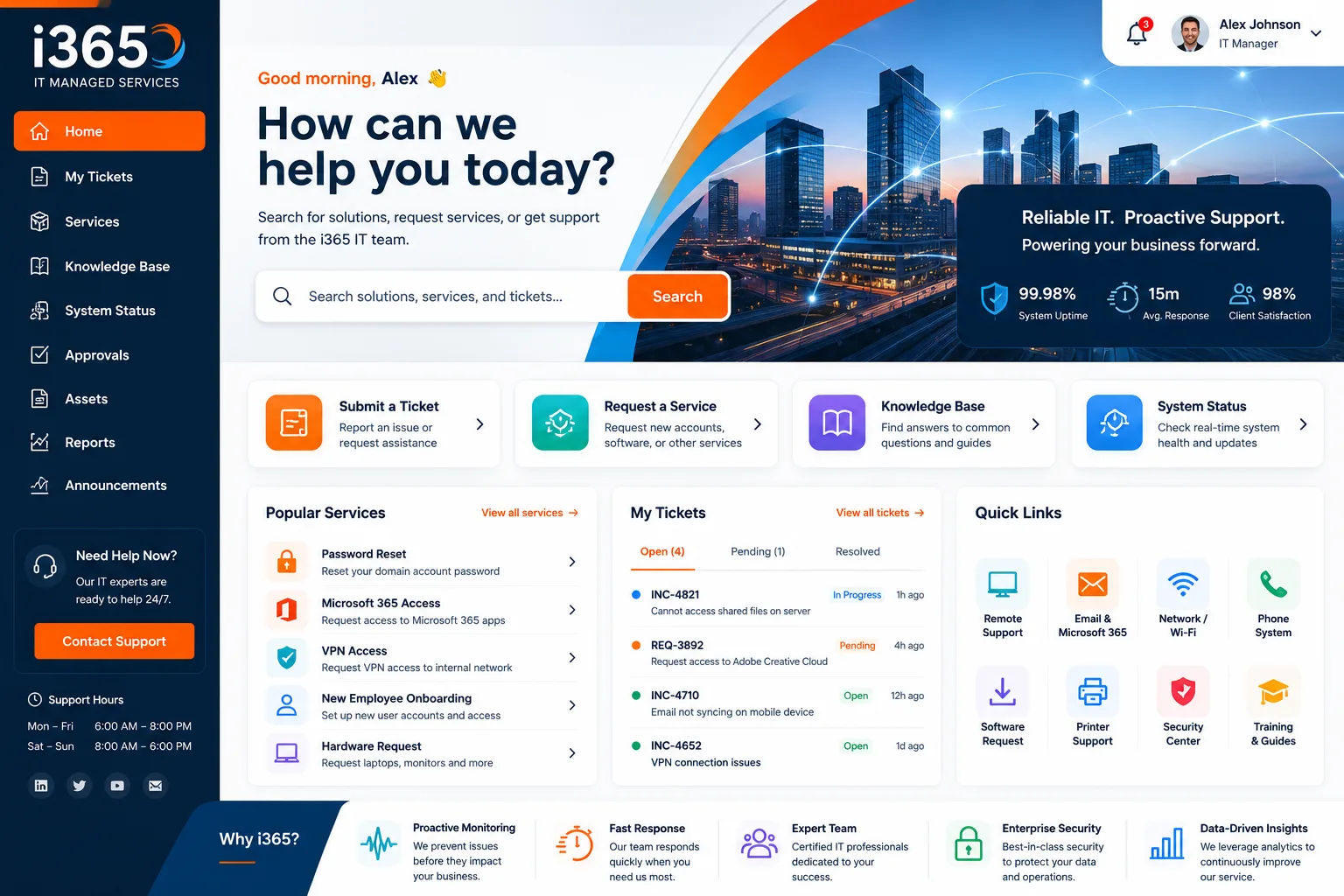
Example 3: The Onboarding Portal
New employee on day one? Instead of drowning in PDFs and forms, they log into the onboarding portal.
A solid onboarding portal walks new hires through:
Related: Employee Experience Through Portal Design: A Guide
- Welcome message from leadership
- Required compliance training and certifications
- IT setup (provisioning accounts, explaining systems access)
- Company policies and handbook
- Benefits enrollment guidance
- Org chart and directory with photos
- First-week schedule and manager introduction
One tech company automated their onboarding with a portal and cut the time new employees spent on administrative tasks by 40 percent. That means more time actually learning the job instead of jumping through hoops.
Example 4: The Company Knowledge and Policy Hub

Not every question needs to go to HR. A centralized knowledge hub answers common questions and makes policies searchable.
This portal type typically has:
- Searchable company handbook and policy library
- FAQ sections organized by topic
- Process guides (how to submit expense reports, how to book conference rooms)
- Organizational updates and announcements
- Links to other internal systems and resources
The magic happens when employees can find answers themselves in 30 seconds instead of waiting for an email response. That's less friction for your team and fewer interruptions for your admin staff.
Example 5: The Integrated Employee Experience Platform
Some larger organizations go all-in with a unified employee experience platform that combines HR, IT, and company information in one place.
These integrated portals pull from multiple systems:
- HR data (PTO, benefits, payroll, performance reviews)
- IT service management (help desk, asset tracking, software catalog)
- Learning management (training courses, certifications, skill development)
- Internal communications (announcements, team updates, company news)
- Directory and team collaboration tools
The goal here is simple: employees don't need to remember five different login URLs. One portal, everything they need. According to Gallup's research on workplace engagement, employees who have clear access to the tools and resources they need feel more connected to their work and the organization.
What Makes These Examples Work
All the portals above share a few common traits:
- User-centered design: They're built around what employees actually need, not what IT thinks they should want.
- Fast and intuitive: No confusing navigation or buried features. People find what they need in seconds.
- Mobile-friendly: Employees aren't always at a desk. A portal needs to work on phones and tablets.
- Regular updates: The portal is maintained and kept current, not abandoned after launch.
- Branding that matters: A portal that reflects your company culture feels like part of the organization, not a clunky add-on.
When you're evaluating an employee portal for your organization, these are the elements to look for. A portal is only useful if people actually use it. And people only use it if it's faster and easier than the alternative.
Building Your Own Portal: Where to Start

If you're using Freshservice as your IT service management platform, you already have the foundation for a solid IT service portal. But the default version? It's pretty bare-bones.
That's where portal customization and thoughtful design come in. A branded, tailored portal transforms the employee experience from "I guess I have to use this" to "Oh, this actually works really well."
If you're thinking about upgrading your Freshservice portal from stock template to something that actually reflects your company and reduces friction, Ascend Portal Experience specializes in exactly that kind of transformation. Fixed-price portal customization that gets it right the first time, no surprises.
People Also Ask
What is the main purpose of an employee portal?
The main purpose is to give employees self-service access to information and tools so they don't have to call HR or IT for every little thing. A good portal reduces administrative burden on your support teams and gets your employees answers faster. It's about making work easier for people.
What are the different types of employee portals?
The main types are HR self-service portals (benefits, PTO, payroll), IT service portals (help desk, requests, knowledge base), onboarding portals (for new hires), knowledge and policy hubs, and integrated employee experience platforms that combine everything. Most mid-sized companies use at least two of these.
How do you measure if an employee portal is successful?
Track adoption rates (are people actually using it?), reduction in help desk tickets, employee satisfaction scores, and time-to-resolution for common tasks. If your portal is reducing interruptions and people are using it consistently, it's working. If people are still calling with questions the portal answers, that's a design problem.
Can I customize a portal to match my company branding?
Absolutely. Most modern platforms allow you to customize colors, logos, and layouts. The level of customization depends on the platform. If you want a portal that truly feels like part of your company culture and drives adoption, investing in thoughtful design and branding is worth it. Employees engage more with a polished, branded experience than a generic default interface.
