
Let's be honest. Most ITSM helpdesk portals look like they were designed in 2005. Your employees dread logging in. They don't use self-service. Tickets pile up. And your IT team is drowning.
This doesn't have to be your reality.
Related: Best Self Service Helpdesk Portal Design for Freshservice
ITSM helpdesk portal design and branding is the difference between a tool nobody wants to touch and an experience your employees actually enjoy using. When you invest in thoughtful portal design, something shifts. Adoption goes up. Ticket volume goes down. Your team has breathing room again.
Related: How to Increase IT Helpdesk Portal Adoption in 2026
Related: Best Employee Helpdesk Portal User Experience in 2026
Here's what actually works.
Why Your Portal Design Matters More Than You Think
Your helpdesk portal isn't just a place to submit tickets. It's an extension of your company culture.
When employees see their company's branding, colors, and visual identity reflected in the portal, something clicks. They feel like they're using a tool built for them, not just some generic software. That matters for adoption rates. It matters for employee satisfaction. And honestly, it matters for your IT budget.
A poorly designed portal becomes invisible. People forget it exists. They email IT instead of using self-service. They call the helpdesk for things they could solve themselves. Your team becomes a bottleneck instead of a resource.
A well-designed, branded portal does the opposite. It pulls employees toward self-service. It deflects tickets before they clog your queue. It makes your team more efficient without hiring anyone new.
The Core Elements of ITSM Helpdesk Portal Design
Brand Customization That Actually Resonates
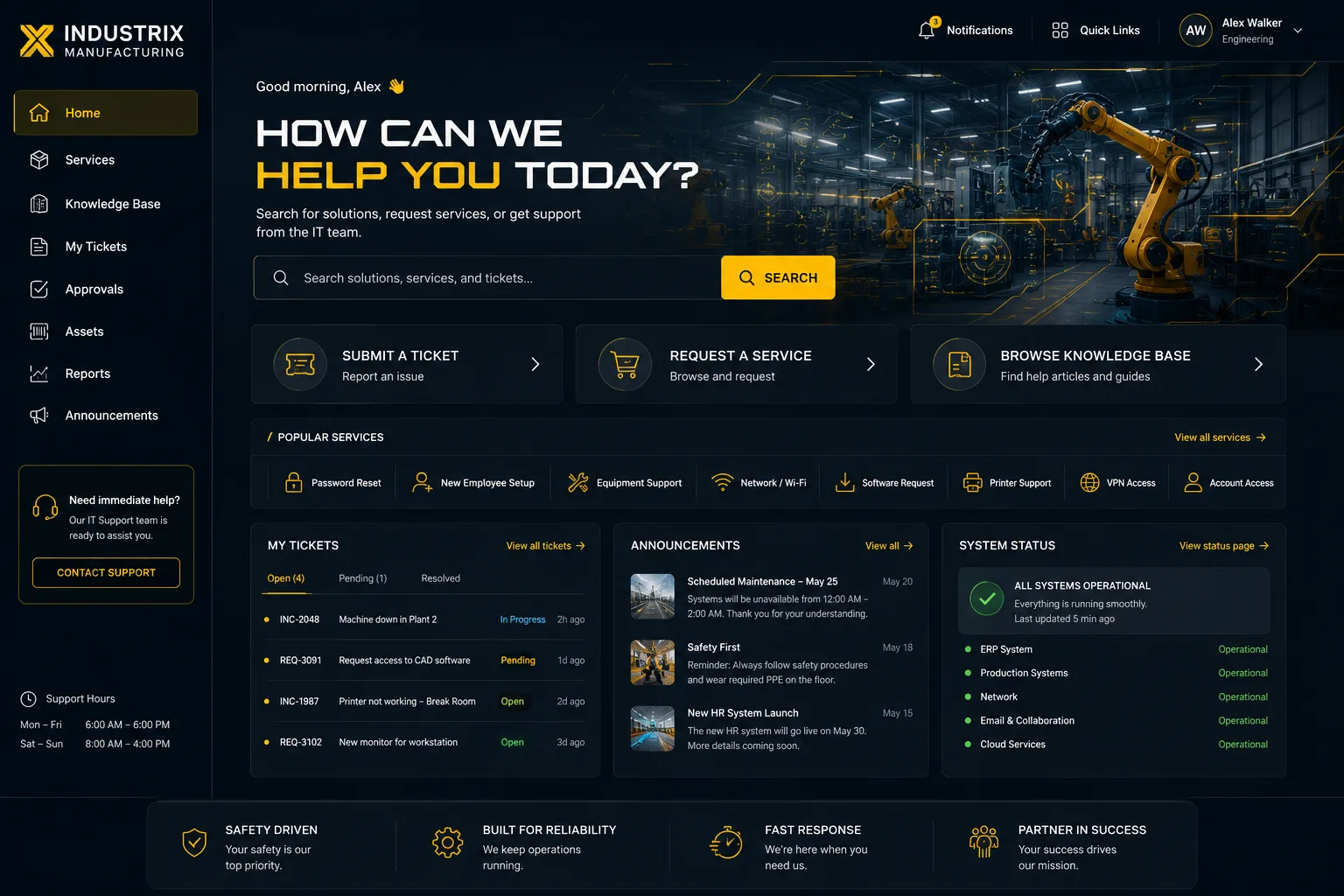
Your portal should look like it belongs to your company, not like a generic out-of-the-box template.
This means your logo, your color palette, your typography, and your visual style. When an employee opens the portal, they should immediately recognize it as part of your organization.
Branded portals feel intentional. They signal that IT invested in the employee experience. And that investment pays back in user engagement and adoption.
Flexible Homepage Layouts for Different Teams
Not everyone uses your portal the same way.
A developer might need quick access to password resets and account provisioning. Finance might need expense reporting or invoice processing workflows. HR might prioritize employee onboarding and offboarding tasks.
A smart portal design lets you customize homepage layouts for different user groups or departments. Employees see what matters to them first. They don't have to dig through irrelevant options. This reduces friction immediately.
Navigation That Doesn't Make People Want to Scream
Intuitive navigation is non-negotiable.
Your portal should have a clear hierarchy. Categories should make sense. Search should work. Users should find what they need in two or three clicks, not seven.
Bad navigation kills adoption faster than almost anything else. People will go around your portal and contact IT directly rather than hunt for what they need.
Multilingual Support
If your organization spans multiple regions or has a diverse workforce, your portal needs language options.
Employees should be able to view the portal in their preferred language. This isn't just nice to have. It's foundational to actually making the portal accessible and usable across your entire organization.
Self-Service: The Real Power of Portal Design
Here's the thing about portal design. It's not just aesthetics.
The real value is in enabling self-service. When your portal is well designed, employees can solve problems themselves without calling the helpdesk.
Password reset. Software requests. Account access. Hardware specs. FAQ searches. All the routine stuff that eats up your helpdesk's time can live in the portal instead.
Knowledge Base Integration
Your portal should include a searchable knowledge base with quality articles and resources.
This is where self-service actually happens. An employee has a problem. They search the portal. They find the answer. They fix it themselves. Your helpdesk never hears about it.
The key is making sure your knowledge content is actually good and easy to find. Outdated or poorly organized resources hurt adoption faster than no resources at all.
AI-Powered Automation and Smart Suggestions
Modern portals can use automation to guide employees toward answers before they even submit a ticket.
An employee starts typing a question or describing an issue. The portal surfaces relevant knowledge articles or common solutions automatically. Sometimes that's all they need to solve their problem.
This is self-service working the way it should. Employees get faster answers. Your team handles fewer routine tickets. Everyone wins.
Want to work together?
Get in Touch →Configurable Portals Built for Your Unique Needs
Your organization isn't generic. Your portal shouldn't be either.
A rigid, one-size-fits-all portal will never serve you as well as one built with flexibility in mind. You need to be able to add custom workflows. Adjust fields based on ticket type. Create specific portals for specific departments.
This flexibility lets your portal evolve with your organization. As needs change, your portal changes with you.
Visual Design Matters (More Than You'd Think)
Don't underestimate the power of good visual design.
Graphical elements, carefully chosen images, whitespace, typography. These things make a huge difference in how people perceive and use your portal.
A visually polished portal signals quality. It makes people want to use it. It builds confidence that they're in the right place.
A visually neglected portal, even if it has great functionality, feels cheap and abandoned. People avoid it.
Portal Design as Strategic Infrastructure
Here's the mindset shift you need to make.
Stop thinking of your helpdesk portal as a secondary interface. Stop treating it like an afterthought. View it as central to your entire IT service delivery strategy.
When you invest in thoughtful ITSM helpdesk portal design and branding, you're not just making something look prettier. You're fundamentally changing how your organization interacts with IT services.
Better portal design leads to higher self-service rates. Higher self-service rates reduce ticket volume. Lower ticket volume means your team can focus on meaningful work instead of triage.
This is strategic infrastructure. This moves the needle on business outcomes.
Getting Started With Your Portal Redesign

If your current portal feels stale or underutilized, it's time to reassess.
Start by asking yourself. Are employees actually using it? Do they find what they need? Does it reflect our brand? Is the navigation intuitive? Do we have current knowledge content?
If you're using Freshservice as your ITSM platform, you have flexibility to customize and brand your portal. You can transform it from a generic system into a tailored experience that drives adoption and improves employee satisfaction.
The team at ascendportalexperience.com specializes in exactly this kind of work. They handle the design, customization, and implementation of branded Freshservice portals with fixed-price certainty, so you know exactly what you're getting.
Related: Freshservice Portal Design Best Practices: 2026 Guide
But whether you work with them or handle it internally, the principles remain the same. Invest in design. Invest in branding. Invest in usability. Your team and your employees will thank you.
Related: Best Employee Self Service Portal Design & UX Guide 2026
Frequently Asked Questions
How much does it cost to redesign an ITSM helpdesk portal?
Costs vary based on the scope of customization, branding elements, and complexity of your specific needs. Factors that affect pricing include the number of custom workflows, design complexity, knowledge base setup, and integration requirements. Contact Ascend Portal Experience to discuss your requirements and learn about their fixed-price packages.
Can you customize Freshservice portals to match company branding?
Yes, Freshservice portals have significant customization capabilities. You can implement your company logo, color schemes, typography, custom layouts, and branded visual elements throughout the portal. The level of customization depends on your specific design goals and requirements.
How does a better portal design reduce helpdesk ticket volume?
When employees can easily find knowledge articles, use self-service workflows, and navigate the portal intuitively, they solve many issues without submitting tickets. A branded, user-friendly portal encourages self-service adoption because employees actually want to use it.
What's the difference between a generic portal and a branded ITSM helpdesk portal?
A generic portal is out-of-the-box and impersonal. A branded portal reflects your organization's identity, improves user engagement, and is customized for how your employees actually work. Branded portals typically see higher adoption rates because they feel intentional and relevant to users.

