
A client portal is basically a private, password-protected gateway where your clients can log in to access information about their account, communicate with you, and manage their relationship with your business—all without picking up the phone or sending an email.
Think of it as a VIP lounge for your clients. They get 24/7 access to what they need, whenever they need it. No waiting for business hours. No back-and-forth messages. Just self-service convenience wrapped in security.
Related: What Is a Portal? B2B Guide to Employee Access Platforms
Related: What Is an Employee Self-Service Portal? 2026 Guide
Related: What Is an Application Portal? B2B Guide for 2026
Related: What is a UI Portal? Complete B2B Guide for 2026
Related: What Is an ESS Portal? Complete Guide for 2026
Related: SSP Portal Explained: Self-Service Benefits Management Guide
For professional services firms, healthcare practices, and B2B companies using IT service management platforms, a client portal isn't a nice-to-have anymore. It's table stakes for keeping clients happy and reducing the workload on your team. Keep reading to understand what actually goes into a client portal, why it matters, and how to pick one that fits your business.
What Does a Client Portal Actually Do?
A client portal consolidates the most common things your clients need to do into one place. Here's what typically lives inside:
- Secure messaging - Back-and-forth communication between client and your team, all logged and searchable
- Appointment scheduling - Book, reschedule, or cancel appointments without phone tag
- Document uploads and digital forms - Clients fill out intake paperwork, consent forms, or intake surveys online
- Payment processing - Submit invoices, process payments, and view payment history
- Account information access - View their profile, service history, billing records, and personal details they've submitted
- Notifications and updates - Get alerts about appointments, new messages, or account changes
The exact feature set depends on your industry and what your clients actually need. A dermatology practice might emphasize before-and-after photo uploads and appointment reminders. An IT-focused organization might prioritize ticket tracking and status updates.
Why Your Clients (and Your Team) Need One
The real magic of a client portal is how it shifts friction away from both sides of the relationship.
For your clients: They don't have to wait for your office to open. They don't have to explain their situation twice. Everything they need is right there, organized and searchable. For busy professionals, that's huge.
For your team: You handle fewer repetitive phone calls and emails asking "where's my appointment?" or "what's the status of my request?" Your staff spends less time on administrative back-and-forth and more time on high-value work. That's a real productivity gain.
A client portal also builds trust. When clients can see what's happening in real time—whether that's appointment confirmations, ticket updates, or payment receipts—they feel less anxious and more in control. According to Health Affairs research on patient portal adoption, transparency and accessibility drive engagement and satisfaction.
In 2026, healthcare and professional services leaders are prioritizing portal redesigns specifically because they know a well-designed portal directly improves client adoption and retention.
Client Portal vs. General Website Login
Don't confuse a client portal with a website login area. A generic login might just let you see one or two pieces of information. A real client portal is purpose-built for managing an ongoing relationship.
A website login might gate a PDF or show a "my account" page. A client portal lets you schedule, communicate, submit documents, and track everything in real time. It's the difference between a bulletin board and a full office.
How Authentication Works

Most modern client portals let your clients sign in using whatever method feels easiest to them. Common options include:
- Email and password
- Google or Microsoft account sign-in
- Single sign-on (SSO) if your clients already use your company's internal tools
- Magic links (click a link in your email, instant access, no password)
The goal is to eliminate friction during login. The fewer barriers between your client and access, the more likely they'll actually use it.
Client Portals in Professional Services and IT Service Management
If you run an IT helpdesk or service desk, a client portal is essential infrastructure. Employees need a fast, intuitive way to submit requests, check ticket status, and get help without hunting down phone numbers or waiting in queue.
A branded, well-designed client portal turns your IT helpdesk from a dreaded bottleneck into a tool that employees actually want to use. When your portal feels like part of your organization—not a generic, clunky form—adoption goes way up.
That's where platform customization matters. Ascend Portal Experience specializes in transforming standard ITSM portals into branded, user-friendly experiences that fit how your organization actually works. Instead of forcing your team to adapt to the software, the software adapts to your team.
Want to work together?
Get in Touch →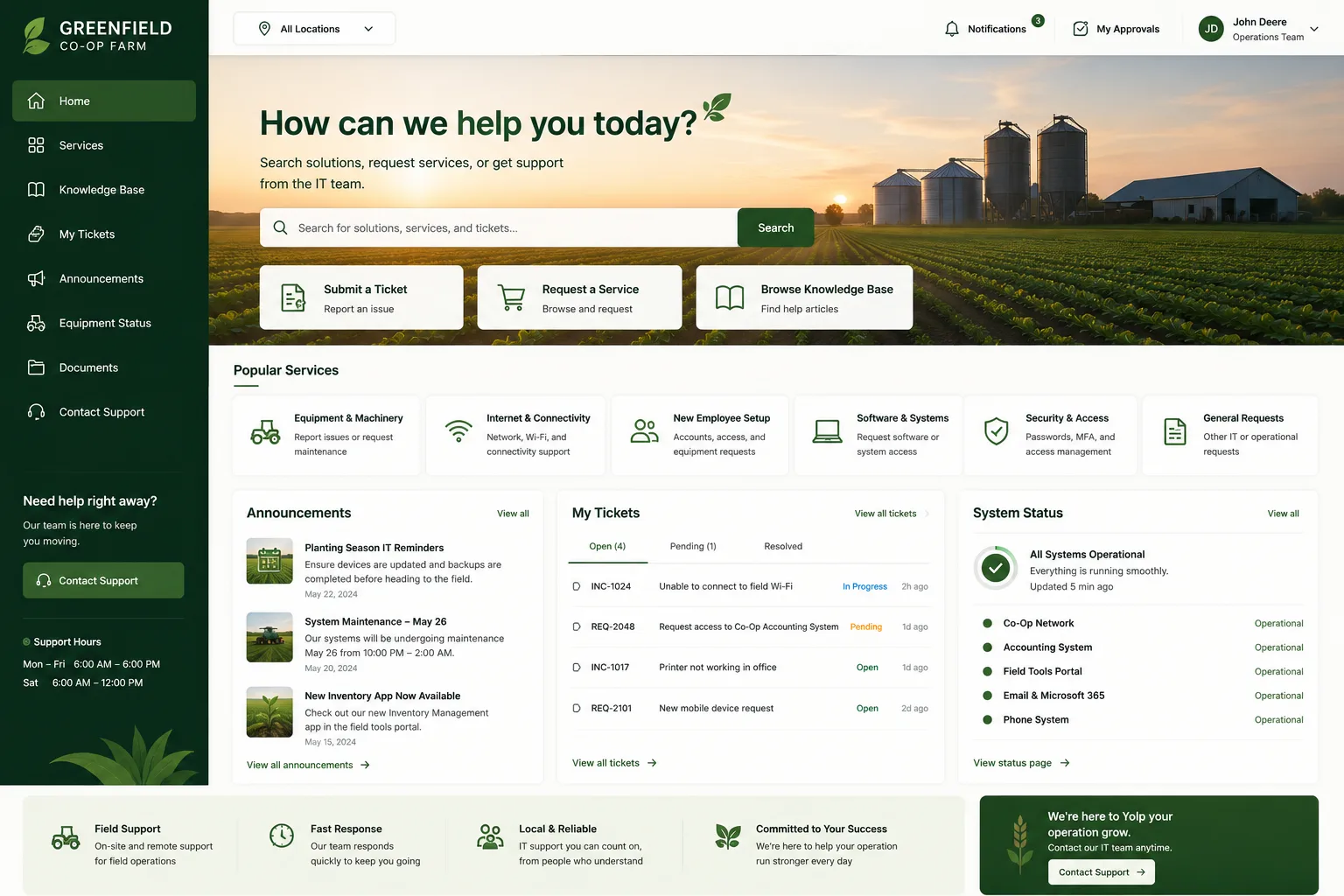
Key Features to Look For
If you're evaluating a client portal solution, here's what to prioritize:
- Mobile-friendly design - Most users will access on their phone. If it doesn't work on mobile, you've lost them
- Fast load times - Slow portals get ignored. Speed matters
- Clear, simple navigation - Your clients shouldn't need a training video to find what they're looking for
- Reliable security - Data encryption, secure authentication, compliance with industry standards (HIPAA, SOC 2, etc.)
- Integration with your existing tools - If your portal doesn't talk to your helpdesk, CRM, or billing system, you're doing double work
- Easy to customize - Your portal should reflect your brand, not look like everyone else's
- Support and onboarding help - A portal is only useful if your team and clients actually know how to use it
Portal Design and Redesign as a Strategic Priority

Healthcare leaders and IT managers are realizing that portal redesign isn't a side project—it's a strategic investment in client retention and satisfaction.
A clunky, outdated portal tells your clients "we don't care about your experience." A thoughtfully designed portal says "we built this for you."
When you're redesigning your portal, focus on the actions your clients actually perform most. If 70% of your traffic is appointment scheduling, make scheduling fast and frictionless. If your clients mainly need to check ticket status, make that prominent and obvious.
If you're using Freshservice as your ITSM platform and want to move beyond the default portal, Ascend Portal Experience can help you build a branded, optimized portal that your team will actually want to use. That's not a generic software recommendation—it's a targeted investment in adoption and satisfaction.
Real-World Impact
Organizations that invest in portal redesign typically see measurable improvements pretty quickly:
- Higher ticket submission rates (employees stop avoiding the helpdesk)
- Lower support volume for basic requests (clients self-serve instead)
- Faster resolution times (because clients provide better information upfront)
- Improved client satisfaction scores
- Reduced training and onboarding time for new users
These aren't soft benefits. They show up directly in your efficiency metrics and client satisfaction scores.
Getting Started With a Client Portal
If you don't have a client portal yet, or if your current one feels outdated, here's the honest path forward:
- Define what your clients actually need. Talk to them. What tasks do they do most? Where do they get stuck?
- Pick a platform that supports those tasks. Don't pay for features you won't use. Match the tool to your use case.
- Design with your users in mind. Mobile-first. Simple. Branded. Fast.
- Make onboarding smooth. Even the best portal won't be used if nobody knows how. Provide help, tutorials, and support during the rollout.
- Measure and iterate. Look at usage data. Ask users what's working and what isn't. Improve based on feedback.
If you're running Freshservice and want to skip the guesswork, Ascend Portal Experience handles the design and customization work with fixed pricing, so you know exactly what you're investing upfront. No surprises. Just a portal that actually works.
Frequently Asked Questions
Is a client portal the same as a knowledge base?
Not quite. A knowledge base is a library of articles and answers (how-to guides, FAQs, troubleshooting steps). A client portal is a personal dashboard where individual clients manage their own account, book appointments, submit requests, and communicate with your team. Many portals include a knowledge base as one feature, but they're different tools with different purposes. A knowledge base helps clients help themselves. A portal helps clients manage their relationship with you.
What's the difference between a client portal and a customer service chatbot?
A chatbot is automated—it uses AI to answer common questions instantly. A client portal is a space where clients access their own information and communicate with your team directly. Chatbots are great for quick answers. Portals are better for ongoing relationships, account management, and personalized communication. Many organizations use both together.
Do I need a client portal if I'm using Freshservice?
Freshservice includes a basic portal by default, but the default portal is generic and often doesn't reflect your brand or match how your specific organization works. A customized portal (like what Ascend Portal Experience builds) boosts adoption and satisfaction by making the portal feel like a natural part of your workflow. If you're serious about client engagement, customization is worth the investment.
How long does it take to implement a new client portal?
It depends on complexity and customization. A standard out-of-the-box portal can go live in a few weeks. A custom-branded portal with advanced features might take 2-3 months. The key is choosing a partner who can handle the design, technical work, and onboarding without dragging the timeline out. Fixed-price projects with clear scope tend to move faster than hourly consulting.


