
Your IT team built a portal. Employees barely use it. Sound familiar?
The problem isn't the technology. It's that generic portals feel generic. When your helpdesk portal looks like every other enterprise software, employees treat it like overhead. They forget passwords, skip self-service, and flood your support queue with questions they could've solved themselves.
Related: How to Increase IT Helpdesk Portal Adoption in 2026
Related: How to Rebrand Freshservice Helpdesk Portal in 2026
Related: Freshservice Portal UI Improvements: What's New in 2026
Related: Best Freshservice Portal Personalization 2026: Top 5 Ranked
Related: Best Freshservice Portal Navigation Improvements for 2026
Related: Best Enterprise IT Service Management Portal Redesign Solutions 2026
Related: IT Service Management Portal Best Practices for 2026
Enterprise IT portal personalization features fix this. They transform a forgettable system into an experience your team actually wants to use. And the business impact is real: better adoption, fewer tickets, happier employees.
If you're using Freshservice or evaluating portal customization, here's what separates portals that work from ones that sit gathering digital dust.
Related: Best Freshservice Portal Optimization for Adoption in 2026
Related: Best Vendor Portal for Freshservice ITSM in 2026
Why Enterprise IT Portal Personalization Features Matter Right Now
In 2026, generic portals are costing you money. Every employee who avoids your self-service portal generates a support ticket. Every ticket is time your team could've spent on strategic work instead of repetitive password resets and FAQ answers.
The solution: personalization. Employees interact more deeply with tools that feel built for them.
Research shows that personalized digital experiences drive significantly higher engagement across enterprise software. When your portal adapts to individual roles, preferences, and workflows, adoption skyrockets.
That's where Ascend Portal Experience steps in. Personalization isn't an afterthought in premium portal design. It's the foundation.
Want to work together?
Get in Touch →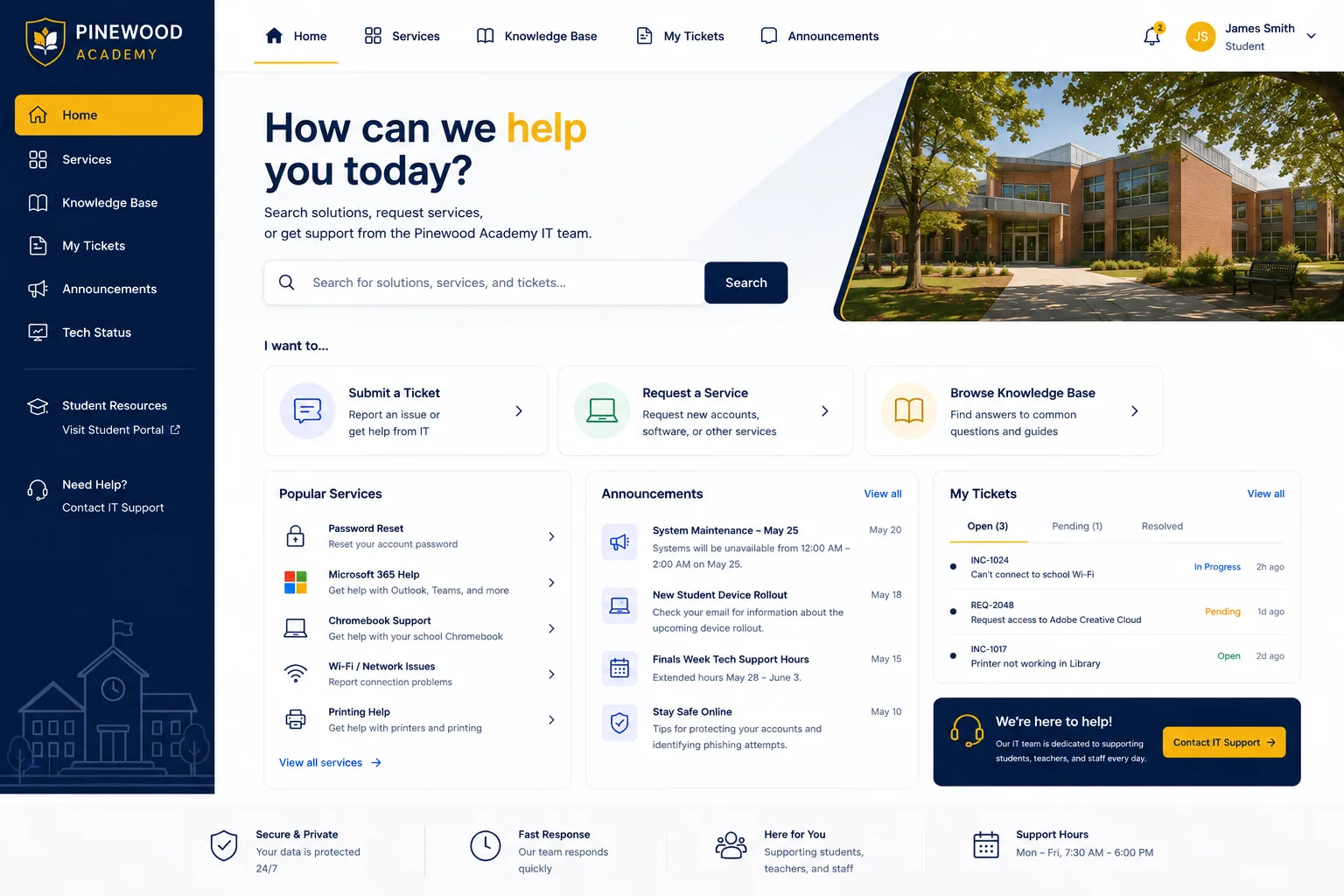
The Must-Have Enterprise IT Portal Personalization Features
Not all personalization features deliver equal value. Here's what actually moves the needle:
Branded Login Pages and Homepages
Your portal is often the first thing an employee sees when requesting help. If it looks generic, they're already thinking "support ticket hassle." A branded, professionally designed login page and interactive homepage signal that IT cares about their experience. It's a small change with outsized impact on first impressions and continued engagement.
AI-Powered Search and Navigation
Employees don't want to hunt for help. They want answers now. Intelligent search functionality that learns from user behavior and delivers contextual results cuts down friction dramatically. When your portal understands what an employee is trying to do and surfaces the right article or form in two clicks instead of ten, adoption goes up and support volume goes down.
User-Specific Dashboards
A one-size-fits-all dashboard wastes everyone's time. Personalized dashboards that show employees their open tickets, pending approvals, and frequently-used services make the portal genuinely useful on first login. When someone sees their own tasks waiting, they stop treating the portal as optional.
Personalized Workflows and Task Management
Different roles need different experiences. Your finance team's portal shouldn't look or function like your development team's. Role-based personalization ensures each user sees only what's relevant to them. Quick access to individual task lists, status updates, and personalized to-do items transforms the portal from a lookup tool into a productivity hub.
AI-Guided Recommendations
Modern portals use intelligent engines to suggest relevant resources, similar solutions, and helpful articles based on what a user is currently doing. This feels helpful, not invasive. When an employee is submitting a hardware request, the portal might suggest related FAQs or previous similar requests. It's like having a helpful colleague whisper the answer before you finish typing.
No-Code Customization Capabilities
You shouldn't need a developer every time you want to adjust your portal. No-code customization empowers non-technical users to tweak layouts, reorder sections, and adjust content without developer dependencies. Faster iterations. Faster response to feedback. Lower costs.
How Personalization Drives Real Business Outcomes
Personalization isn't just about making things look nice. It changes how employees behave.
Organizations that implement robust portal personalization consistently report:
- 30-40% increases in self-service resolution rates
- Reduced support ticket volume by up to 25%
- Higher portal adoption across all user segments
- Improved employee satisfaction with IT services
- Lower onboarding friction for new employees
Why? Because personalization removes the friction between "I need help" and "I found the answer." When your portal anticipates employee needs and surfaces relevant content automatically, it becomes a trusted tool instead of a reluctant last resort.
This is especially powerful in professional services environments where tech teams manage complex implementations, integrations, and ongoing optimization. Portal personalization helps these teams find technical documentation, access project-specific resources, and collaborate more efficiently.
The Difference Between Surface-Level and Strategic Personalization

Not all personalization is created equal. Some vendors offer basic customization: color your logo, rename fields, shuffle sections around. That's cosmetic personalization. It feels nice but doesn't meaningfully change behavior.
Strategic personalization goes deeper. It's about understanding user intent, adapting content dynamically, building workflows that align with how people actually work, and continuously improving based on engagement data. This requires both strong design thinking and technical capability.
When you're evaluating Ascend Portal Experience's approach to portal design, ask yourself: Is this vendor helping me understand my users and adapt the experience to their needs, or are they just painting my logo on a template?
Building a Personalization Strategy That Works
If you're ready to implement enterprise IT portal personalization features, here's how to approach it strategically:
Start with User Research
Who actually uses your portal? What are they trying to accomplish? What frustrates them? Spend time understanding your audience before you customize anything. The best portal features solve real problems, not imagined ones.
Prioritize High-Impact Changes First
You can't personalize everything at once. Focus on the changes that will reduce support volume fastest: better search, role-based dashboards, clearer self-service for your top ten request types.
Test and Iterate
Personalization isn't a one-time project. Your portal should evolve based on how employees actually use it. Track engagement metrics, gather feedback, and adjust. The best portals are the ones that improve continuously.
Invest in Professional Design and Implementation
DIY customization feels cheap until it doesn't. A professionally designed, strategically personalized portal drives adoption and reduces support costs for years. Ascend Portal Experience specializes in exactly this: transforming generic Freshservice portals into branded, personalized experiences that employees actually prefer using.
Making Enterprise IT Portal Personalization Affordable and Achievable
Portal personalization doesn't have to be a massive, open-ended project with unclear budgets and timelines. Fixed-price portal customization services eliminate guesswork. You know exactly what you're getting, what it costs, and when it's delivered.
The Ascend Professional Portal Package includes everything: strategic design assessment, personalization features implementation, branding integration, employee onboarding, and post-launch support. No hidden costs. No surprise bills. Just a personalized portal that works.
For IT directors and service managers tired of employees avoiding their helpdesk portal, this is the fastest path to meaningful change. You don't need months of internal project management or a big consulting budget. You need a partner who understands both the business outcomes you're chasing and the technical precision required to deliver them.
Your Next Step: Evaluate What's Actually Possible
Enterprise IT portal personalization features have matured significantly. What was cutting-edge two years ago is now table stakes. The question isn't whether you can personalize your portal. It's whether you're ready to act on the fact that generic portals are costing you time, money, and employee satisfaction.
If you're using Freshservice and thinking about portal customization, start a conversation with professionals who've done this dozens of times. You'll learn what's achievable, what actually drives adoption, and what ROI you can expect. That's the conversation that transforms a mediocre portal into a competitive advantage.
What's the biggest barrier to personalizing our current portal?
Usually, it's not technology. It's either unclear ROI, fear of disrupting existing workflows, or uncertainty about where to start. Talk to your team about which one is stopping you. The answer will clarify your next move.
How long does it take to implement enterprise IT portal personalization features?
That depends on scope. Basic personalization (branding, dashboard customization, improved search) can be live in 4-8 weeks. More comprehensive personalization involving AI-guided recommendations and complex workflow redesign might take 8-12 weeks. Fixed-price implementations give you a clear timeline from day one.
Can we personalize our portal without disrupting current operations?
Yes. Modern portal customization should happen in parallel to your existing system, with phased rollout to users. You can test, gather feedback, and refine before full launch. Zero disruption is absolutely achievable.
How do we measure whether personalization is actually working?
Track adoption rates, support ticket volume, self-service resolution rates, employee satisfaction surveys, and portal engagement metrics. Compare before and after. The best personalization efforts show measurable increases in adoption and reductions in support volume within 30-60 days of launch.


