
Your IT service desk portal is either working hard for you or working against you. If you're watching adoption rates plateau while your help desk team fields the same repetitive questions, the problem usually isn't your Freshservice platform itself. It's that your portal doesn't feel like it belongs to your organization. Employees see a generic, out-of-the-box interface and skip straight to emailing the IT team. That's when Freshservice portal optimization for adoption becomes your competitive edge.
The good news: adoption doesn't require a complete rebuild. It requires strategic design decisions that align your portal with how your employees actually work. Let's walk through the moves that move the needle.
Related: Freshservice Portal UI Improvements: What's New in 2026
Related: Best IT Helpdesk Portal Redesign Process for Freshservice
Related: How to Rebrand Freshservice Helpdesk Portal in 2026
Related: Freshservice Portal Design Best Practices: 2026 Guide
Related: Best Vendor Portal for Freshservice ITSM in 2026
Related: Best Unified Portal for Freshservice ITSM Teams
Why Portal Design Directly Impacts Adoption Rates
Here's what most IT leaders discover too late: a poorly designed portal kills adoption before any training program can save it. When your self-service experience feels disconnected from your company's brand and culture, employees lose confidence. They assume it's outdated. They assume it won't solve their problem. So they pick up the phone instead.
The data backs this up. Organizations that invest in portal customization aligned with their brand guidelines see measurable jumps in self-service utilization. Your Freshservice portal isn't just a ticketing interface. It's your first touchpoint with employees during moments of friction. Make it count.
Related: Freshservice Portal Customization Services: A Complete Guide
Related: Best Freshservice Portal Customization 2026: Top 5 Ranked
Related: Best Freshservice Portal Design 2026: Top 5 Ranked
Related: Best Freshservice Portal Solutions 2026: Top 5 Ranked
Ascend Portal Experience specializes in transforming Freshservice portals from generic tools into branded, adoption-driving assets. The philosophy is simple: a portal that feels like yours gets used. A portal that feels like software gets ignored.
Want to work together?
Get in Touch →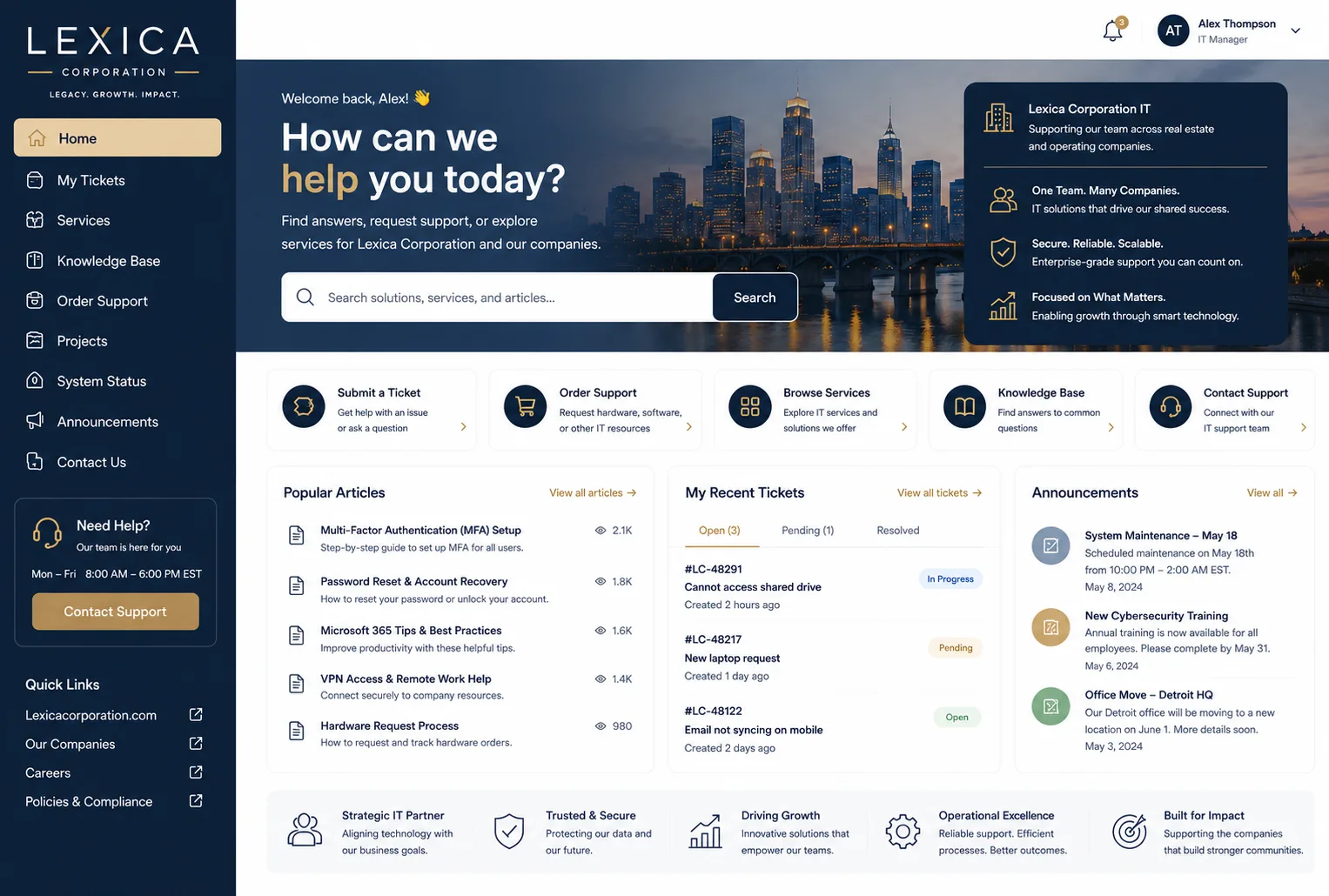
The Three Pillars of Freshservice Portal Optimization
1. Branding Integration That Builds Trust
Your employees recognize your company's colors, logo, and visual language instantly. When they land on your IT portal and see a completely different design system, cognitive dissonance kicks in. This isn't your Freshservice portal anymore. It's some external tool. Their guard goes up.
Customizing your portal to match your organizational brand guidelines creates psychological continuity. The portal feels like an official part of how work happens here. That shift from "external tool" to "part of our ecosystem" is adoption's foundation. Employees engage more readily. They spend time exploring services they might otherwise skip. Self-service ticket resolution accelerates.
2. Service Catalog Organization That Guides Behavior
How you sequence and categorize your service catalog determines where employees look first. Freshservice's Global Settings let you control the display order of service categories with surgical precision. This matters more than it sounds.
Most organizations dump 40+ services into their catalog without hierarchy or logic. Employees scroll past the solutions they need because the catalog feels overwhelming. When you reorganize services around employee workflow and language, adoption climbs. The most requested services surface first. Related items cluster together. New employees find what they need without asking.
Think of it like grocery store layout. Nobody complains when milk is in the back. But when milk is scattered across three aisles, you lose shoppers to frustration. Same principle applies to your service catalog.
3. Portal Navigation That Reduces Friction
Self-service adoption lives or dies on speed and clarity. Can an employee find a password reset in under 10 seconds? Can they submit a software request without decoding IT jargon? Does the portal tell them what to expect next, or leave them wondering?
Streamlined portal configuration reduces administrative overhead while making the experience frictionless. Clear CTAs, logical menu structures, and transparent status tracking all push adoption upward. Ascend Portal Experience architects these workflows so employees move through self-service experiences with confidence.
Measurable Outcomes From Portal Optimization
You're not optimizing for vanity metrics. You're optimizing for outcomes that directly impact your IT team's capacity and employee satisfaction.
Faster Issue Resolution: When self-service works, tickets get resolved without human intervention. Password resets, software requests, and access provisioning move through automated workflows. Your service desk team stops being a task queue and starts being a problem solver for complex issues that actually need human judgment.
Reduced Ticket Volume: A well-designed, adoption-friendly portal can reduce overall ticket volumes by moving routine requests to self-service. According to research on ITIL best practices and service management, optimized self-service reduces helpdesk workload by 30-40% on average. That's capacity you can redeploy to strategic work.
Related: How to Increase IT Helpdesk Portal Adoption in 2026
Related: Best Enterprise IT Service Management Portal Redesign Solutions 2026
Related: Best Enterprise IT Portal Personalization Features for 2026
Higher Employee Satisfaction: Employees want to solve problems without waiting. When your Freshservice portal feels native to your organization and works intuitively, they get that experience. Satisfaction scores climb. IT's reputation improves. That matters when you're competing for budget and talent.
Common Optimization Mistakes to Avoid

Not all portal customization strategies work equally. Here's what derails adoption:
- Over-branding without usability: Your portal can look beautiful and still be broken. Visual design matters only if navigation works underneath. Always test with actual users before launch.
- Ignoring mobile users: Employees submit tickets from phones. A portal that only works on desktop forces them to wait for a computer. Mobile-first design isn't optional.
- Burying the most-used services: If password reset requires three clicks and software requests require seven, adoption fails. Most-used services should always be prominent.
- Static portals that don't evolve: Your service catalog should reflect seasonal demand and new offerings. Stale portals feel abandoned. Keep content fresh.
- Launching without training: Even a perfect portal needs a 30-day rollout with communication and training. Expect adoption to ramp over weeks, not days.
How to Measure Optimization Success
Before you optimize, establish your baseline. What's your current self-service adoption rate? How long does the average ticket spend in queue? What's the first-contact resolution rate?
After optimization, measure these metrics monthly:
- Self-service request volume as percentage of total requests
- Time-to-resolution for automated requests
- Employee portal satisfaction scores
- Ticket volume trend (should decline)
- Help desk team capacity freed for strategic work
You should see adoption gains within 60 days. Significant shifts in team capacity typically follow within 90 days.
Getting Started With Portal Optimization
Portal optimization doesn't require starting from scratch. Most organizations using Freshservice can achieve dramatic adoption gains by focusing on the three pillars: brand alignment, service catalog logic, and frictionless navigation.
Related: Best Freshservice Portal Navigation Improvements for 2026
The challenge is execution. Freshservice's flexibility is powerful but also complex. Small missteps compound into poor adoption. That's why many IT leaders bring in specialized partners who've done this work dozens of times.
If you're ready to transform your Freshservice portal from a generic tool into a branded, adoption-driving asset, Ascend Portal Experience builds portals on fixed-price engagements with guaranteed outcomes. No surprises. No endless customization cycles. Just a portal designed to actually get used.
What's the typical timeline for portal optimization?
Most portal redesigns take 6-10 weeks from discovery through launch. That includes branding workshops, service catalog reorganization, design, configuration, testing, and a phased rollout. Some organizations move faster with a limited initial scope and iterate afterward.
Will optimization work if our employees already ignore the current portal?
Yes, but you'll need a relaunch communication plan. Employees form habits quickly. If they've gotten used to emailing IT, they'll skip the portal at first even if it's better. Plan for 2-3 weeks of active promotion, training, and gentle friction (polite redirects from email to self-service) to reset behavior.
Do we need to migrate data or rebuild Freshservice to optimize?
No. Portal optimization works with your existing Freshservice instance. You're reconfiguring the front-end experience, not touching your backend data, workflows, or automations. Your current tickets, users, and configurations stay intact.
How much does Freshservice portal optimization typically cost?
Costs vary based on complexity, branding depth, and service catalog size. Most mid-market organizations invest $15,000-$40,000 for a complete redesign with full branding, catalog reorganization, and launch support. Premium packages with advanced customization run higher. Ask about fixed-price engagements to lock in costs upfront.


