
ITSM stands for Information Technology Service Management. It's basically the framework and set of practices your IT team uses to design, deliver, operate, and support the technology services your business relies on every single day.
Think of it this way: instead of treating IT as a bunch of separate, disconnected tasks, ITSM brings everything together. It's about managing IT as a cohesive service that aligns with what your business actually needs. That could mean faster request fulfillment, better uptime, smoother onboarding, or more predictable costs.
Related: Best ITSM Capabilities for Employee-Focused Service Desks
Related: Is ITSM the Same as Helpdesk? Key Differences Explained
Why ITSM Matters for Your Business
You probably interact with ITSM without even realizing it. When you submit a password reset request and get a ticket number, that's ITSM. When IT makes sure your email doesn't go down during peak hours, that's ITSM. When your company onboards 50 new employees and everything gets provisioned in a day instead of a week, that's ITSM working.
The real value? ITSM reduces chaos. It cuts costs, improves how often services actually work (that fancy term is "availability"), and makes it way easier for employees to get what they need. Most teams using ITSM report better service quality and lower operational costs.
The Core Components of ITSM
ITSM typically covers five main areas:
- Service Design: Planning what services you'll offer and how they'll work
- Service Delivery: Actually running and maintaining those services day-to-day
- Request Fulfillment: Processing employee requests (new laptop, software license, access to a tool)
- Incident Management: Fixing problems fast when something breaks
- Access Management: Making sure the right people get the right permissions
When these five pieces work together smoothly, your IT operation feels less like a helpdesk and more like a strategic partner in your business.
ITSM and ITIL: What's the Difference?
You'll often hear ITSM and ITIL mentioned together, and that can be confusing. Here's the simple version:
Related: ITSM vs ITIL 2026: What's the Difference?
Related: Top 5 ITSM Tools for 2026: Complete Breakdown
Related: Best ITSM Tools 2026: Top 6 Ranked & Compared
ITIL (IT Infrastructure Library) is the rulebook. It's a set of best practices and standards that tell you how to do ITSM the "right way."
ITSM is what you actually do. It's the day-to-day practice of managing your IT services.
So ITIL is the guidance, and ITSM is the execution. Most organizations that take ITSM seriously follow ITIL principles, but they customize things based on their size, budget, and goals.
How ITSM Tools Power Better Service Delivery

You can't do modern ITSM without the right platform. Tools like Freshservice help you automate workflows, track requests, measure performance, and give employees a smooth experience when they need help.
The best ITSM platforms do more than just log tickets. They integrate with your other business systems, give you real-time dashboards, and let you customize everything to match your company's brand and culture. That's why many enterprises partner with Ascend Portal Experience to transform their Freshservice setup from a generic helpdesk into a branded employee experience that people actually want to use.
Related: Best ITSM Standards Framework for Freshservice Portal
Related: Best ITSM Functions for Freshservice Portal Success
Related: Best Vendor Portal for Freshservice ITSM in 2026
Want to work together?
Get in Touch →Related: What Does Employee Self-Service Portal Mean?
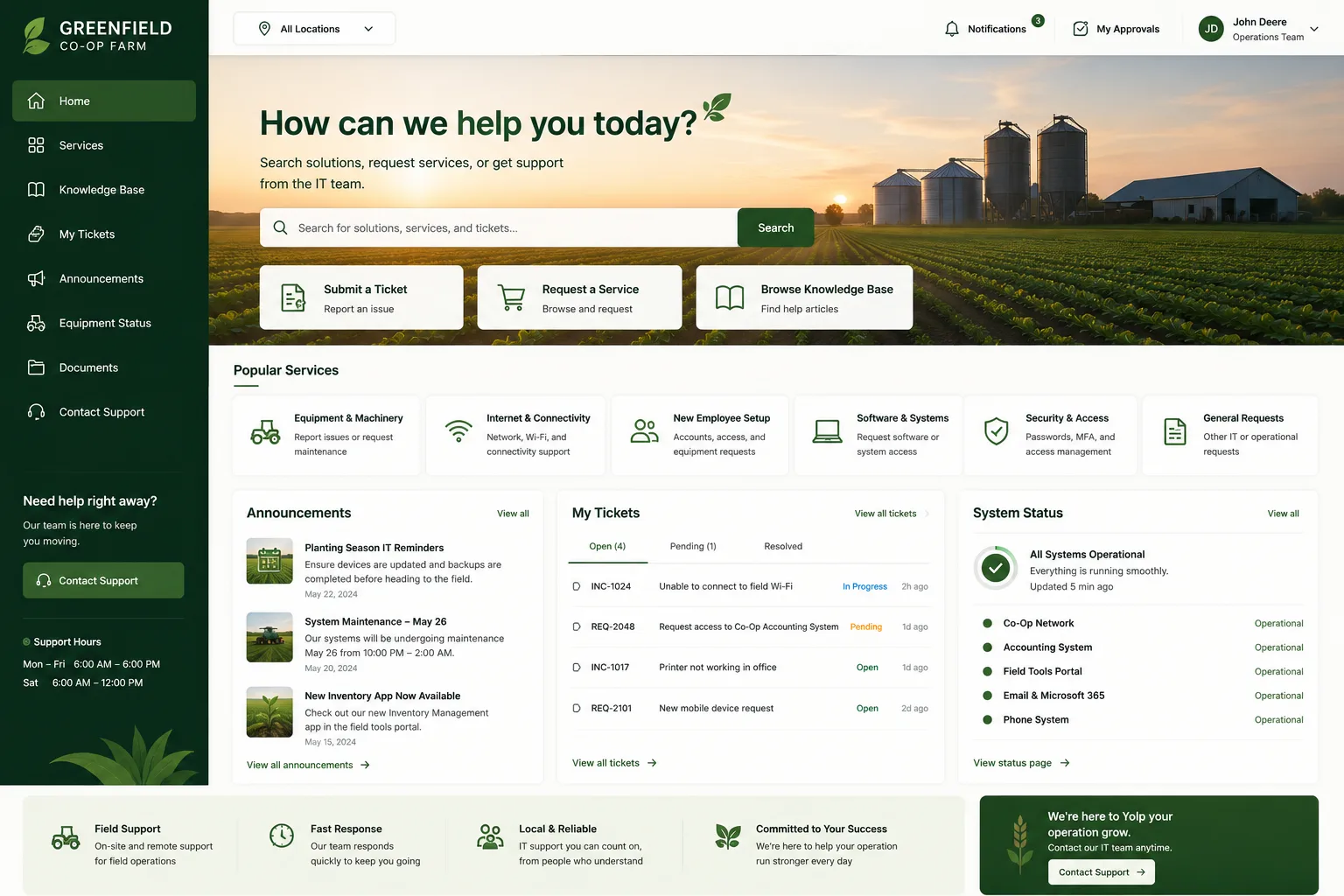
When your ITSM tool is tailored to your business and easy to navigate, adoption goes up. That means faster resolution times, happier employees, and measurable ROI.
The Business Impact of Strong ITSM
Organizations with mature ITSM practices typically see:
- 20-30% reduction in IT operational costs
- Faster incident resolution (sometimes hours instead of days)
- Higher employee satisfaction scores
- Better alignment between IT and business goals
- Easier compliance audits and governance
The key is treating ITSM as an investment in employee experience, not just a cost center. When people can submit requests through a clean, branded portal and get answers fast, they perceive IT as helpful rather than a roadblock.
Getting Started with ITSM
If your organization doesn't have formal ITSM practices yet, start small. Pick one area (like request fulfillment or incident management) and build a repeatable process around it. Use your ITSM platform to track metrics so you can see what's working and what needs adjustment.
Related: ITSM Guidelines: 6 Steps to Build a Structured Approach
For organizations already using tools like Freshservice, the next step is often to optimize the experience. That's where Ascend Portal Experience comes in. A well-designed ITSM portal isn't just functional, it's a reflection of your company culture. It's the difference between employees dreading a ticket submission and actually preferring to use your system over email or Slack.
Read more about how premium portal design transforms Freshservice implementations for mid-market and enterprise teams.
Common ITSM Mistakes to Avoid

Don't treat ITSM as IT's problem alone. Your finance, HR, and operations teams should be part of the conversation because IT services affect everyone.
Don't over-complicate things right out of the gate. Start with clear, documented processes and add complexity only when you actually need it.
And don't ignore the user experience side. A powerful ITSM platform that nobody wants to use is a waste of money. Check out how Ascend Portal Experience helps teams design portals that employees actually enjoy using.
Key Takeaways
ITSM is Information Technology Service Management, and it's essential for running IT like a business. It covers everything from service design to request fulfillment to incident management. When you implement ITSM well and pair it with a great platform and user experience, you reduce costs, improve uptime, and create a better working environment for everyone.
For more information on ITSM best practices, check out the official ITIL body of knowledge, which outlines the globally recognized standards for service management.
What's the difference between ITSM and IT operations?
IT operations is what your IT team does on a daily basis (running servers, fixing computers, managing networks). ITSM is the management framework and set of practices that organizes IT operations around delivering value to the business. Think of IT operations as the work, and ITSM as the system that makes the work efficient and aligned with business goals.
Do I need ITIL certification to implement ITSM?
No. ITIL certification is valuable for individuals who want to specialize in service management, but your organization can absolutely adopt ITSM practices without anyone holding a certification. That said, having at least one or two certified ITIL professionals on your team can help you avoid common mistakes and build a stronger program faster.
What's the best ITSM platform?
There's no single "best" platform because it depends on your company size, budget, and specific needs. Popular options include Freshservice, ServiceNow, and others. The best choice is the one that fits your workflows and can be customized to reflect your company's brand and culture. That's why many teams invest in portal design and implementation after selecting their core ITSM tool.
Related: Best Custom ITSM Portal Implementation 2026: Top 5 Ranked
Related: Best ITSM ITIL 4 Solutions 2026: Top 5 Ranked
How long does it take to see ROI from ITSM?
You can start seeing quick wins (faster ticket resolution, fewer missed requests) within weeks of implementing ITSM practices. Larger cost savings and efficiency gains typically become measurable within 3-6 months once your team settles into new processes and your employees get comfortable with the system.