
Your employee portal is either working for you or against you. There's rarely a middle ground.
When employees open their portal expecting a frustrating experience, they've already checked out. They'll find workarounds. They'll email IT instead of self-serving. They'll tell new hires the system is broken. One poorly designed portal doesn't just create friction—it erodes trust in your entire IT operations.
The good news? Improving your employee portal experience doesn't require a complete platform overhaul. It requires clarity about what your employees actually need and the willingness to design around those needs instead of accepting your platform's defaults.
Related: Employee Portal Examples: Real-World Use Cases
Related: Employee Self-Service Portal Transformation: A Complete Guide
Related: Employee Experience Through Portal Design: A Guide
Related: What Does Employee Self-Service Portal Mean?
Related: Employee Portal Interface Improvements: A Complete Guide
Related: Employee Experience Portal Improvements: 5 Changes That Work
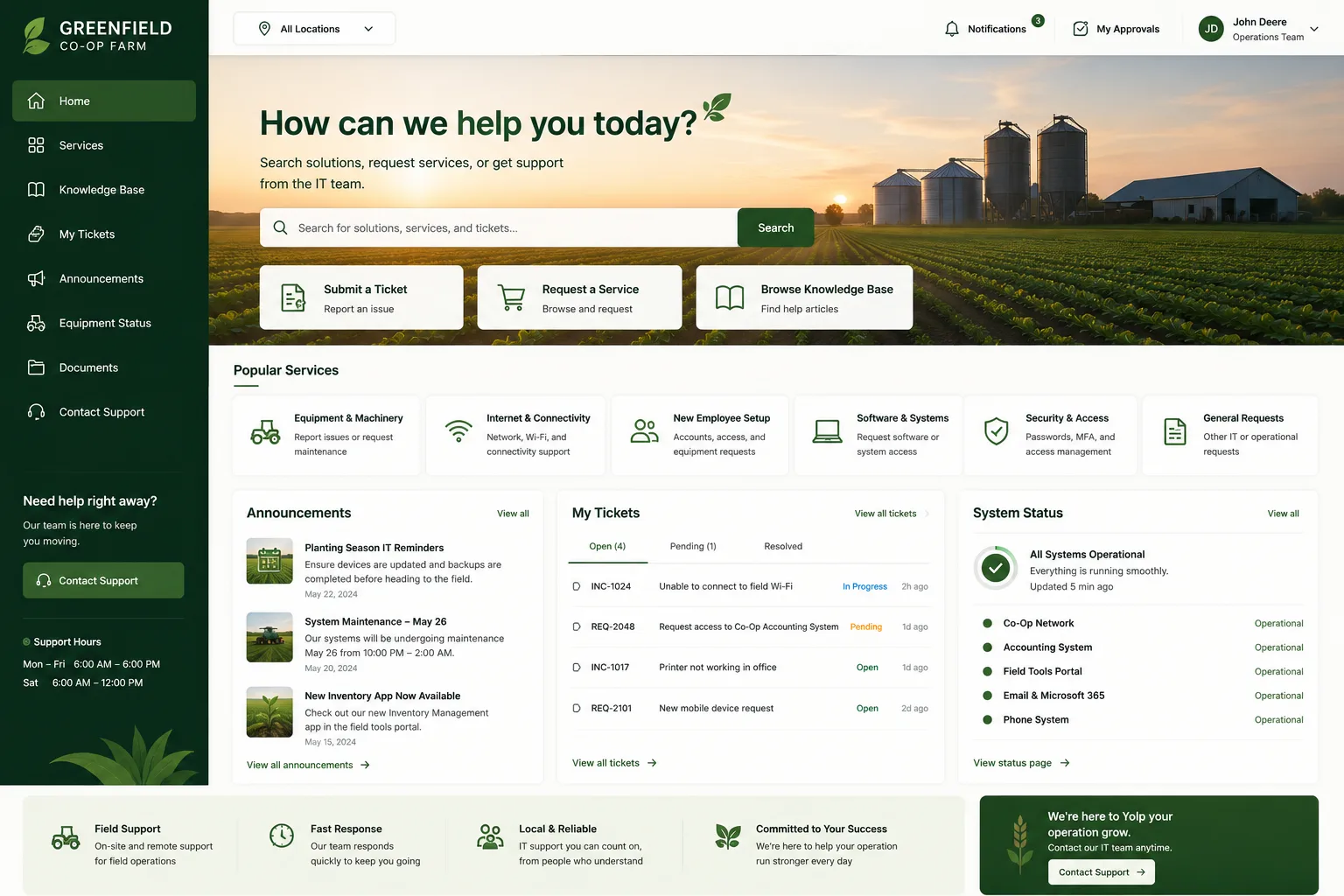
This guide walks you through five proven strategies to transform your employee portal from a frustrating utility into a tool that employees actually want to use. These aren't theoretical concepts. They're grounded in employee behavior research and proven in environments where organizations have moved beyond generic helpdesk interfaces to branded, user-centric experiences. When you partner with Ascend Portal Experience, these principles become the foundation of your portal redesign.
1. Map Your Employee Journey to Identify Real Pain Points
Before you redesign anything, you need to know where employees actually struggle.
Most IT teams assume they understand the problem. They don't. They see tickets and assume the portal was too hard to find. But the real issue might be that employees couldn't locate the right service category, or they didn't realize the portal could solve their problem at all.
Start by documenting the entire employee journey through your portal. What does an employee do when they need IT help? Do they search first? Click categories? Give up and email? Track these moments.
Map critical touchpoints:
- Initial portal landing (first impression)
- Service discovery (finding what they need)
- Request submission (ease of form completion)
- Status tracking (visibility into progress)
- Resolution and feedback (closure and improvement signals)
Each of these moments either reinforces confidence in the portal or pushes employees away. When you understand where employees drop off, you can prioritize improvements that actually move the needle on adoption and satisfaction.
Related: IT Helpdesk Portal User Adoption Strategies That Actually Work
2. Enable Two-Way Communication That Builds Trust
A portal that only receives tickets creates a one-way experience. Employees submit requests and disappear into a void. They check back obsessively. They assume nothing is happening. They feel unheard.
Two-way communication transforms that dynamic entirely.
Employees need visibility into ticket progress, but they also need to know they can ask questions mid-resolution without creating new tickets. They need reassurance. They need to feel connected to the person helping them.
Implement portal features that allow:
Related: Best Freshservice Portal Employee Engagement Features 2026: Top 5 Ranked
- Real-time status updates on open requests
- Direct messaging with support agents
- Feedback collection at resolution (not buried in surveys)
- Knowledge base suggestions that show up before they open a ticket
- Community forums where employees can help each other
This isn't just about communication. It's about reducing support volume. When employees can find answers in peer discussions or self-serve resources before opening a ticket, your support team spends less time on repetitive questions and more time on complex issues.
3. Strengthen Onboarding as Your Portal's First Impression
New employees are either learning to love your portal or learning to avoid it. There's no in-between.
If onboarding doesn't include portal training, new hires will struggle for months. They'll be the ones creating unnecessary tickets because they don't know the portal exists or doesn't work the way they expect.
Use the portal as a central onboarding tool. Make it the first place new employees go for answers about:
- How to request IT services (passwords, hardware, access)
- How to get help when they're stuck
- Which services are available to them
- Self-service options for common needs
A strong onboarding experience sets expectations early. Employees who learn that the portal actually solves their problems on day one become power users. They trust it. They use it. They recommend it to colleagues.
4. Give Managers Portal Tools That Support Better Experiences

Managers are gatekeepers to employee experience. When they understand the portal and have tools to support their teams, adoption accelerates dramatically.
Equip managers with manager-specific portal capabilities:
- Dashboards showing their team's open requests and SLA status
- Quick-access links to common services their team needs
- Ability to submit bulk requests for their department
- Reporting on IT service usage and satisfaction
When a manager can address an employee's question without IT escalation, employees see the portal as accessible and effective. Managers become ambassadors. They'll encourage their teams to use it because they see the results.
5. Design for Usability, Not Just Functionality
Generic portal templates fail because they prioritize what's technically easy to build, not what's easy for employees to use.
Your portal design matters more than the underlying platform. Here's what actually moves the needle on usability:
- Search should be prominent and intelligent—not buried in menus
- Service categories should match how employees think, not how IT organizes things
- Forms should only ask for essential information—not every field the system supports
- Mobile experience should be seamless, not an afterthought
- Visual design should reflect your organization's brand—not generic helpdesk gray
When your portal feels intentional and branded, employees perceive it as professional. They trust it more. They use it more.
Related: Best Employee Helpdesk Portal User Experience in 2026
Organizations that have redesigned their portals with user experience as a priority see measurable improvements in adoption rates, ticket quality, and employee satisfaction. If you're running Freshservice, Ascend Portal Experience specializes in exactly this transformation—turning generic Freshservice interfaces into branded, intuitive employee experiences that actually drive behavior change.
Want to work together?
Get in Touch →Measure Your Progress and Iterate
You can't improve what you don't measure. After implementing these strategies, track:
- Portal adoption rates (percentage of employees using self-service vs. email/phone)
- Time to resolution for portal-initiated requests
- Employee satisfaction scores (run brief post-resolution surveys)
- Ticket volume trends (are common questions decreasing?)
- Search patterns (what are employees actually looking for?)
These metrics tell you what's working and where to focus next. Maybe your search function is solving 70% of questions but your service categories are confusing. Maybe new employees are adopting quickly but experienced staff still prefer email. Use that data to refine your approach.
The best employee portal experiences aren't built in a day. They're iteratively improved based on real usage data and ongoing feedback. When you partner with Ascend Portal Experience, you get fixed-price design work that starts with your current state and maps a clear path to improvement—with measurement built in from the start.
Why Portal Experience Directly Impacts Your Bottom Line

This matters because according to McKinsey research on employee experience, organizations that invest in frictionless digital employee experiences see measurable improvements in retention, productivity, and employee engagement. A poorly designed portal is literally costing you money—in IT support overhead, lost productivity time, and employee frustration.
The opposite is true too. When employees can solve problems themselves through an intuitive portal, your IT team spends less time on repetitive issues and more time on strategic work. Employees are happier because they're not waiting for support. The entire organization wins.
If you're using Freshservice and you're ready to move beyond the default helpdesk experience, the Ascend Professional Portal Package provides fixed-price portal customization and design that transforms your interface into a branded, user-friendly experience your employees will actually want to use. No endless consulting engagements. No guesswork. Just clear outcomes.
How long does it take to see improvements in employee portal adoption?
Most organizations see noticeable improvement within 4-6 weeks of launching a redesigned portal. The key is that improvements are visible immediately—employees notice better design right away. Meaningful adoption increases (where more employees use self-service instead of emailing IT) typically take 2-3 months as employees adjust to the new experience and build confidence.
Related: Improving IT Service Portal Adoption Rates: 7 Proven Tactics
Related: Best Service Portal for Freshservice: Premium Employee Experience Design
Related: Freshservice Portal Design Best Practices: 2026 Guide
Do we need to change our ITSM platform to improve portal experience?
Not necessarily. Most ITSM platforms (including Freshservice) have far more design flexibility than organizations realize. The problem is rarely the platform—it's the portal design and configuration sitting on top of it. A well-designed portal experience can be built on your current platform without switching systems.
How do we get employee feedback on portal improvements?
The most reliable methods are: post-resolution surveys (ask one question: "Did you find what you needed?"), portal usage analytics (track which pages employees visit and search for), and direct interviews with employees from different departments (get qualitative insights into why they do or don't use the portal). Avoid long surveys—employees won't complete them.
What's the most common portal experience mistake organizations make?
Building for IT convenience instead of employee usability. IT teams often organize services by internal structure, create forms that capture every possible data point, and design for desktop-only usage. Employees don't care about IT's organizational structure—they care about solving their problem fast. Start with employee needs, not system capabilities.


