
Your IT service portal is the front door to every ticket, every request, every interaction your employees have with IT. If it looks generic, feels clunky, or doesn't reflect your brand, you're losing adoption before users even log in.
The good news? Portal modernization isn't a massive overhaul anymore. It's a strategic investment that pays back fast through higher ticket volumes, faster resolution times, and happier employees. Here's what you need to know to get it right.
Related: Best IT Helpdesk Portal Modernization for Freshservice Users
Related: Best Self Service Helpdesk Portal Design for Freshservice
Why IT Service Portal Modernization Matters Now
Organizations across B2B professional services are waking up to a hard truth: a default, out-of-the-box IT portal doesn't cut it. Employees expect the same frictionless experience they get from consumer apps. When your portal feels outdated, they bypass it entirely, calling the helpdesk instead of self-serving. That kills your efficiency metrics.
Related: Best Employee Helpdesk Portal User Experience in 2026
Related: How to Rebrand Freshservice Helpdesk Portal in 2026
Related: Branded Helpdesk Portal Best Practices for Freshservice
Related: IT Service Management Portal Best Practices for 2026
Related: Service Desk Strategy Examples: Real-World Best Practices
Related: Best Freshservice Portal Navigation Improvements for 2026
Modernization addresses this directly. A redesigned portal with clear branding, intuitive navigation, and personalized experiences drives adoption rates up by 40-60% in most organizations. You reduce ticket volume through better self-service, speed up onboarding, and free your IT team to focus on strategic work instead of fielding basic requests.
Related: Best Enterprise IT Service Management Portal Redesign Solutions 2026
Related: Best Enterprise IT Portal Personalization Features for 2026
Ascend Portal Experience works with mid-to-large enterprises that recognize this shift and want to move beyond generic ITSM software to build something that actually reflects how their business operates.
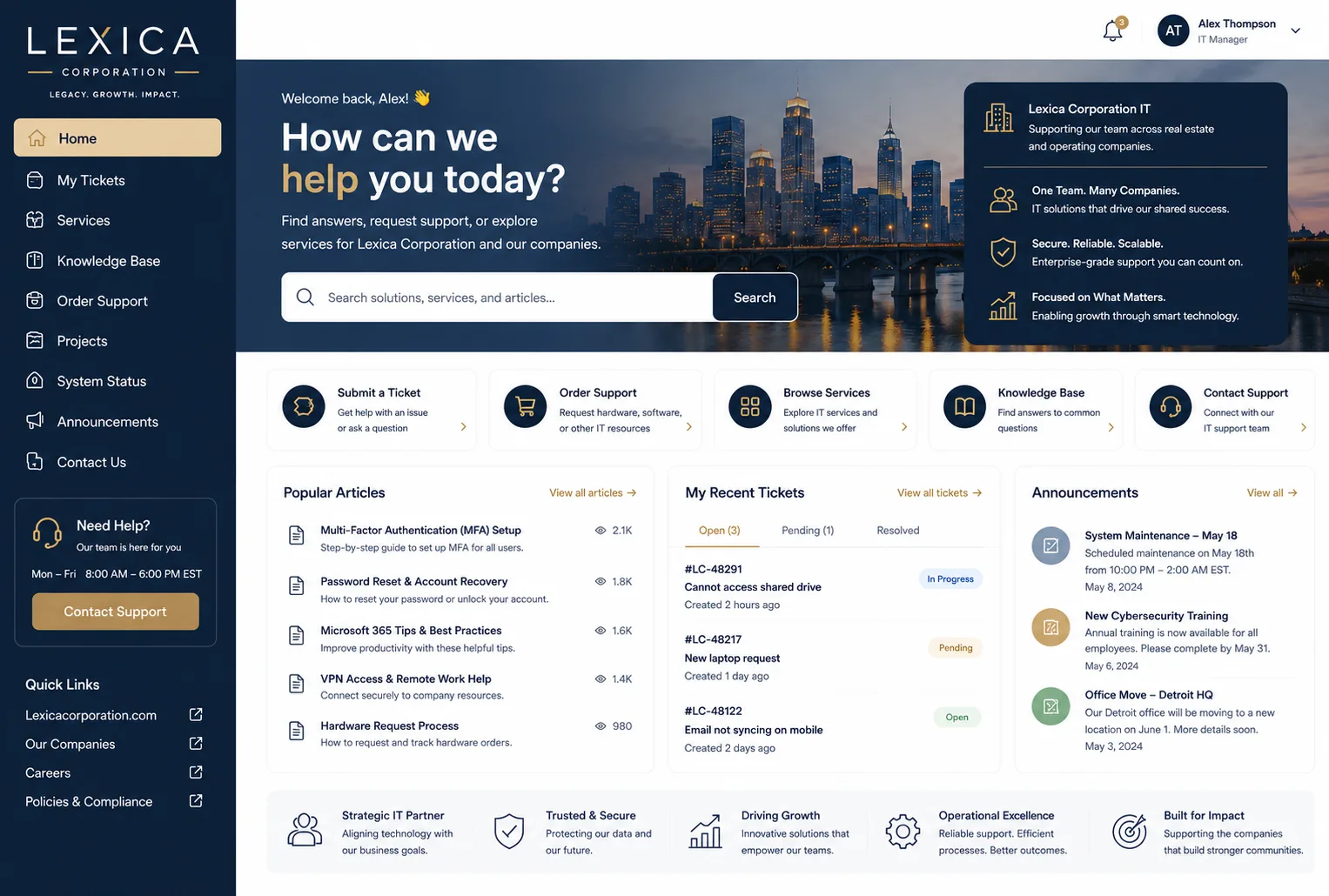
Core Principles of Effective Portal Modernization
A successful modernization effort starts with understanding what "modernization" really means. It's not about chasing the latest tech. It's about aligning your portal with three core outcomes:
- User adoption. Employees use it because it's faster than calling the helpdesk.
- Operational efficiency. Your IT team handles more requests with the same headcount.
- Brand consistency. Your portal reflects who you are, not a generic software vendor's vision.
Each of these requires intentional design and implementation. You can't bolt them on as afterthoughts.
Step 1: Audit Your Current Portal Against Modern Standards
Before you redesign, you need a clear picture of where you are. Run through these questions:
- Can a new employee find the IT service catalog without training?
- Does the portal work seamlessly on mobile, or do users abandon it on their phones?
- Are knowledge articles actually helping users, or are they just digital clutter?
- Can employees see ticket status in real time, or do they follow up with support constantly?
- Does your portal feel like part of your organization, or like a generic helpdesk tool?
These aren't minor UX questions. They directly impact ticket volume, resolution time, and employee satisfaction. According to Gartner's research on modern service delivery models, organizations that invest in user-centered portal design see 35-45% improvements in first-contact resolution rates.
Related: Best Employee Self Service Portal Design & UX Guide 2026
Step 2: Define Your Modernization Scope

Not every organization needs a complete rebuild. Your scope depends on where you're starting.
Tactical modernization focuses on quick wins: improving navigation, streamlining the request form, adding mobile responsiveness, embedding your branding. This typically takes 4-8 weeks and delivers immediate adoption gains.
Strategic modernization goes deeper: rethinking the entire user journey, restructuring your knowledge base, integrating proactive support workflows, building AI-powered search and recommendations. This is a 3-6 month engagement that transforms how employees interact with IT.
The key is honest assessment. If your current portal has fundamental usability problems, tactical work won't solve them. If it's functionally solid but lacking personality and brand alignment, a refresh is all you need.
Step 3: Build Predictable Cost and Timeline Expectations
One reason many IT leaders hesitate on portal modernization is cost uncertainty. Hourly-rate consulting engagements can spiral. You need fixed-price, outcome-based delivery.
Ascend Portal Experience offers the Ascend Professional Portal Package, which delivers tailored Freshservice portal customization at fixed cost with clear deliverables and timelines. No surprises, no scope creep, no billable hours that extend indefinitely.
Want to work together?
Get in Touch →This model matters because it shifts risk away from you. You know exactly what you're paying for and when you'll have a modernized portal in production. That certainty helps you budget confidently and move forward faster.
Step 4: Prioritize User Communication and Adoption
A beautiful new portal fails if employees don't know about it. Recent portal modernization projects (like the U.S. CBP's Automated Commercial Environment initiative) underscore the importance of clear user communication during transitions.
Your launch strategy should include:
- Advance notice to all users about what's changing and why.
- Clear on-screen guidance for first-time users on the new portal.
- Targeted training for power users and department leaders.
- Quick-reference guides (especially for service catalog navigation).
- Feedback loops so users can report issues and suggest improvements.
Adoption is not automatic. It's earned through transparency and support.
Step 5: Embed Operational Best Practices in Your Design

A modernized portal isn't just about looks. It's about embedding service delivery best practices into the user experience.
Related: Self Service Portal: Setup & Best Practices for 2026
Consider proactive support workflows: instead of employees opening tickets when something breaks, your portal can prompt them to run diagnostics, access relevant knowledge articles, or contact the right team based on their issue. This reduces ticket volume while improving first-contact resolution.
Consider predictable SLA communication: when an employee submits a ticket, they should see clear estimates for response and resolution times upfront. This reduces support follow-up and manages expectations.
Consider self-healing capabilities: many common requests (password resets, software provisioning, account access) can be automated entirely. Your portal should be smart enough to route these to automation rather than human support.
When you bake these practices into portal design, you don't just improve the experience. You transform your IT operating model.
Measuring Success: Metrics That Matter
After modernization, track these outcomes:
- Ticket volume shift. Are employees using self-service more? Tickets opened through the portal should increase while helpdesk call volume decreases.
- First-contact resolution rate. More tickets resolved without back-and-forth means your portal is guiding users effectively.
- Employee satisfaction (CSAT). Post-launch surveys should show improved sentiment compared to the old portal.
- Time-to-resolution. Better portal design accelerates ticket flow, reducing average resolution time.
- IT staff productivity. With less basic support work, your team should have more capacity for strategic initiatives.
Set baselines before you modernize so you can quantify the impact afterward. This gives you ammunition to justify future IT investments and shows your organization the ROI of a thoughtful portal strategy.
Getting Started with Your Modernization Roadmap
The hardest part of IT service portal modernization is often just starting. You know something needs to change, but the scope feels unclear and vendor options are overwhelming.
The clearest path forward is to partner with someone who specializes in this exact problem. Ascend Portal Experience brings deep expertise in Freshservice portal transformation, from audit through design through launch. We handle the complexity so you don't have to, and we deliver at fixed cost with guaranteed outcomes.
Related: Freshservice Portal Design Best Practices: 2026 Guide
Whether you need a tactical refresh or a complete strategic overhaul, the right partner will help you move fast, stay on budget, and actually achieve adoption. That's the modernization that matters.
Frequently Asked Questions
How long does IT service portal modernization typically take?
Tactical modernization (branding updates, navigation improvements, form optimization) usually takes 4-8 weeks. Strategic modernization (complete user journey redesign, workflow integration, knowledge base restructuring) typically takes 3-6 months. Timeline depends on scope, your current system's complexity, and how quickly stakeholders approve design iterations. Fixed-price engagements give you clear visibility on delivery dates upfront.
What's the ROI on a modernized IT portal?
Most organizations see 35-45% improvements in first-contact resolution rates and 40-60% increases in portal adoption after modernization. You also reduce helpdesk call volume, speed up ticket resolution, and free IT staff time for strategic work. In terms of dollars, a typical mid-size organization recovers investment within 6-12 months through reduced support overhead and improved employee productivity.
Do I need to migrate to a new ITSM platform to modernize my portal?
No. If you're using Freshservice or another modern ITSM system, you can modernize your existing portal without replacing the underlying platform. Portal modernization is about redesigning the user experience layer on top of your current system. Platform migration is a separate, much larger project that should only happen if your current system genuinely can't support your business needs.
How do we ensure employees actually adopt the modernized portal?
Adoption requires three things: clear communication about what's changing and why, intuitive design that makes the new portal easier to use than the old one, and ongoing support during the transition. Launch with targeted training for power users, provide quick-reference guides, and establish feedback channels so employees can report issues. Set adoption metrics before you launch so you can measure progress and adjust your support strategy if needed.


